Saturday 28 November 2009

Full commercial software for free

I’ve found some more free commercial software available for a limited time:

image
Register Here and Receive the CD Key to Fully Install CyberLink YouCam 1 available from2009/11/19 to 2010/03/20:
http://www.cyberlink.com/prog/event/bundle/index.do?nEventId=2099

image 
This is only used for CyberLink MediaShow 4 DE available from 2009/11/01 to 2010/03/31: http://www.cyberlink.com/prog/event/bundle/index.do?nEventId=2122
image

CyberLink PowerDirector available from 2009/09/30 to 2010/02/05: http://www.cyberlink.com/prog/event/bundle/index.do?nEventId=2101
image

CyberLink PowerDVD available from 2009/10/01 to 2009/11/30: http://www.cyberlink.com/prog/event/bundle/index.do?nEventId=2119 
image

Paragon Total Defrag 2010 free until 29Nov2009:  http://www.paragon-software.com/free/giveaway.html
image

Here’s another site that you would want to keep your eye on: http://dottech.org/category/freebies

image


Friday 27 November 2009

You want to create a copy of your current hard drive without having to reinstall everything: clone it – Solved!

I’ve often been asked how to replace a suspect hard drive before it fails completely without having to reinstall all the programs and then copy all the data back onto it… well, here’s a free OpenSource solution that clones your hard drive quickly – no, very quickly!

image 

CloneZilla is a super-fast cloning tool that can clone one system to another, or one-to-many (over the LAN) using multi-casting (or broadcasting) technology.

Clonezilla, allows you to do bare metal backup and recovery.

Clonezilla Live is suitable for single machine backup and restore.

Clonezilla SE (Server Edition) is for massive deployment, it can clone many (40 plus!) computers simultaneously.

Clonezilla saves and restores only used blocks in the hard disk which increases the clone efficiency.

Clonezilla supports many file systems including GNU/Linux,FAT, NTFS, HFS+, and more; no matter if it’s 32 or 64 bit.

See here for screen shots: http://clonezilla.org/screenshot/

See here for downloading Clonezilla and instructions on how to create a bootable CD: http://clonezilla.org/clonezilla-live/

I’m sure this will save you lots of time and trouble – consider donating to Clonezilla here: Donate

Update on 28Nov2009:
Here’s another great article listing the “5 Ways to Clone and copy your hard drive” (all free tools) covering: Paragon’s Drive Backup Express (Windows), DriveImage XML (Windows), CloneZilla (cross platform), XXCLONE (Windows), EASEUS Disk Copy (cross platform).


Thursday 26 November 2009

So, you need an old version of the Java Runtime Engine (JRE)… look in the archive – SOLVED

Took me a while, but finally found the JRE that I was looking for (and a lot more) I was looking for JRE 1_5_0_15 for Windows.
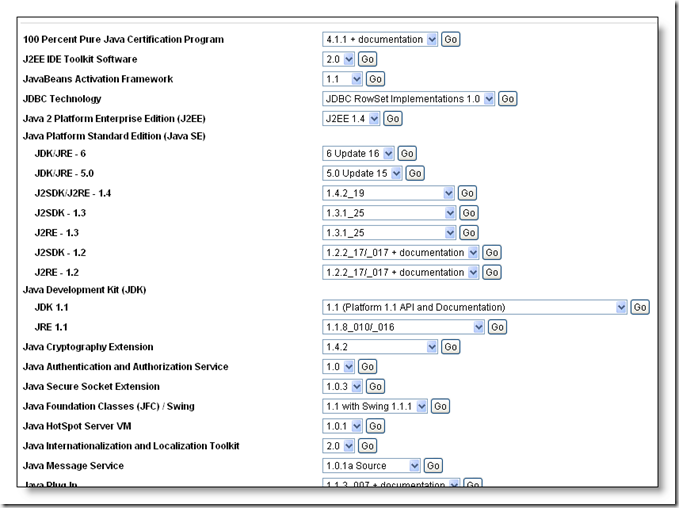
Here’s the Sun Java Technology Products Download page (archive): http://java.sun.com/products/archive/

imageAs you can see, there is all sorts of information listed: J2EE toolkits, JDBC drivers, JDK, SDK, J2RE, JCE, JSSE, JFC, Swing, and more.
Use the pull-down menus to select what you need to download and press “Go”, then the next window will allow selection of your operating system, then download the file:
image

If you have multiple versions of the JRE on your computer, then use the control panel’s “Java” icon to control which JRE is used by which browser: image

In the “Java Control Panel”:
Click on the “Java” tab, then configure the ‘Java Applet Runtime Settings’ by clicking the ‘View’ button and ticking the JRE version that your browsers should use. 

Then configure the ‘Java Application Runtime Settings’ by clicking the ‘View’ button and ticking the JRE version that WebStart JNLP (Java Network Launching Protocol) files should use:

image

So, there’s no need to UNinstall the latest version of the JRE if you need to use an older version :)


How to make transparent images (gifs)

I often need to make a transparent image – I figured out that the image type needs to be a .gif file.

My tool of choice – for its simplicity and rich functionality is an old version of Jasc Software’s Paint Shop Pro – yup, it’s old, but it does the trick!   The version that I have was from the Jasc Software days, but I see now that it’s been “absorbed” by Corel.
image   image
Thanks to http://www.hypergurl.com/transparentgif.html  for much of the info below:

Here is a simple technique to make transparent gifs with Paint Shop Pro:

Open an image and click on the ‘Dropper Tool’ image and right click on the image’s background.  This will set the colour palette to match the background colour of your image.

Click on Colours->Set Palette Transparency, then check the option “Set the transparency value to the current background colour”, then click OK, and then save the image as a .gif file.


Tuesday 24 November 2009

I’ve been looking for an English to Afrikaans translation web site…

Since my home language isn’t Afrikaans, and I sometimes get challenged with Grade 5 Afrikaans homework – an online tool is often the last resort.  I’ve found a couple – it’s always useful to have “a second opinion” and these are the ones that I use:

Google Translate:
image What’s nice with Google Translate is that the translations happen in real time – in other words, the Afrikaans translation appears as you type in the English!  Very cool.

Interpret.co.za:
image
image  
Go to the bottom of the page and enter your phrase to be translated.
I see that there’s a limit of 400 words that can be translated – then it stops translating and gives “... A MAXIMUM OF 400 WORDS TRANSLATED!“  Not very nice… :(

This site also has a nice “Chat slang dictionary”, which is very useful when looking up abbreviations or acronyms like “WTH = what/who the heck?” and “ATEOTLYWBAT = at the end of this lesson you will be able to” and more…


Monday 23 November 2009

Discovery Life – I’m getting a surprise ‘cheque’ in the mail after 5 years of contributions

Discovery Life Integrator PayBack managed to surprise me after 5 years of contributions!  I received my “Health Integrator PayBack™ Benefit statement” by email and had to read it twice, then again to make sure that I understood it.  It read as follows:…

“Discovery Life’s Integrator PayBack enables you to build a financial asset in your risk policy by managing your health. Every fifth year, you can receive a percentage of your LIFE PLAN premiums (excluding Vitality and Discovery Retirement Optimiser contributions) paid over the previous five years.”

image 
My Discovery Health claims were in the R5,071 to R10,280 range and I’m on Diamond Vitality level so that mean that this year, I get 47.5% of my Discovery Life premiums added to my PayBack benefit!  That’s over R10,000 - cool man!  I need the extra cash!

Over the past 5 years, I’ve managed to attain silver for 2 years, and gold for 2 years, and Diamond for this year.  So, my 5 year payback total is over R30,000I’ll let you know when the real cheque arrives – they say payment date is 1st Jan 2010 – perhaps I’ll be able to buy some tickets for the World Cup Soccer 2010 and visit that new Green Point Stadium – or is it now called “The Cape Town Stadium”?

Also, instead of my Life Cover going up every year – the monthly premium is now less each year – due to my Vitality Diamond status.

Thanks to my financial advisor (Wayne from ExecUneed more contact details here) who convinced me to switch from Liberty Life to Discovery Life (more cover and benefits for the same amount)… and it proves that taking advantage of Discovery’s suite of products really saves me money!  I have Discovery Health, Discovery Life, Discovery Credit Card and I’m on Vitality level Diamond.  See here for an article about Discovery Credit card savings.
Click here to learn about Discovery’s product integration [pdf 180Kb]: Health Integrator with payback


Update: on 24 Dec 2009 I received over R30,000 into my bank account - what a nice Christmas present - thanks so much Discovery Life, Discovery Vitality, Discovery Credit Card! :) :)


Thursday 19 November 2009

Free domain and web hosting (R0.00) no credit card needed

Yes, I’ve just registered and created my own domain and web site 100% free using 000WebHostHere’s what’s included:
1,500MB disk space, 100GB traffic per month, 5x email addresses, WebMail, PHP, 2x MySQL databases, FTP, cPanel, weekly backups, cron jobs…

There are no hidden costs, no adverts, and no restrictive terms.  Lighting fast speeds, maximum reliability and fanatical user support are just a few of the features you'll receive.

I’m going to create an e-commerce site using Joomla and VirtueMart for a friend who runs a business from home – no start-up fees nor monthly costs – gr8 :)

The web site setup process asks if you want a free (sub-)domain and it creates that for you instantly (yoursite.comli.com)

Click on the image below for more info:
image

There’s no ssh access, so I’m going to use two Joomla components called JoomlaPack to zip my files, and JoomlaXplorer to unzip via the GUI.

Wow, and I was going to suggest to my friend to pay R100 per month for a basic hosting package…

Is there a catch?  Let me know please – comment or email me HandyTechTipper at gmail.com

image  


Get up to 25% (at least 10%) off at some restaurants in return for filling in an online questionnaire after your meal

Diner’s Delight is a dining club, where members (free membership) enjoy discounts of up to 25% (at least 10% then 5%) from a list of (currently) 35 restaurants (currently) in the Western Cape (South Africa) – soon to be expanded (according to the web site). 
See here for the list of restaurants along with their menus.
imageIn return, you need to complete a short survey (16 multiple choice +1 other) of your dining experience the following day (or at the latest, before you make your next booking).

This information is then passed back to the restaurant, and is used to help improve your dining experience. Diners Delight also gives its members recommendations on new restaurants to try, based on their previous dining experiences.

Once you’ve registered, you can immediately login and book for a restaurant (up to 7 days in advance).  They will then make the actual booking at the restaurant (to let them know the discount that’s applicable) and then will send you an email within 15 minutes.  If the restaurant is fully booked then a Diners Delight restaurant advisor will call you back to make an alternative arrangement.

If you want to book at short notice, then make a call (+27 21 481 7600, or cell: +27 82 337 0962) – they need only 30 minutes notice to book your table. 

Here’s what the booking form looks like (after selecting the restaurant that you want to go to):
image
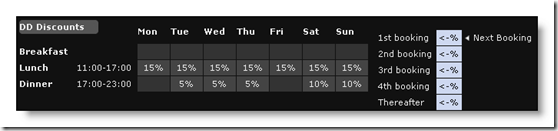
Some restaurants prefer different discount structures that varies depending on the day & time:
image
image

You can enjoy up to 4 discounted meals per restaurant (as long as the questionnaire is filled in), and the discount will be applied to your entire bill, regardless of how many people are dining with you.  Thereafter you will be entitled to a flat 5% discount at that restaurant for the remainder of the year.

After 12 months, the discount cycle is refreshed, and you can once again enjoy the escalating discounts.

Now to pick a restaurant, and take advantage – I love Doppio Zero at Mandela Square and I see that they’re on the list and offer a 10% discount for the first visit – whoopppeee! 


image image


Wednesday 18 November 2009

Did you know that over filling your car with oil can cause it to blow the engine? – no jokes!

A colleague has just had a horrible experience!  His car had just been in at a garage for a service and the oil had been replaced.  When he picked up the vehicle he noticed that the oil light was on and so he called the garage owner over and discussed the problem.  The garage owner decided that a top up of oil was required, so he called one of the mechanics to bring more oil.  Some oil was added but the light still didn’t go off.  By this stage, the oil dipstick read over the “full” mark and the garage owner told the mechanic to pour more in
The mechanic refused, saying that it was too full, but his boss was adamant that more oil was needed, so he ordered him to pour more.
The car was now full, the oil light was still on – but the light was explained away as “it needed to be reset, and he would do some research and call my colleague back.  But you can drive the car – no problem!”.
My colleague nervously agreed, but before leaving said something like: “(nervous agreement), I’ve had an engine blow on me before, so if anything happens, then it’s your responsibility to buy the spares and pay for the labour – everything!”

This was agreed, and he drove the car away with the oil light still burning brightly.

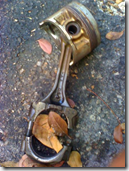
Needless to say, two days later, my colleague’s car’s engine seized and came to a grinding halt on the side of the road!

image   image

A few choice swear-words later.. he grabbed his cell phone and called the garage owner and explained the situation.  An obviously embarrassed garage owner apologised and made good his promise to fix the car.
He picked up the stranded family and is now ferrying them wherever they need to go: school, work, shopping, etc. until the car is fixed.

I would like to have seen that mechanic’s face when the car was towed back into the garage to be fixed!

Moral of the story: do NOT overfill the oil in your car – it could be very expensive!

Technical explanation:
From
http://wiki.answers.com/Q/What_happens_if_you_over_fill_engine_oil: “If you put too much oil in the engine, it raises the oil level high enough that the crankshaft touches it.  The crankshaft will whip the oil, aerating it.  This air in the oil will destroy your engine bearings.  The bearings have a very thin layer of oil on them which keep the bearing and whatever the bearing is against from locking up.  The air will remove the oil layer from the bearing and the bearing will then rub against whatever engine part it is used for.  The bearing will then be shredded and metal parts will go about destroying your engine.  Moral of the story, don't over fill your oil.
image


Sunday 15 November 2009

Discovery Health 2010 - updated calculator: how much will that plan cost?

Yes, it’s that time of the year again – time to choose your Discovery Health plan….all those options and all that paperwork to read and understand…

This article might save you a lot of reading and paging through all the web pages on the Discovery web site.

The new https://new.discovery.co.za web site contains detailed information about each plan and the costs.
See my earlier posting on where to get detailed info on the health plans for 2010: Discovery Health plans for 2010 are on the new Discovery web site  You can also download pdf files describing what each plan covers and the associated costs.

I have collated all the information on the various plans into a spreadsheet (calculator) which takes into account the number of people in your family and allows you to compare the actual cost of each plan.

Download HTT’s calculator that will assist you in costing and understanding the various options: DiscoveryHealthOptions2010calculator.xls

Open the calculator to assist with narrowing your choice of plan as follows:
Use the pyramids to compare the plans - note the missing parts of the pyramids to see "what's missing" from each plan.
Note too, that the size of each segment shows smaller ATBs and larger SPGs.

So, if you want a plan with "out of hospital" cover, then you need a plan that has an MSA (Medical Savings Account) - so don't choose the Core plans (since Core plans don't provide MSA).
See this posting for explanations of these terms: Are you MSA, ATB, SPG ‘ed out with Discovery Health – here’s a brief explanation of these terms
To summarise: If you need that "parachute" to kick in when out of hospital expenses get too much then you need a plan that offers the ATB facility (Above Threshold Benefit): so select from the Executive, Comprehensive or Priority plans (either: Executive, Classic Comprehensive, Essential Comprehensive, Classic Priority or Essential Priority).
Note: Priority plan has "limited ATB"
The Self Payment Gap is the amount that you need to pay once you have run out of MSA.
If you want a small SPG (Self Payment Gap) then you need to select one of the Comprehensive plans. If you want zero SPG (Self Payment Gap) then you need to select the Executive plan (as you can see the smaller the gap, the more expensive the plan becomes).

The DeltaSaver plans are similar to the Saver plans; and
the DeltaCore plans are similar to the Core plans except (mainly) that you are limited to the Delta network of hospitals (and you pay about 25% less).  The Delta Hospital Network list is included in the pdf files (refer to file “DiscoveryHealthDeltaNetworkHospitals.pdf” and also pasted at the bottom of this article.)

Using the spreadsheet (using the 'Figures2010_Pyramids' worksheet):
[Please read the disclaimer at the top of the spreadsheet :) ]
Modify the following “purple” cells to suit your situation i.e. number of dependants, Vitality, Discovery card.

Compiling the spreadsheet has highlighted some points which I did not understand previously and I am sure the following pointers will assist you in choosing which plan is best for you:
· There are 8 categories of cover: Executive, Comprehensive, Priority, Saver, Delta Saver, Core, Delta Core and KeyCare.
· Each of these categories sometimes have sub-categories: Classic, Classic Delta, Essential, Essential Delta, and Coastal.
The above 2 statements are very important in understanding how Discovery health plans have been organised… so read them and understand how categories have been split into sub-categories. 
· The "Saver" and “Core” plans are cheaper mainly because they have no ATB (Above Threshold Benefit) which means when your out-of-hospital expenses have used up your MSA (Medical Savings Account) then you will need to pay all out of hospital costs out of your (after tax) pocket.  All the other plans have an ATB which kicks in as soon as you have paid a certain amount (the “gap”).
· The “Priority” plans are cheaper mainly because they have co-payments for some hospital procedures (see '04 PrioritySeriesPlansDiscovery2010.pdf' for details)
· If you only need a ‘hospital plan’, then the “core” or "saver" plans are for you… "Core" have no MSA nor ATB and "Saver" plans have a small MSA - remember that out of hospital expenses can add up very quickly e.g. MRI scans etc. and can wipe out the monthly savings of being on a cheaper plan (although a maximum of R1,800 will be paid out of your MSA (or out of your pocket if you're on the "Core" plan), the remainder comes out of your in-hospital benefit)
· “Classic” and “Essential” plans have almost the same in-hospital cover except for the rate paid: Classic pays up to 300% of the Discovery Health rate while Essential pays up to the Discovery Health rate. [In my experience, the doctors will charge the maximum that they can! So, if you have cover for the 300% then that’s what they’ll charge. It is no indication of their “rate”]
· The MSA amount is fixed according to the plan you're on (25% or 15% of your contribution).
· The “prescribed medicine” sub-limit has some widely differing benefits so study these carefully when selecting your plan.
· Check this year’s benefit usage by logging in on the Discovery web site: http://www.discovery.co.za –> Discovery Health  »  Benefits and cover  »  Benefits used.  This will give you an idea of what cover you have used this year (Note: the past usage is no indication of next year’s needs).

Bottom line: nobody can tell you which plan you need to take – it’s a decision based on i) how much you can afford vs ii) how much you think you will need cover vs iii) how  much you think you can cover yourself from your own emergency funds.
Use the calculator to compare the pyramids (cover differences) and graphs to compare costs and pdf’s to compare each plan’s detail.
If you see any errors in this article, or in the calculator, or suggestions for improvement, then please let me know so that everyone can benefit) by leaving a comment or emailing me: HandyTechTipper at gmail.com

See here for other HTT (HandyTechTipper) calculators:
http://handytechtips.blogspot.com/search?q=calculator

See here for more info on Discovery:
http://handytechtips.blogspot.com/search?q=discovery

Here’s the Discovery Health Delta Network Hospitals list (subject to change):
{Also included in the pdf files - DiscoveryHealthDeltaNetworkHospitals.pdf} 

Hospitals in the Discovery Delta Hospital Network
Gauteng: 
Arwyp Medical Centre, Bedford Gardens Private Hospital, Bougainville Private Hospital, Brenthurst Clinic, Carstenhof Clinic, Clinix Private Hospital – Lesedi, Clinix Private Hospital Sebokeng, Clinton Clinic, Emfuleni Medi-Clinic, Fourways Hospital, Legae Private Clinic, Lenmed Clinic Limited, Little Company of Mary, Louis Pasteur Hospital, Midvaal Private Hospital, Robinson Hospital, Roseacres Clinic, Suikerbosrand Clinic, The Donald Gordon Medical Centre, Wilgeheuwel Hospital.

KwaZulu Natal:
Chatsmed Garden Hospital, Entabeni Hospital, Midlands Medical Centre, Mount Edgecombe Hospital, Westville Hospital.

Free State:
Pelonomi Private Hospital, Universitas Private Hospital.

Western Cape:
Cape Town Medi-Clinic, Kingsbury Hospital, Mitchells Plain Medical Centre, Panorama Medi-Clinic, Vergelegen Medi-Clinic

Please note that this list is subject to change.
DHN 9Dec2008


In addition to hospitals mentioned above, there is a list of additional day facilities available in the network:
Gauteng:

Birchmed Day Clinic, Boksburg Medical & Dental Centre, Brooklyn Surgical Centre, Centurion Eye Hospital, Constantia Park Medical & Dental Centre, Cormed Clinic, Fauchard Clinic, Fordsburg Clinic, Johannesburg Clinic, Johannesburg Eye Hospital, Kilnerpark Narko Clinic, Mayo Clinic, Medkin Clinic, Mercidoc Day Clinic, Ocumed, Optimed, PJ Schutte Theatre Unit, Silverton Medical & Dental Centre, The Healthy Eye, Visiomed Eye Laser Clinic, Wierda Park Clinic, Wilgeheuwel Day Clinic.

KwaZulu Natal:
Bluff Medical & Dental Centre.

Western Cape:
Khangella Eye Theatre, Panorama Laser Clinic, Parow Medical & Dental Centre, Wesfleur Private Clinic.

Free State:
Bethlehem Medical Centre, CityMed Theatre, Medovs Day Clinic.

Please note that this list is subject to change.
DHN 9Dec2008


Saturday 14 November 2009

Are you MSA, ATB, SPG ‘ed out with Discovery Health – here’s a brief explanation of these terms

When trying to explain to friends and family which Discovery Medical Aid plan to take, I find that the TLAs (Three Letter Abbreviations) are the main stumbling block.  So, here’s a short explanation of the ones that Discovery Health uses all over their web site and pamphlets:
MSA = Medical Savings Account
SPG = Self Payment Gap 
ATB = Above Threshold Benefit
CIB = Chronic Health Benefit

Some plans do cover out of hospital expenses – so they do have an MSA, SPG and ATB.
Some plans do not cover out of hospital expenses – so they do not have an MSA, SPG and ATB.  These plans are called “Hospital Plans”.

If you’re on one of the following plans, then you are on a “Hospital Plan” only: Core, or KeyCare plans.
ie: Classic Core, Classic Delta Core, Essential Core, Essential Delta Core, Coastal Core, KeyCare Plus, KeyCare Core.

If you’re on one of the following plans, then you are not on a “Hospital Plan”: Executive, Comprehensive, Priority, or Saver plans.
ie: Executive, Classic Comprehensive, Classic Delta Comprehensive, Essential Comprehensive, Essential Delta Comprehensive, Classic Priority, Essential Priority, Classic Saver, Classic Delta Saver, Essential Saver, Essential Delta Saver, Coastal Saver.

In other words, if you’re on a Discovery hospital plan, then they will not cover any out-of-hospital expenses, so you need not bother yourself with the meanings of MSA, SPG nor ATB… and you need not read on.

The MSA, SPG and ATB differs and depends on the following: i) the Discovery Health Plan; ii) how many people (adults and children) are covered.  
So, if you are on Classic Comprehensive plan (2010) with two adults, and 2 children, you then will have an MSA for the year of R16,512, and a SPG of R1,788, and an ATB of R18,300.

These figures are calculated as follows:
MSA: From the Classic Comprehensive plan page on the (new) Discovery Health web site: Comprehensive Series Plan click on “Your cover for day-to-day medical expenses” which gives the monthly MSA of:
R587 for the main member + R555 per adult + 2x R117 for 2x children = 587+555+117+117 = R1,376 per month.  So, that’s R16,512 for the year.
ATB: From that same section of the page: Refer to the section “Annual Threshold amounts”:
R7,700 for the main member + R7,700 per adult + 2x R1,450 for 2x children = R18,300.
SPG: The annual Self Payment Gap is calculated by subtracting the annual MSA from the annual ATB
ie: R18,300 – R16,512 = R1,788.  Which means that once your MSA has run out, you will need to pay R1,788 from your own pocket before Discovery Health pays for your out-of-hospital medical expenses again (at Discovery Health rates).
Note: there is no SPG for the Executive plan since the MSA is equal to the ATB.
Note: your SPG can go up – it is not necessarily static.  It goes up if you claim for non-prescription drugs, or if your doctor charges more than the Discovery Health rate.

HTT’s Discovery Health plan calculator calculates all these figures and plots them on a graph for easy reference.  See here for more: HTT’s Discovery Health plan calculator and remember to add your comment…

Here’s some more details:
All out of hospital claims (except chronic medication and blood tests and Vitality Health checks) get paid from your MSA ie: Doctors visits, medication, tests, spectacles, dentists, pretty much everything.

Once you have used up your MSA (Medical Savings Account), then you enter your SPG (Self Payment Gap).  Here you pay for everything yourself, but you still must submit the claims to Discovery so they can keep tally of your expenses and assign them to your SPG.  Once the amount you have paid out yourself, equals the amount of your SPG, then your above ATB kicks in, where they pay again (at Discovery Health rates).

There are limits to the amount you can claim for certain categories of healthcare services – refer to “Your cover for day-to-day medical expenses” and see what limits apply.  For example, on the Classic Comprehensive plan, the annual limit for ‘Optical’ is R2,600 per person.  This means that even if you have funds in your MSA, Discovery will still not pay more than R2,600 per person for say spectacles.  

imageimage


Browse Freely to access those blocked sites anonymously

Browse Freely is a free, anonymous web proxy which allows you to surf the web while maintaining total anonymity.  Browse Freely is also capable of bypassing a great percentage of censorship and access control systems, allowing you to access blocked sites from schools and other (overly) restrictive environments.

Though Browse Freely was created as a tool for privacy and the free exchange of information, as well as an anti-censorship resource, we cannot be held responsible for any misuse of the system by malicious visitors. Browse Freely is offered as a free, "as-is" service without any guarantees, expressed or implied.

image

This address also works: http://www2.browsefreely.com/


Thursday 12 November 2009

If you want to zip something really small, then use bzip2

bzip2 is a freely available, patent free, high-quality data compressor.
imageI was amazed by the efficiency and speed.  In my tests I used a 10MB text file that compressed to 1MB using pkzip (set to maximum compression).
Running bzip2 resulted in a compressed file of 543Kb – that’s half the size – WOW!!!

From the home page: http://www.bzip.org/index.html :
It typically compresses files to within 10% to 15% of the best available techniques (the PPM family of statistical compressors), whilst being around twice as fast at compression and six times faster at decompression.

Why would I want to use it?

  • Because it compresses well.  So it packs more stuff into your overfull disk drives, distribution CDs, backup tapes, USB sticks, etc. And/or it reduces your customer download times, long distance network traffic, etc. It's not the world's fastest compressor, but it's still fast enough to be very useful.
  • Because it's open-source (BSD-style license), and, as far as I know, patent-free. (To the best of tbzip2’s knowledge. Caveat emptor). So you can use it for whatever you like. Naturally, the source code is part of the distribution.
  • Because it supports (limited) recovery from media errors. If you are trying to restore compressed data from a backup tape or disk, and that data contains some errors, bzip2 may still be able to decompress those parts of the file which are undamaged.
  • Because you already know how to use it. bzip2's command line flags are similar to those of GNU Gzip, so if you know how to use gzip, you know how to use bzip2.
  • Because it's very portable. It should run on any 32 or 64-bit machine with an ANSI C compiler. The distribution should compile unmodified on Unix and Win32 systems. Earlier versions have been ported with little difficulty to a large number of weird and wonderful systems.
  • Because everybody else uses it too.

Download from here: http://www.bzip.org/downloads.html 


Wednesday 11 November 2009

Downloading Skype: where’s the full install program?

I notice that Skype now allows you to download their “install” package that actually isn’t the full install program.  So, here’s a link to download the full package so that you can use it to install on multiple computers:
Skype 4.0:  http://download.skype.com/partner/trackable259/SkypeSetupFull.exe 
OR
Skype 4.1: http://skype.updatestar.com/description

This will download the full package and it’s currently about 20MB, and not 2.5MB for the “plain” installer package.
image  image


Tuesday 10 November 2009

Looking for a better program that doesn’t quite do it for you?

If you’re looking for a program that’s an alternate to one that you already use that gives you problems, or costs too much or… whatever the reason, then here’s a nifty web site that allows you to see if there are programs that do it for you better: AlternativeTo
It’s also a great way to find freeware programs that do the same.
image
From their web site:

We have one mission: helping you find the right software for your computer or mobile phone.  To do this we wanted to rethink the whole process of searching for apps.  No more browsing through categories with long lists of crappy software.
Based on our users’ recommendations, we list great alternatives to the applications you want to replace. By joining the site you can participate in the process of making these recommendations better, so please join in!


The web site allows you to search for a program xxx then if you click on the “Find alternatives to xxx” and then the alternatives are displayed - you can then filter the results by license (eg: free and opensource) or platform or by likes.
For example, searching alternative to Microsoft Outlook email client, and filtering by ‘free programs’ and for ‘Windows’ gives:
Windows Live Mail, eM Client, My Life Organized, Sylpheed, emClient, Spicebird, Zimbra Desktop, Mutt, Popcorn, IncrediMail
Click here for the full results page: alternatives to Microsoft Outlook

Another example: searching alternative to Skype
and filtering by ‘free programs’ and for ‘Windows’ gives:
Pidgin, Yahoo Messenger, Google Voice and Video chat, Ekiga, Gajim, Gizmo, Psi, Tpad, QuteCom, Voip Stunt, Tkabber, OpenWengo, Palringo, ooVoo.
Click here for the full results page: alternatives to Skype


Cheetah “frozen” in motion with Canon’s image stabiliser – what a photo!

I thought that this was a great marketing flyer sent out by Pinnacle Africa (formerly Pinnacle Micro) and Canon cameras!  What a clever idea to prop the cheetah up and make it “stable” – just like the image stabilizer would do :)
image
Now all I need, is to save up (about R9,400 incl. VAT)for that awesome looking camera bundle: the Canon EOS450D


image


Here’s another one: 
CheetahSnakesHands


Monday 09 November 2009

Discovery Health plans for 2010 are on the new Discovery web site (not the old!)

I’ve noticed that the Discovery Health plans for 2010 are now available.  But, don’t follow your bookmark to the old Discovery web site, you need to go to the new web site here (no need to login): New Discovery web site
The new plans can be seen by clicking on the panels on the left hand side of the page: ‘Discovery Health->2010 Plans we offer’, and then select the plan that you’re interested in.
Unfortunately, the new pages describing the plans have accordion-like sections that expand and collapse so you can’t print the pages :(  That means you need to read them online and keep on clicking to expand and collapse, which is rather irritating!
But, don’t despair when HTT is near ;)  I’ve managed to turn off the accordion scripting and here are the documents for offline reading for your convenience…
         -----> Discovery Health 2010 Plans zipped in pdf format [875KB]: DiscoveryHealthPlans2010.zip
{Thanks to gr8 FireFox add-ins!  Thanks to www.mediafire.com for hosting the file for free!}   image   image
Here’s a list of the plans
– as you can see there are a couple of new ones:  2 more Comprehensive options:
imageGo to the web site for an explanation of the symbols: https://new.discovery.co.za/portal/loggedout-individual/health-plan-compare-2010

Comment to let me know if you want an updated calculator to see how much each plan will cost your family (as done in 2008 here: How to choose your Discovery Health Plan and how much will it be?)
image
Why not read last year’s article to get to see if you’re interested… remember, it’s all free, no charge and for gratis!
If you have any comments, then make them now so that I can include them if there’s enough demand for this year’s update.
Remember, no comments = no interest, so no update.
image

Here’s some interesting info: http://www.medicalaidcomparisons.co.za/discovery-health-south-africa.aspx
Highlights are (but read it for yourself, there’s lots more):

8. Vitality – Discovery Health members (excluding those on Core and KeyCare options) who are on Vitality and have a Visa Discovery Card can choose to activate the new Medical Savings Booster. Members will qualify for a saving of up to 75% on over 6000 of HealthyFood items at Pick n Pay. If elected, this Booster would replace the member’s 25% cash-back option. The 75% savings would be housed on the Discovery Card and act as an extended savings balance to be utilised when the regular medical savings account is exhausted.

9. Gym membership
– the activation fee will reduce from R850 to R595. The main member and spouse will then pay a monthly fee of 80% off the retail monthly rate. Visa Discovery Card members can further reduce their discount from 90 to 100%.
Adult dependants and child dependants over 18 will receive a 50% discount off the retail rate, which can be further discounted to between 60 and 70% through a Visa Discovery Card.

Update from the ‘Discovery Spring 2009’ magazine (page 56):
It seems that point 9 above is correct in some parts, but not in all:
True: joining fee goes down to R595 per adult
True: members will need to pay a percentage of the retail monthly fee (per month)
True: Discovery card members and spouses (who use their Discovery Card to pay) can increase their monthly saving from 80% to 90% and more (depending on the number of years on Vitality)
True: Adult dependants and children over 18 can receive 50% discount, which can be further discounted to between 60% and 70% if you pay with your Discovery Card
But, what point 9 above doesn’t mention is that “the new 2010 rules will not affect Discovery Vitality members who currently have access to the gym benefit.  If these members fail to meet the 24 gym visits in any 12 month rolling period, or willingly cancel their gym access, they must reactivate their gym access on the 2010 rate structure.”
See the full article here:
DiscoveryGym2010
Update on 16Nov2009:
HTT’s updated discovery health 2010 calculator can be found here: Discovery Health 2010 - updated calculator: how much will that plan cost?

Update on Wed15Sept2010:  Due to legislation changes please note that, if your Visa DiscoveryCard doubles up as your HealthyFood card you must swipe your Visa DiscoveryCard twice: once before the cashier scans your items and again to pay.  If you don’t use your Visa DiscoveryCard to pay they won’t be able to accurately capture your purchases and you won’t get your HealthyFood savings and Vitality points. 
So, please make sure that when you make purchases from Pick 'n Pay you swipe your Visa DiscoveryCard before the cashier scans your items and again to pay.  This update was sent to all DiscoveryCard member's on their statements.

Sunday 08 November 2009

Connecting your laptop to your TV (make your own SVideo to RCA cable)

I have a laptop with an S-Video output and I wanted to watch a DVD on my TV (that didn’t have an S-Video input), so I decided to make my own cable – the ones in the shops were over R150. 
See below for the wiring – you’ll need a ceramic capacitor in the wiring.
I thought that the S-Video plug would “carry” video signal and the audio – I was wrong – I needed 2 cables: 1 for the video and another for audio.
image {Thanks to www.allpinouts.org for the images and diagrams pasted below – I wish I had them when I made my cables!}

Video cable:

Here’s an S-Video plug: image (plugged into the laptop’s S-Video output, and the TV end soldered onto a RCA jack and plugged into the video-in socket on the TV)

Here’s the RCA plug: image  

Here’s the wiring of the S-Video to RCA cable:
image

Pin S-Video

Description Pin RCA
1 Ground (Y) Ground
2 Ground (C) Ground
3 Y - Intensity (Luminance) Signal
4 C - Colour (Chrominance) Signal through 470pF Ceramic Capacitor
Notes:
  • Larger capacitor values will also work, but cause picture to become "softer".
  • The impedances and signal levels not matched exactly right, but near enough to work acceptably.

Audio cable:
The audio cable had a small stereo jack on it and plugged into the laptop’s headphone jack, and the TV end had two RCA male connectors and plugged into the audio-in (“Left and Right”) sockets on the TV.

www.allpinouts.org
While investigating this article I Googled into www.allpinouts.org which is an absolute mine of valuable information regarding pinouts of cables and connectors for all sorts of devices.  If you need to know how to wire up a connector or cable, then www.allpinouts.org will be your last stop!


Share this article

Recent Posts by HandyTechTipper

HTT topics cloud

Money saving tips (91) tips (68) time saving tip (63) free (56) free programs (47) free software (47) free apps (45) Calculator (27) free services (25) Discovery Vitality (19) Skype (18) discount (17) Vodacom (16) Discovery credit card (14) SkypeOut (14) VOIP (14) cellphone (14) Cape Town (13) Discovery Health (12) International calls (12) SMS (11) save electricity (11) saving electricity (11) Vodacom PrePaid (10) Vodago (10) reduce power usage (10) stop crime (10) PrePaid ADSL (9) mobile Internet (9) tagga (9) ADSL (8) Electricity Usage Calculator (8) Firearm licence (8) cash back (8) neighborhood watch (8) Firearm license renewal (7) GPS (7) SIP (7) credit card (7) firearm renewal (7) send free SMS (7) stolen goods (7) Firefox (6) Mugabe (6) Telkom (6) airtime (6) compare prices (6) pre-paid electricity (6) solar heating (6) time switch (6) CellC (5) DIY (5) Eskom load shedding (5) Nokia N70 (5) Zimbabwe (5) anti-theft (5) best cell phone apps (5) flag as stolen (5) geyser (5) phishing (5) thermostat setting (5) 3G settings (4) Inflation (4) KeyFinder (4) MS office (4) Yebo4Less (4) free internet (4) gmail (4) life lesson (4) load shedding (4) second hand goods bill (4) time switch on your geyser (4) FIFa world cup soccer (3) Firefox3 (3) GPRS settings (3) Gun license renewal (3) Joomla (3) MTN (3) Nokia (3) Nokia Navigator (3) Online backup (3) Robert Mugabe (3) TopTV (3) Twitter (3) ZenCart (3) cell phone contract (3) email to SMS (3) free email (3) free entry (3) free games (3) liquidation (3) save environment (3) scam (3) setup cell phone in South Africa (3) tourism (3) 567CapeTalk (2) Act (2) Bluetooth (2) Celine Dion (2) Concert (2) Edge settings (2) Linux (2) Lotto results (2) MS Outlook (2) Opera to Firefox (2) WWE wrestling (2) backup (2) bank account (2) browser war (2) eTV wrestling (2) elderly (2) emoticons (2) event organising (2) excel (2) false advertising (2) funny (2) lotto (2) lotto plus results (2) mobile setup in South Africa (2) national lottery (2) personal email security (2) pre-emptive load shedding (2) privacy (2) save paper (2) second hand goods (2) software development (2) toll free (2) used goods (2) webcams (2) wooden bowl (2) 0800 (1) Asperger's (1) Eskom load shedding monitor (1) Google Earth (1) VAS rates (1) World Cup soccer 2010 (1) backup software (1) hoax (1) load shedding schedule (1) sql client (1)

www.priceisright.co.za

Live Traffic Feed


Be notified of
page updates
it's private
powered by
ChangeDetection

Copyright © 2008 HandyTechTipper. All articles are released under the Creative Commons Attribution 2.5 South Africa license, unless where otherwise stated.