Tuesday 24 May 2011

So, does it work? Building your own HDD recorder (PVR) for under R1,850 (US$280)

Here’s a follow up posting to my design of How to build your own 500GB HDD recorder (PVR) for under R1,850 (US$280)
Unfortunately, it's not as easy as I hoped it would be....
The smoothest part was the ordering of the parts from BidOrBuy and Kalahari.  The parts arrived much faster than I expected. (BidOrBuy much faster than Kalahari by the way.)
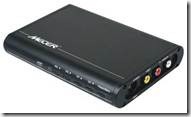
The Mecer LT291HD Stand Alone TV Tuner did not work as advertised/expected and I am in the process of sending it back (seems like getting a refund from Kalahari is no problem #BrandPlus). 
The web page (https://www.kalahari.net/profile/electronics/Mecer-LT291HD-TV-Tuner/4585/37643532.aspx) states: “TV input: (75 ohm impedance, F or PH type)” and “Video output: RCA x1” BUT the TV signal is *not* output on the video RCA cable at all :(
So, either the unit is faulty or does not operate as I interpreted.  I will have to rely on the input from my TopTV decoder. 
Additionally, it did not remove the CSS copy protection :(
For anyone that needs it, here is the Mecer’s instruction manual: Instruction Manual Mecer LT291HD External Tuner HD
Unfortunately, the Emprex ME1-V2 Media Player+Recorder also gave more than its fair share of problem – however, I don’t think I’ll be returning that box as I have 2 possible workarounds, and I kind of enjoy watching the media files on our bedroom TV.
The problems that I encountered were with pausing live TV.  The system seemed to hand and had to reset it by removing power! :(
Googling a bit found that the 500GB HDD that I have (WD5000AAKB) was incompatible with the Emprex unit! – how is that for UNlucky! #FFS #Frustrating!
So, I might also try to get another (bigger 1TB HDD) at some time.
Another option is to get an external HDD enclosure (info from this article).
The picture quality on AV OUT was poor on my 29” TV, but displayed fine on my older 54cm TV in the bedroom.
I had to use the Component (Y, Pb, Pr) to get excellent quality picture on the 29” TV (I don’t have a HDTV to test the higher quality output on).
I upgraded the firmware and played with the scheduled recording function – the start date setting is a bit clunky, but once you get the hang of it it’s fine… remember to set the date to today’s date in the settings page before trying to play with the scheduled recordings feature.
I wanted to test how many tasks you could program in that scheduled list – but didn’t get to it – the HDD hung while I was testing the live-pause feature.
I haven’t yet tested the streaming content feature yet.

The remote control is a bit thin and looks brittle, but it works well and the range is good.  I have programmed most functions into the learning remote but it doesn’t have enough buttons for all the features :(

So, to summarise:
The Mecer LT291HD Stand Alone TV Tuner did not work as I needed it to and will need to record from the channel that the TopTV decoder is set to.
Not having a tuner inside the recording device is a big disadvantage since you cannot schedule recordings independently from your “tuner-device” – that’s the coup-de-grace of this design…
The Emprex ME1-V2 Media Player+Recorder is a nice media player, and I think that I will sort out the HDD issues.
The number of cables and connections (power and video and audio) don’t make the “system” very portable

So, if I had R2,800 would I spend it on that Sony RDR-HX980B 250GB unit?  It’s only 250GB, but it has a tuner, it’s standalone, it has a scheduled recording feature, its HDD doesn’t hang when doing live-pause… I think I would!
image   image

Wednesday 18 May 2011

How to build your own 500GB HDD recorder (PVR) for under R1,850 (US$280)

So, my 250GB Philips DVDR appliance died an untimely death (well, it was 5 years old) – it wasn’t the most user friendly unit, but we loved it.  The ability to pause live TV and fast forward over the advertisements was awesome.  We missed it when it horribly when it was in for repair.  Unfortunately, it couldn’t be repaired, and it was time to look for a replacement… we went shopping and hoped to find even larger capacity DVDR devices for much less than what we originally paid for the Philips unit: bought in Apr 2006 for R3,200 incl. VAT. 
We were unpleasantly surprised: The cheapest we could find was a 160GB LG unit for about R3,300!
Another option (through a friend-of-a-friend) was a Sony RDR-HX980B 250GB unit for about R2,800 incl VAT… but that’s also only 250GB.

Many people have asked… why not just buy a PVR from DSTV… well, we don’t want DSTV and their recurring monthly fees of over R500 – the recordings become inaccessible if the PVR isn’t connected to a dish and your account is paid up – and there’s no way to copy the recordings to DVD or USB memory or external HDD. 
We want to be able to record SABC, eTV, CTV (Cape Town TV), TopTV, video camera to HDD.

So, decided to see what modern media players could offer.  1st problem – we needed a media recorder.  Not that many recorders around….
But managed to find this one which had good reviews: 

Emprex ME1-V2 Hi Def Media Player Recorder:
image  image
Comes with remote control; HDD Support: 3.5” IDE and SATA - FAT32 (Max Capacity 1TB with new firmware)
One Touch Record and Time-shift input video from AV-in port -> so no internal tuner; records from AV in
Has Schedule Record function (with new firmware)
Built in RJ-45 Ethernet connector you can stream content from networked devices such as your PC, notebook or home NAS.
Instruction manual is here: http://www.emprex.com/03_support_03.php?group=84
Review: http://www.goodgearguide.com.au/review/home_entertainment/emprex/me1/224284
Forum: http://emprex.codejs.com/
See here for full specifications and diagrams: http://www.emprex.com/02_products_02.php?id=253
From the reviews and forum, I could see 2 main “problems” with it with respect to what we needed:
1) No tuner inside it: solved with this nifty standalone box: http://www.kalahari.net/electronics/Mecer-LT291HD-TV-Tuner/4601/37643532.aspx for R380 (with added possibility that this box might remove CSS copy protection)
clip_image003
2) Dicey remote control: purchase a learning remote control from Cash Crusaders C-Tech for about R65: http://www.saiteg.com/products/en/91/2303/sort/1/filter/0_0_0_0/SRM-403E-Intelligent-Learning---Type-Remote-Control.html
 image
3) Minor issue: Audio output: 3.5mm audio connector converter cable: http://www.dealextreme.com/p/3-5mm-audio-jack-male-to-rca-audio-converter-30cm-5143
image 
So this is what my bill will look like:
Emprex ME1 (from BidOrBuy):  R850 + R145 delivery: R995 (Note: this is available on Amazon.com for much cheaper (R250), but they do not ship to SA and price does not include SARS Duty).
HDD drive: 500GB: approx. R375 
Remote control: R65
TV Tuner: R380
3-5mm audio jack to RCA audio converter cable: R20
Total: R1,835

So, there you have it: a replacement PVR/HDD recorder unit for under R1,850 – with the ability to upgrade to 1TB of storage and no proprietary recording format.

I can’t wait for all the bits and pieces to arrive to see how it all fits together!
Stay tuned for the results.

Do you have any comments or advice to me or others on the above design?

Update on 15May2011:  I have written a follow up posting over here listing the results of my design:
http://handytechtips.blogspot.com/2011/05/so-does-it-work-building-your-own-hdd.html

Saturday 07 May 2011

Send free "messages" to BlackBerry phones – it works!

Send ‘Blackberry Pin Messages’ using The Internet: If you know someone’s BBM number then you can send messages to their phone for free by connecting to this web page:  http://www.web2pin.com/web2pinfree.aspx and filling in the details: your name, your reply address, their BBM number, subject and message.

It takes about 20 seconds for the message to go through.  All you need to know is their BBM PIN number.

It does not come through on BBM, but appears on their phone in an e-mail-like format.  It is called a ‘PIN message’. 

The "From Name" appears at the top of the sent message.image

The sent message looks something like this:
Reply to: 'From Name' at ‘Reply Addr’
Then your message appears…

The message also has an advertisement for the Web2Pin.com web site ie: “A free service of Web2Pin.com  http://www.web2pin.com

image So, if you don’t have a BlackBerry phone and you can’t install WhatsApp, then you can still use your phone’s Internet browser and send a BBM message to your BB friends for free :) :)

Other related posts:
WhatsApp for Nokia Symbian phones is now available
What’s the cheapest cell phone to run WhatsApp on?
Calculator: How much data does WhatsApp use and what are the costs?

Tuesday 03 May 2011

Calculator: VoIP services: compare their prices

If you make international calls (PC-to-phone) and you aren’t using VoIP (Voice over IP) then you are probably paying too much.  I have also previously blogged about the different services out there and created comparison calculators to figure out the savings – but there are now so many VOIP services out there – and I get asked the question a lot: “Which VOIP provider is the cheapest?”.

I have created another HTT calculator to help you compare VoIP services: HTT_Calculator_VoIP_Rates_May2011

A fellow blogger wrote: “FastVoip now offers Free Calls to 13 Countries including India” on the “Free VOIP Solution Free calls Worldwide” blog where the readers asked questions about other services offering calls to India.  I found this great page that compares all of the Betamax VoIP providers in a list which you can use to compare the rates to various countries. 

As stated on the web site: “Price chart for Betamax VoIP providers - the only one available and automatically updated on a daily basis!”

I still can’t figure out why the Betamax group doesn’t just have 1 site with the best rates from each of their 35 sites!  Must be so that they can change their rates once they have “locked you in”…. {Confirmed… see this explanation of the BetaMax company}
So, I would advise that every time you need top-up your airtime – you need to check the rates to the country(s) that you call.  So, this is where Robert.Siemer-betamax at backsla.sh ’s rates comparison list comes in very handy!

The prices are in Euro Cents per minute excl. VAT.
Click here to go to the: Price comparison chart for Betamax VoIP providers

{
While writing this article, I found another site that does the same comparison (daily too), but also allows you to filter online: http://progx.ch/home-voip-prixbetamax-3-1-2.html
Thanks to: image
Additionally, it lists the number of “freedays” per site: ranging from 0 to 120 days.
Also, the “Features and fees” page lists the following: SIP Support, Freedays, Free minutes, Connection Fee, Connection Fee (phone2phone)
Also, the call simulation page: allows you to enter the number you want to dial, then  it finds the cheapest service to use for that call.  Click on the service name and SIP settings and best rates to other countries are also listed.
}

As you can see, currently, the cheapest Betamax VoIP rates to India are:

Destination [Euro cents/min
excl. VAT]
actionvoip.com dialnow.com easyvoip.com fastvoip.com internetcalls.com powervoip.com rynga.com smartvoip.com voipdiscount.com voipgain.com

India (landline)

1

1

0.8

0

1

1.1

1

1.1

0.7

1

India (mobile)

1

1

0.8

0.5

0.6

1.1

0.9

1.1

0.6

1


The cheapest Betamax VoIP rates to South Africa are:

Destination
[Euro cents/minute excl. VAT]

12voip.com

actionvoip.com

calleasy.com

dialnow.com

intervoip.com

jumblo.com

lowratevoip.com

rynga.com

smartvoip.com

voipgain.com

voipraider.com

voipzoom.com

webcalldirect.com

South Africa (landline)

1

2

2

2

2

1.5

2

0

1.5

2

1.1

2

1.5

South Africa (mobile)

11

8

8

9

10

11

9

6

7

8

8

7

7

A consideration that I need to take into account is: does the VoIP provider provide software to interface to a USB phone eg: VoipBusterMate and SkypeBusterMate


Note: if you need to make PC-to-PC calls (and even video calls) for free then why not install Skype.

Other similar articles about VoIP calls:
120 free days of calls to major cities, then rates at cheaper than SkypeOut
My DECT cordless phone is now actually working with Skype and SkypeOut and VoipBuster and VOIP calls – cool, and so convenient!
VoipBuster over SkypeOut: the verdict? Read this for hands on tips on saving on your phone bill
A cheaper service than SkypeOut (PC-to-Phone) - another one of HTT's comparison calculators shows what savings are possible
Where to download VoipBusterMate and SkypeMate for USB phones

Share this article

Recent Posts by HandyTechTipper

HTT topics cloud

Money saving tips (91) tips (68) time saving tip (63) free (56) free programs (47) free software (47) free apps (45) Calculator (27) free services (25) Discovery Vitality (19) Skype (18) discount (17) Vodacom (16) Discovery credit card (14) SkypeOut (14) VOIP (14) cellphone (14) Cape Town (13) Discovery Health (12) International calls (12) SMS (11) save electricity (11) saving electricity (11) Vodacom PrePaid (10) Vodago (10) reduce power usage (10) stop crime (10) PrePaid ADSL (9) mobile Internet (9) tagga (9) ADSL (8) Electricity Usage Calculator (8) Firearm licence (8) cash back (8) neighborhood watch (8) Firearm license renewal (7) GPS (7) SIP (7) credit card (7) firearm renewal (7) send free SMS (7) stolen goods (7) Firefox (6) Mugabe (6) Telkom (6) airtime (6) compare prices (6) pre-paid electricity (6) solar heating (6) time switch (6) CellC (5) DIY (5) Eskom load shedding (5) Nokia N70 (5) Zimbabwe (5) anti-theft (5) best cell phone apps (5) flag as stolen (5) geyser (5) phishing (5) thermostat setting (5) 3G settings (4) Inflation (4) KeyFinder (4) MS office (4) Yebo4Less (4) free internet (4) gmail (4) life lesson (4) load shedding (4) second hand goods bill (4) time switch on your geyser (4) FIFa world cup soccer (3) Firefox3 (3) GPRS settings (3) Gun license renewal (3) Joomla (3) MTN (3) Nokia (3) Nokia Navigator (3) Online backup (3) Robert Mugabe (3) TopTV (3) Twitter (3) ZenCart (3) cell phone contract (3) email to SMS (3) free email (3) free entry (3) free games (3) liquidation (3) save environment (3) scam (3) setup cell phone in South Africa (3) tourism (3) 567CapeTalk (2) Act (2) Bluetooth (2) Celine Dion (2) Concert (2) Edge settings (2) Linux (2) Lotto results (2) MS Outlook (2) Opera to Firefox (2) WWE wrestling (2) backup (2) bank account (2) browser war (2) eTV wrestling (2) elderly (2) emoticons (2) event organising (2) excel (2) false advertising (2) funny (2) lotto (2) lotto plus results (2) mobile setup in South Africa (2) national lottery (2) personal email security (2) pre-emptive load shedding (2) privacy (2) save paper (2) second hand goods (2) software development (2) toll free (2) used goods (2) webcams (2) wooden bowl (2) 0800 (1) Asperger's (1) Eskom load shedding monitor (1) Google Earth (1) VAS rates (1) World Cup soccer 2010 (1) backup software (1) hoax (1) load shedding schedule (1) sql client (1)

www.priceisright.co.za

Live Traffic Feed


Be notified of
page updates
it's private
powered by
ChangeDetection

Copyright © 2008 HandyTechTipper. All articles are released under the Creative Commons Attribution 2.5 South Africa license, unless where otherwise stated.