Sunday, 13 June 2021

eBucks This is how I chose whether to upgrade from Gold (Aspire) to Premier or Private Client or Private Wealth (with/without Spouse)

As you know FNB has pretty much killed earning eBucks on the Gold account – they have renamed it “Aspire” and dropped the tier levels from the rewards on the Aspire account.  Which means the rewards/CashBacks/eBucks are limited and the 40% off discounts from their Shop. 


To see how they have changed, go to the eBucks page and check out how to qualify, and how to earn eBucks: https://www.ebucks.com/web/eBucks/earn/fnb-aspire-2021.jsp  As you can see the rewards are very limited:

  • Up to R150 back in eBucks at Checkers, Shoprite or USave
  • Up to R150 back in eBucks at Clicks
  • Up to R150 back in eBucks at Engen
  • Up to R150 back in eBucks at InterCape – I mean who goes on an InterCape trip every month?

…and, to get the maximum of R150 back in eBucks, per partner, you would have to spend R3,000 or more at a partner,
and have an active Credit Product or have an investment account with a minimum balance of R150,000.

An additional “boost” is available: R1,500 towards a pair of shoes.  (Really?)


OK, so… moving on – it’s time to either ditch eBucks and go with DiscoveryBank OR move to Premier or Private Clients or Private Wealth – with or without the Spousal option (to earn extra 1,000 tier points, and to earn more eBucks on Spouse’s spend)?

See here for the eBucks page explaining how to qualify, and how to earn eBucks for each of those accounts: https://www.ebucks.com/web/eBucks/earn/fnb-premier-2021.jsp

Having read all of that, and estimated my highest possible monthly spend at FNB, I came up with this calculator taking the account fees into account and other personal criteria – like my Discovery Card miles, linked to my Discovery Life’s “Discovery Card Integrator” which says that if I spend at least Rxx per month then my Life premium is lowered (a bit).

The main decision criteria for me were:

  1. How easy/difficult is it for me (and Spouse) to get to tier 5 every month
  2. How many eBucks could I reasonably expect to earn by making minor changes to my current spend habits
  3. Still use my Discovery Card to earn partner store Discovery Miles (I’m still on the “old” non-VitalityMoney plan): BP, Pick ‘n Pay, Nando’s, Dischem
  4. Via DiscoveryInsure: Still use my Discovery Card to earn 50% cashbacks on BP (up to earned DQ points)
  5. Still spend the minimum on my Discovery Card to satisfy my Discovery Life’s “Discovery Card Integrator” policy
  6. Still use my Woolworths card for 3% cashback at Woolworths plus additional 5% on various items
  7. All other non-cashback spend would then move from the above to FNB card to earn eBucks (Clicks, Checkers, Engen, SmartSpend)

To assist me with the decision, I put together this calculator (which is open for feedback, as I’m sure there are many gaping holes and errors) which laid out the figures based on my current spending habits and other decision criteria. 

The aim was to use my predicted FNB spend and compare that with the banking fees and predicted eBucks and SmartSpend rewards, and so help me decide which account to upgrade to – and decide whether it was best to go up to a higher account type (and have to deal with the more difficult tier earning criteria) OR to take the Spousal account option (and pay 50% of the monthly banking fees).

The calculator:

From the “ReadMe” worksheet:

  • Worksheet "RewardsCalc_Premier_Jul2021"
    • Use worksheet "RewardsCalc_Premier_Jul2021" to see how many tier points you and your spouse can earn
    • Fill in your figures in the green cells
  • Worksheet "PersonalSpend_SmartSpend_Plan"
    • Use worksheet "PersonalSpend_SmartSpend_Plan" to see how your monthly spend can be split across your current cards
    • Compare YOUR spend with the SmartSpend eBucks earn levels per FNB account type
    • Fill in your figures in the green cells
  • Worksheet "AccountCosts+Cashback"
    • Use worksheet "AccountCosts+Cashback" to see how your monthly spend will earn eBucks based on the caps per account type,
      and whether getting a Spousal account is worth the banking fees and effort to earn (and maintain monthly) tier miles
    • Fill in your figures in the green cells
    • Cells marked in yellow are my choices based on decisions made using the above worksheets
  • Use the SmartSpend plus Cashback at Checkers, Clicks, Engen to make your decision
    ie: Add figures from worksheets: "PersonalSpend_SmartSpend_Plan" + "AccountCosts+Cashback"

Link to HTT's Calculator: 2021_06_13_eBucks_Calculator_Gold_Aspire_Premier_Private-Blog.xls  (File->Download and enter your data into green cells - on your local, downloaded copy)

From the above, I decided it was best for me to:

  1. Upgrade ASAP from Gold to Premier (Bundled option: to get free credit card, plus set up an auto payment to earn 1,000 tier points per month)
  2. Open a Spousal Premier account
  3. Move all my non-Woolworths spend from my Woolworths credit card to my FNB Fusion Premier card
  4. Get Spouse a FNB Connect SIM before end June – to benefit from the monthly free 1GB data allocation
  5. Buy some streaming and online platform services: eg: GoogleOne for more space on my GMail accounts, NetFlix, Spotify, XBox;
  6. FNB Pay: Change to use Virtual cards to earn double tier points (main and spouse)
  7. Remember to do 6 financial transactions per month on FNB app(main and spouse)
  8. Set up SmartBudget on three categories, and check them every month (main and spouse)
  9. Spousal: Check credit status
  10. Set up monthly transfer of R1,250 to Savings (main and spouse)
  11. Maintain savings balance >= R13,500
  12. Spouse: Monthly payment of >=R1,000 into FNB Tax Free Shares
  13. Spouse: move salary into new Premier account


Your comments and corrections are welcome in the comments below.


Some useful resources:

eBucks online calculator: https://www.ebucks.com/web/calculator/rewardsCalculatorAction.do

MyBroadband forum: Tips to boost your eBucks July 2021 to 30 June 2022

FNB pricing guides from 1 July 2021: FNB Pricing Guides

Sunday, 17 May 2020

What's the phone for me? What's the data deal for me - in South Africa

I have been asked... What's the phone for me?  What's the data deal for me?
I have taken out contracts - but only if the price of buying the phone plus data  plus airtime makes sense.  Otherwise, it's buy the phone for cash, and go PrePaid for me.

I like Samsung J70 Pro, and now their A71 - Telkom FreeMe deals were gr8 until 1st May 2020 when Telkom reduced their value so much so that I cancelled getting the new A71+FreeMe 1GB.  

I decided to stay with my J7 Pro with its "expired" contract - which still has the "old" FreeMe 1G plan (free 3,000 Telkom to Telkom minutes (cell and landline), and 1GB data and 100 any network minutes included).

I also like Xiaomi phones -  Redmi 4X dual SIM phone was a gr8 phone and still working well.
All phones in my house are dual SIM.  I purchase the following pre-paid deals for my family - depends on their use:

FNB’s eBucks Compare: What’s the difference between FNB Gold, and Premier, and Private accounts?

I recently started taking advantage of FNB’s eBucks rewards program and have managed to get to Level 5. 
Here are the steps that I took:
1) “Downgraded” from Premier cheque account to Gold Fusion: Reasons: R199 pm fee went down to R109 pm, *and* I get 1,000 points per month *and* I get a “Free” credit facility (30 days free credit as opposed to 59 days – but there are no credit charges as long as you pay by due date) Note: interest charges are higher if you don’t pay it all off.
2) Use the FNB calculator to see what I needed to do to earn points per month: https://www.ebucks.com/web/calculator/rewardsCalculatorAction.do
Use the Account selector to see your goals:


3) With the help of the calculator, I made the following changes (based on Gold Fusion account) – target is 9,500 points to get to Level 5):
a) started using the FNB app (2,500 points pm),
b) Spend more online – using my Fusion card (1.5% back in eBucks – limited to R7,500 pm) (>R2,000 gives 2,000 points)
c) Converted my Gold account to a Gold Fusion account (1,000 points pm) – no charges incurred when doing this
d) Stopped drawing cash from ATMs – use tellers at Pick ‘n Pay and Checkers (2,000 points)
e) Spend more than R5,000 on Fusion card pm (1,500 points)
f) Use Fusion card for 100% of spend (2,000 points)  => 11,500 points reached => reached the target of 9,500 points to get to Level 5.
g) Scheduled an auto-transfer of R500 per month to FNB savings account (500 points pm)
I then could take advantage of the eBucks – earning at level 5 (from the bottom of the eBucks Calculator page):

I then quickly hit the limits – check by entering a large amount in each cell in the calculator:
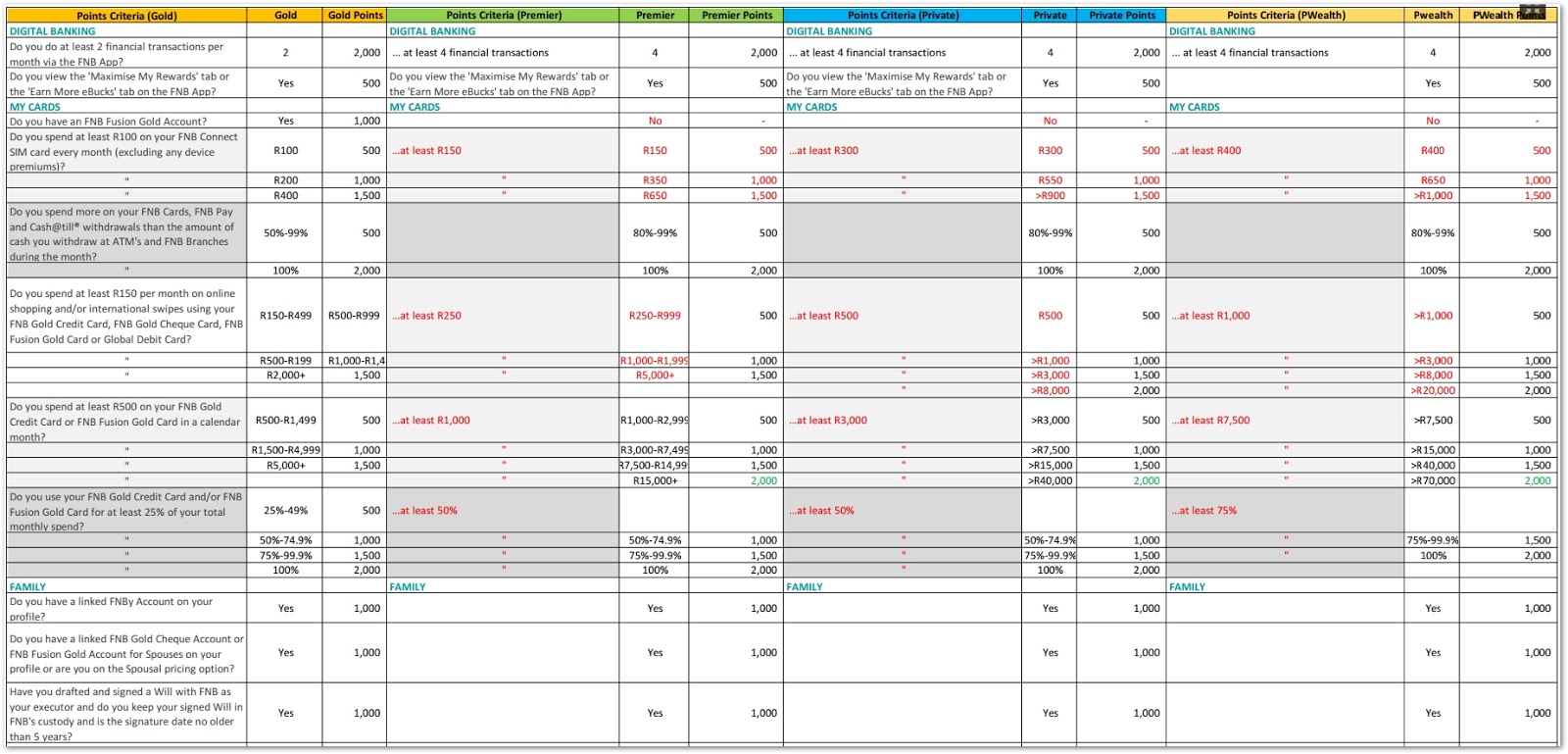
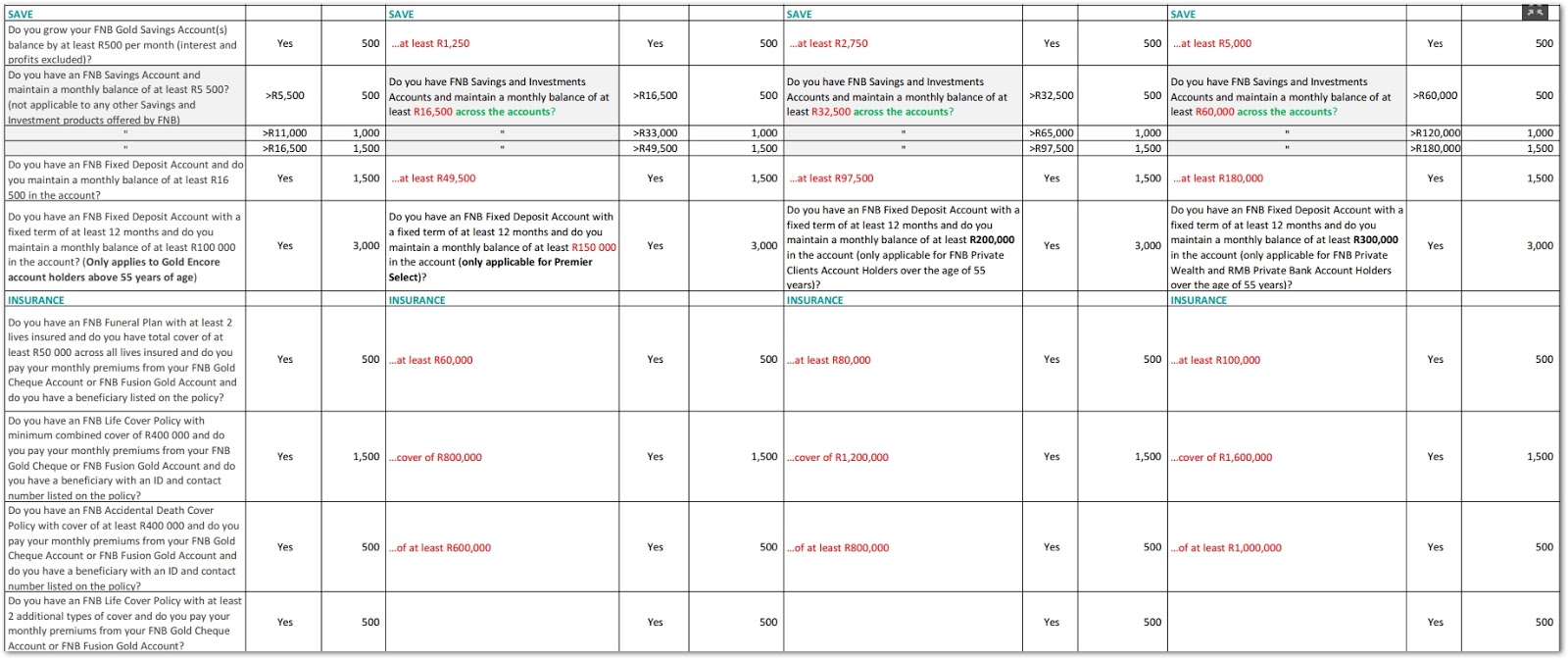
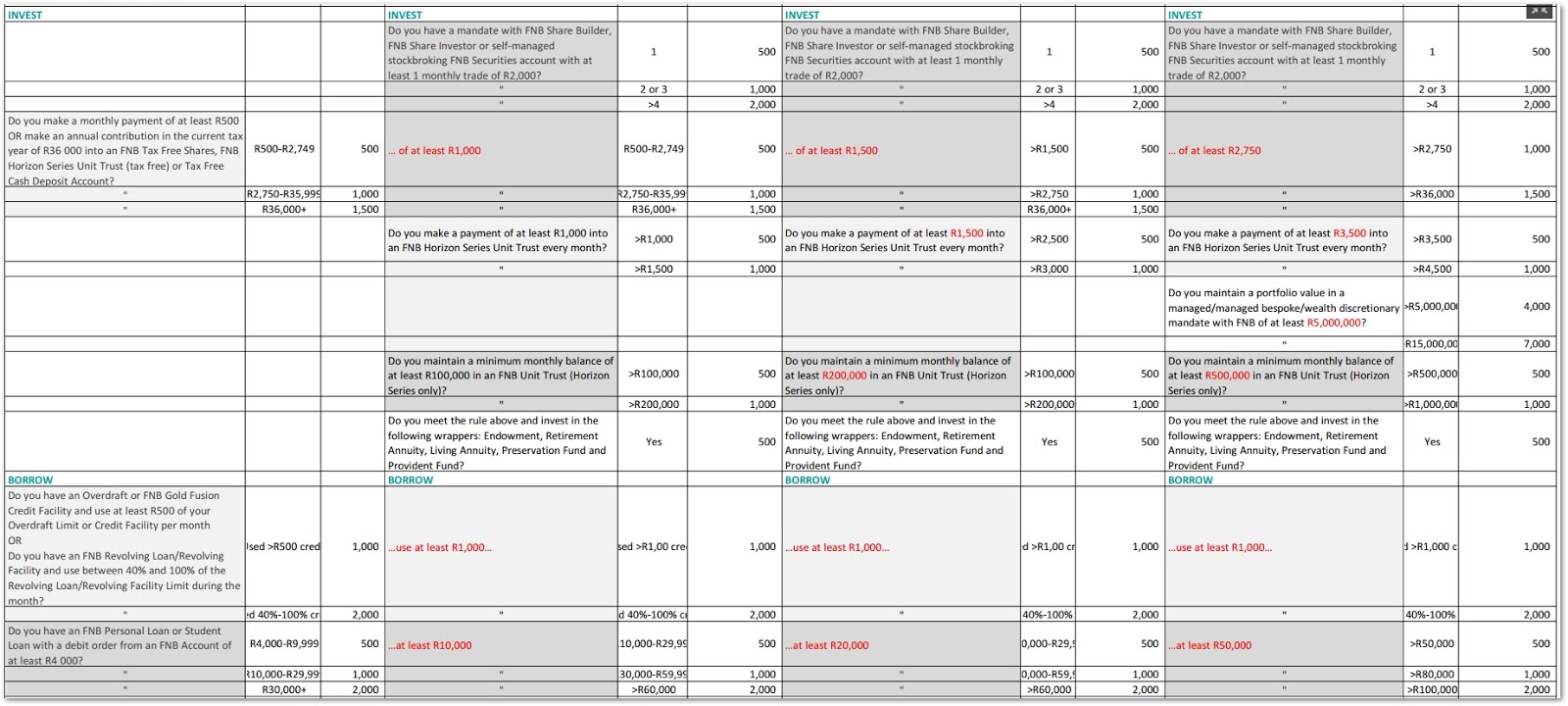
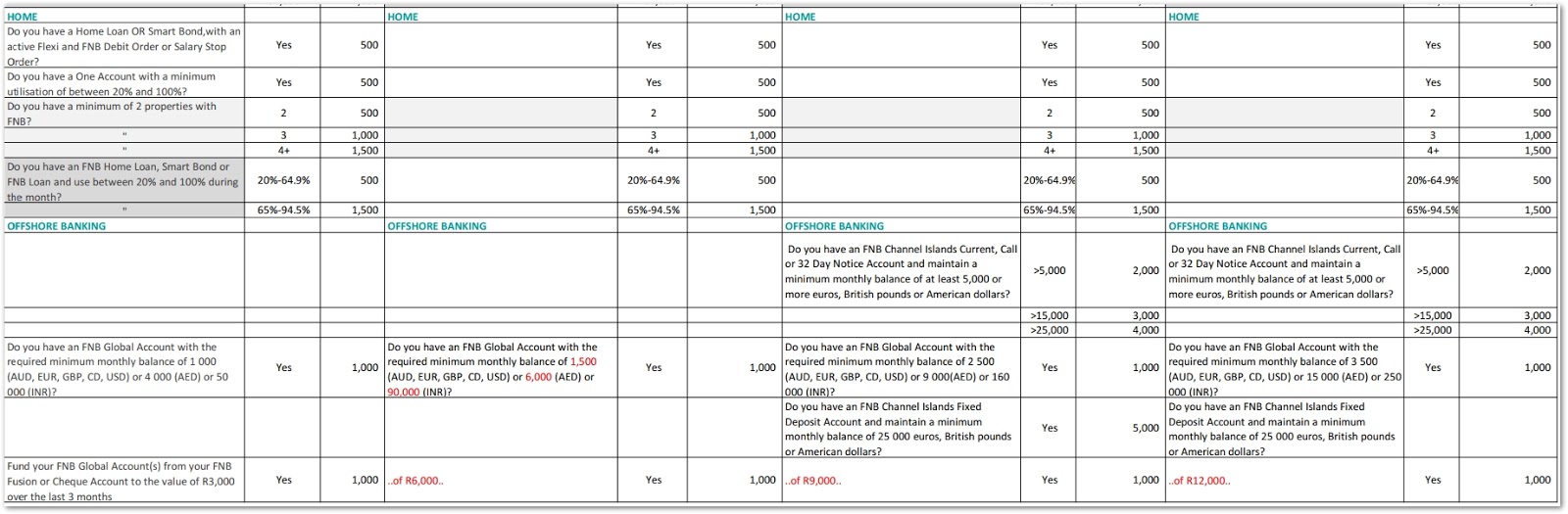
Then I thought: what would the limits be if I “upgraded” to a FNB Premier account, or Private, or Private Wealth account?
So, I used the calculator to see… but it was difficult to see them side by side using the FNB eBucks calculator :(

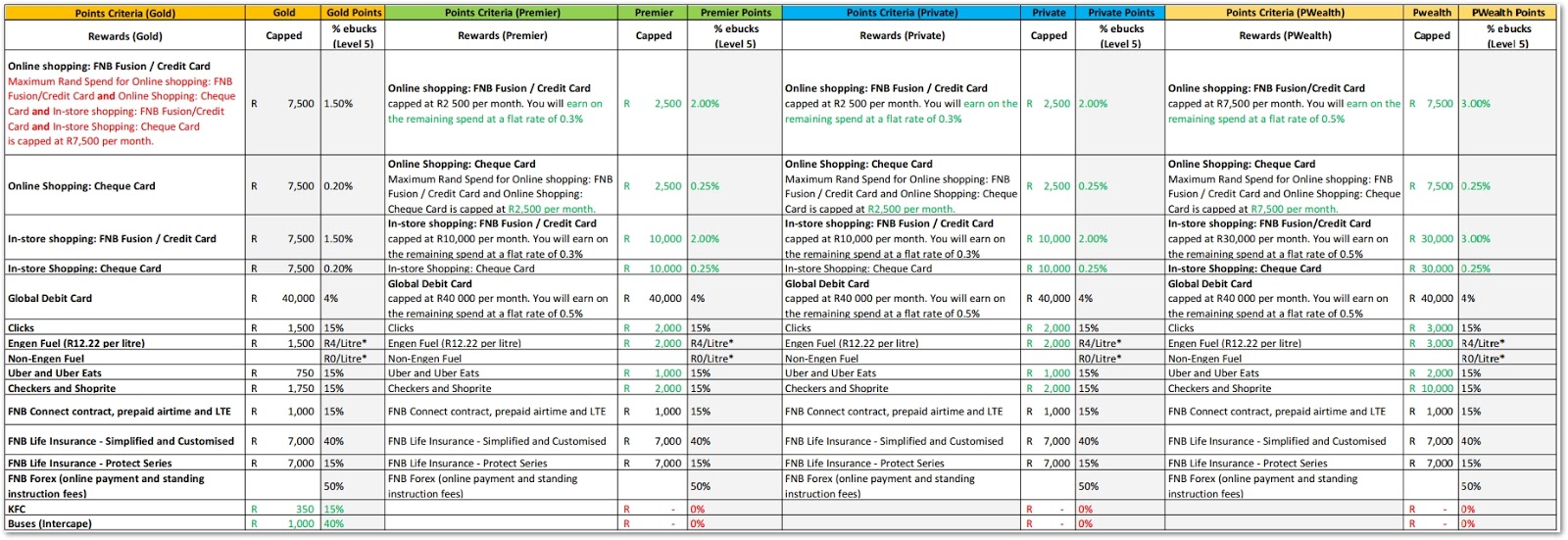
So, I put together this table to see them side by side (downloadable pdf here) (downloadable xls here).  


and the rewards comparisons:

There is also a great forum for tips here: MyBroadband forum Tips-to-boost-your-ebucks-1-july-2019-to-30-june-2020
and a WhatsApp group click here

Sunday, 4 August 2019

Discovery Bank – I got "invited" and here’s my research: DiscoveryBank, VitalityMoney... and here's why I CLOSED my account

OK, so my invitation has arrived, and here’s the info that I collected to try and find all the small print, and limits, and “ifs and buts”:
“
Hi HTT, your new Discovery Card is waiting. Join Discovery Bank today!
We’re pleased to invite you to be one of the first to get a new Discovery Card with Discovery Bank. We’ll seamlessly transfer your current balance, any linked debit orders and your credit limit to your new Discovery Card.
Download the Discovery Bank app and select Join the bank today!
You need to take the first step to move your Discovery Card to Discovery Bank. It will take you less than five minutes.

A banking product that helps you bank healthier
As the world’s first behavioural bank, we’ll help you manage your money well, and reward you every step of the way. Sign up for your new Discovery Platinum Card or full banking suite. If you have any secondary cards, the cardholders will be invited to register on the Discovery Bank app when you are done.
Read more about the features, benefits and fees of your new Discovery Card, or browse our full banking suite and savings products.
Banking that gives you better rewards
Get rewarded for banking well with
Vitality Money. Track your progress on the app – how much you get is up to you. You’ll benefit from interest rates that flex monthly – get higher interest rates on savings and positive balances, as well as up to 4% less on your credit.
You’ll also enjoy a world of new rewards like up to 50% off local flights, up to 50% cash back on HealthyFood, HealthyCare and HealthyGear items, up to 15% back on fuel, Uber rides and more.
Bank on the go – it’s safe and secure
Enjoy complete control with your bank branch in the palm of your hand. Bank anytime, anywhere, and with extensive mobile banking security. You’ll be able to pay safely and faster than ever before with innovative features like having your phone contacts become payment beneficiaries and the ability to complete easy payments linked to your health plan.
We’re moving to a better way of banking
Some of the ways that you used your Discovery Card in the past will change for the better –
read more about the details. Remember, you can continue to use your current Discovery Card until your new card arrives. If you have any questions, please call us on 0860 11 2265 (BANK) or email us at service@discovery.bank
It’s time to bank healthier.The Discovery Bank team
“


So, I read all the links provided… and more – in fact there are so many links that I lost track of them when I wanted to review the information so I made a list of the links that helped me decide whether to take up the offer:

Bank Healthierhttps://www.discovery.co.za/bank/bank-healthier
Vitality Moneyhttps://www.discovery.co.za/bank/vitality-money
Vitality Rewardshttps://www.discovery.co.za/vitality/rewards
Vitality Money Rewardshttps://www.discovery.co.za/bank/vitality-money-rewards
Vitality Money Tools and Goalshttps://www.discovery.co.za/bank/vitality-money-tools-and-goals
3point: Vitality Money: How it workshttp://michaelrobert.co.za/how-vitality-money-works
Credit card comparisonhttps://www.discovery.co.za/bank/discovery-credit-card-comparison
Airport loungeshttps://www.loungekey.com/ssavisainfinite
Credit card FAQshttps://www.discovery.co.za/credit-card/faqs
Migrating to Discovery Bankhttps://www.discovery.co.za/credit-card/migrating-to-discovery-bank#show0
3point: 10 things before moving your Discovery Cardhttp://michaelrobert.co.za/10-things-you-need-to-know-about-moving-your-discovery-card-to-discovery-bank
Accountshttps://www.discovery.co.za/bank/accounts
Banking suites comparisonhttps://www.discovery.co.za/bank/discovery-banking-suite-comparison
Banking suites fee: OneFeehttps://www.discovery.co.za/bank/discovery-banking-suite-fees
Banking suites fee: Pay-as-you-gohttps://www.discovery.co.za/bank/discovery-transaction-fees-pay-per-transaction
Savings accounts comparisonhttps://www.discovery.co.za/bank/discovery-savings-comparison
Savings feeshttps://www.discovery.co.za/bank/discovery-savings-fees
https://mybroadband.co.za/news/banking/314891-here-it-is-discovery-banks-account-prices-and-discounts.html
https://businesstech.co.za/news/banking/306820/discovery-bank-hints-at-fee-structure/


Some things I wanted to highlight for myself (and for you):
Vitality Money
Dynamic interest rates
Monthly fee
Local flights discount
Discounted gym membership
Discounted borrowing rate
Automatic warranty extension of up
to 24 months
Online training: R750https://worth.co.za

As a Discovery Bank client, you will earn Discovery Miles based on your Discovery Bank credit card spend. These will accumulate separately on the Discovery Bank app and you’ll be able to spend them from September 2019 in even bigger, better ways.
I called Discovery Bank to confirm this: You’ll earn 1 mile for every R15 that you spend on your Discovery Black Card, or R20 on your Discovery Platinum or Gold Card.

Ummm, hold on – if the number of miles is reduced (from 1 mile per R15, to per R20 spend) that’s a loss of R67 per month on a monthly spend of say R40,000.
That’s 25% less.


"Up to" Cashbacks: Platinum Card
Local flights: <= 60%
Gym: <= 100%
Healthy foods <= 50%
Healthy Care <= 50%
Healthy Gear <= 50%
Fuel <= 15% (limited to R1,000 fuel per month) = R150
Uber <= 15%

The accounts are broadly defined by income level:
Gold: Low to middle income (earning less than R350,000 a year);
Platinum: Middle to high income (earning R350,000 to R850,000 a year);
Black: High income (earning R850,000 or more a year);

Purple: Invitation only for very wealthy customers.


Credit cards comparison: https://www.discovery.co.za/bank/discovery-credit-card-comparison


Transactional Banking 

One fee for all your transactions   as compared to    Pay per transaction:


Example costs on pay per transaction:
Total: R 230.00
Monthly60.00
Vitality money25.00
Payments122.5030.00
Debit orders183.7567.50
Cash withdraw142.0028.00
ATM withdrawal1,000.0019.5019.50


Vitality Money information


If you are a member of Vitality Drive and Vitality Money, then the discounts get added.
Note: the Vitality Money cashback has a limit of R1,000 petrol purchase – so, if you are on the “up to 20%” cashback on Vitality Money, then the maximum cashback will be R200 per month.


DiscoveryCard spend bands and other “small print”

On one of my calls to the Discovery Bank call centre I asked about the BP cashbacks: If I spent R1,500 per month on petrol, and I managed to get onto Silver Vitality Money status, then what would my cashback be?
Answer: Well, that depends on your credit card colour, and credit card spend, and Vitality Money status – and there are Discovery card spend band matrix that map spend to cashbacks; and it is limited to R1,000 petrol spend (same limit on all cards: Black, Platinum, Gold cards)). The Vitality Drive cashback benefit is also paid out.  For platinum card, a spend over R25,000 per month the cashback is 20% = R200.


Platinum Discovery Card spend bands:
R5,000 (spend band 1) to R25,000 (spend band 4) per month
=> Silver status on spend band 4 gives 12% cashback      => max R120 (since petrol spend is capped at R1,000 per month).
=> Diamond status on spend band 4 gives 20% cashback => max R200 (since petrol spend is capped at R1,000 per month).


Vitality Money status [points... not confirmed - I think...from call centre calls] (Blue (39,999), Bronze (40,000 to 59,999), Silver (60,000 to 69,999), Gold (70,000 to 79,999 plus Discovery Savings account of R40,000), Diamond (over 80,000 plus Discovery Savings account of R100,000) is dependent on 5 factors: 1) Debt management, 2) Savings, 3) Savings for retirement, 4) Short and long term insurance (medical aid, and life insurance, and sort term insurance), 5) Assets or property. 

See here for more info: http://michaelrobert.co.za/how-vitality-money-works


If you haven't already... then please read this excellent post from MichaelRobert.co.za: 10 things before moving your Discovery Card


I al
so asked if there’s a 3 year “timer” to get from Gold Vitality Money status level to Diamond – and there isn’t. 


Let me know in the comments below if you have found some more small print or ifs-and-buts.


Update 1 (4th Aug 2019): So, everyone has been asking me... so, what did you do?  Did you join?
Well, if it wasn't for all the open questions that I had - the main one being the Discovery Miles... I would have joined immediately.  I downloaded the DiscoveryBank app (Android, Apple), took my selfie, read the terms and conditions, called their call centre (0860 11 2265) a few times, and investigated a bit ;)
Then, I clicked the "Accept" button.  Then: "Great choice HTT... let's finalise your application": Employment status, Employment sector,  Employment division, Occupation, Employer, Marital status and type, Address;
Foreign tax and citizenship info
Additional cards (R30 each per month),
Verify email address, enter OTP,
Declare that all info provided is correct,
Congratulations, your application has been submitted - we will notify you when your account(s) are open.  Please keep using your existing Discovery Card until you receive your new one.

Update 2 (4th Aug 2019): A few minutes later, two SMSs and two emails:
"Discovery Bank: Your new card is being prepared. Expect a call from DSV couriers to confirm delivery"
and
"Congrats and welcome! Your credit card account is now open. Log in to the app to start banking with us. Regards, Discovery Bank"
and
my wife got an SMS asking her to download the app.

Update 3 (10th Aug 2019): After 5 days of not being able to login to the Discovery banking app, and calling the call centre twice (hanging on for over 12 minutes each time), I figured out a workaround - so it's sort of, SOLVED.  
I logged in on another phone fine and while playing with it, I figured out that the problem was caused because I disallowed the app access to my Contacts ('permission' was OFF).  
On the other phone, it was off too - but logged in fine.
Giving the app access to my Contacts on my phone "fixed" it :(  (I hate giving apps access to my Contacts)


Update 4 (10th Aug 2019): The maximum points that I can receive on Vitality Money on a Platinum card is: 
Retirement: 10,000
Debt Management: 25,000
Savings: 25,000 
Insurance: 25,000
Property: 15,000

Proof of (non-Discovery products) contributions need to be provided within 150 days to keep benefits.

Points awarded for achieved goals in 55 days :(

Update 5 (11th Aug 2019): Browsing the Discovery Vitality web site: https://www.discovery.co.za/vitality/rewards-not-qualifying I found that I now need to deposit a monthly amount of R17,500 into the account - now what is a "Discovery 1+ account"
"
If you don't make the minimum required deposit for your Discovery 1+ account, you'll still qualify for Dynamic Interest Rates. You'll get the rate applicable to the Discovery 1 account, but only if your account is in good standing. You can view your Dynamic Interest Rates on the Discovery Bank app.
"

Update 6 (3rd Oct 2019): I CLOSED my DiscoveryBank account.
Bottom line - they are not ready for me as a Client - the info available and rules are not available on the web pages.  The app isn't ready for me (and I suspect many others) to use.
DiscoveryMiles aren't available yet (I have just seen a Tweet that you get 1 mile for R50 spend! (As compared to R15 per mile with the "old" DiscoveryCard (powered by FNB).
I never received my secondary cards - no response to my emails (and no call backs), and I wasn't going to wait in the call centre queues for another 20 minutes.
I was getting charged the R60 monthly fee for VitalityMoney and I was getting no value (since I didn't activate my new DiscoveryCard because I didn't have my secondary cards.
I was getting charged the monthly credit card fee and I hadn't activated the new credit card.
I didn't fancy the idea of swiping the separate Vitality Food card as well as my new DiscoveryCard.
The spending bands were not published and I had to ask the call centre staff to send the info to me (after seeing some tweets about this).
I seem to remember the full banking suite monthly charge changed after this blog post... 
The savings goals seems way out of reach for me... so I doubt that I would ever be in the top tier rewards bracket.

Sunday, 19 March 2017

Calling all Virgin Active and Planet Fitness Gym paying members: Why pay for your gym membership if you can pay for life cover instead?

Confused, well it is, a bit – so read this carefully: by paying the gym membership amount into a Discovery Life policy, you can get your gym membership (and more) for free! 
For a detailed explanation (and professional assistance) , go to the GymForLess web site:
image
Navigating the newly revamped web site is really easy and fast and it explains in detail the steps needed to “swop” your gym membership for life cover and Vitality membership, and gym membership.

So, to repeat: if you are not on Discovery Health, you can still benefit from the Discovery Vitality ‘world’.
You do not need to belong to Discovery Health to benefit from this deal – in fact, it’s cheaper to purchase an “entry level” life policy than to join Discovery Health.  You will also benefit from the Vitality benefits too.

The web site also explains the benefits of getting a Discovery Credit Card and their cash back schemes.
image
From the Gym For Less web site:
How to get the Discovery Life Insurance and the Vitality Benefit:

Step 1: Purchase a life insurance policy with Discovery Life for a minimum monthly premium of R350.

Step 2: Attach the Vitality Benefit at an additional R116 per month.

Step 3: Discovery Life and Vitality members are entitled to savings and benefits and can join either Virgin Active or Planet Fitness for a R595 once off activation fee.
Result: For only R466 per month – almost the same price as you would pay for a regular gym contract – you get:
    * Life insurance with Discovery Life.
    * An 80% saving on the monthly fees at either Virgin Active or Planet Fitness.  This saving can be increased further with a Visa DiscoveryCard. 
    * Access to the entire Discovery Vitality Benefit without being on Discovery Health!
    * Huge savings with Kulula, British Airways, Imperial Car, Southern Sun, Clicks, Ster Kinekor and many more!
    * A saving of up to 25% on over 10,000 HealthyFood™ products at Pick ‘n Pay.  Save 100’s of Rands every month!
    * Vitality members can get up to 25% of their life insurance premiums paid back to them every 5 years, tax-free! 

For more information, why not go to the Gym For Less web site, and contact them if necessary by email.  There are also online forms that you can fill in for prompt action (at bottom of the web page).
This is not a scam nor joke – it works.  See here for their Financial Services Provider details: True2Life Financial Services (Pty) Ltd details

Note:
the joining fees and gym monthly payments will change in 2011 – so act before 17Dec 2010 to benefit from 2010’s scheme and prices – if you join now, then you won’t be affected by the new scheme.

Saturday, 18 March 2017

How much cashback will I be losing out now that I’ll be earning 10x Discovery Miles? [Calculator]

I received another “good news” email from Discovery Card the other day… Subject = “Now MORE places to earn up to 10x more Discovery Miles”, and I read it with the good news anticipation that it called for… until I got to the last paragraph.  Lucky I was used to receiving these emails with misleading subject lines.  See here for more info: https://www.discovery.co.za/portal/individual/credit-card-news-cashback-miles-benefit

Here’s the paragraph that “takes it away”:  “As Incredible Connection, Toys R Us, Babies R Us, Reggies and The Pro Shop become Discovery Miles Multiplier partners, from 15 April, you will no longer earn cash back when shopping at these stores.”

Ok, so how much cashback hath Discovery taken away?

Well, I’m on Diamond Vitality level, so I get 20% cashbacks calculated on a maximum monthly spend of R10,000.
To do that, my total credit card bill needs to be 5x the spend, so that’s a total bill of R50,000.

That means a cashback of R2,000 taking the purchase down to R8,000.

What will that same purchase cost from 15th April 2017, ie: how much will I be losing out?
I have a platinum credit card – so the monthly miles cap is 10,000.

Well, according to my calculations, it will be R1,333 less in my pocket Sad smile

Here’s the tabulated figures for someone that is on Diamond (and has been on Vitality for more than 5 years):
image


The miles are also capped per month… which isn’t mentioned in the email.
The cap is linked to the type of Discovery credit card that you have:
Blue or Gold cards: 5,000 miles per month… Platinum card: 10,000 miles per month.
(see here for the info’s hiding place: terms and conditions: https://www.discovery.co.za/discovery_coza/web/linked_content/pdfs/card/terms_and_conditions/discovery_miles_ts_and_cs.pdf)

As you can see there are (true to form) lots and lots of loops to jump through – and it’s not surprising that people are so “accepting” of all these changes!

To see how much you are losing out, use my handy calculator and change the 3 purple cells: DiscoveryMilesComparedToCashbackCalculator_2017.xls

Sunday, 16 August 2015

Where to spend all those hard earned Discovery Miles?

I think the best way of spending miles is to buy vouchers from the online DiscoveryMall: http://www.vitalityshop.co.za/c-1646-vouchers.aspx#&panel1-2 

List of vouchers available:
iTunes voucher code
Sunglass hut
Babies R Us
Naartjie
Reggie’s
Toys R Us
Majors for Minors
Hirsch’s vouchers
Mangwanani African Day Spa
Health Spa vouchers
Camelot Spa
Yuppiechef Vouchers
Superga Vouchers
Bibo Vouchers
Tempur Vouchers
Cape Union Mart vouchers
@home Voucher
Stuttafords vouchers

Superga vouchers
Spilhaus Vouchers
Tempur Vouchers
Yuppiechef Vouchers
Cycle Lab vouchers
The Pro Shop vouchers


They can also be converted to Avios points and SAA Voyager miles
https://www.discovery.co.za/portal/individual/card-miles-partner-avios
https://www.discovery.co.za/portal/individual/card-miles-partner-saa


You can also spend your Discovery Miles online:
http://www.actiongear.co.za             
http://www.activitar.com               
https://www.bidorbuy.co.za               
https://www.bigconcerts.co.za           
http://www.caffeluxe.com               
http://www.capeunionmart.co.za           
http://www.daddysdeals.co.za           
http://dischem.co.za                   
http://www.eterniti.co.za               
http://www.flook.co.za                   
http://www.hirschs.co.za               
http://www.hpshop.co.za
https://www.incredible.co.za
http://www.istoreonline.co.za          
http://www.kulula.com/payment-options/discovery-miles 
http://www.loot.co.za                   
http://www.lovetodogood.org.za           
http://www.netperfume.co.za               
http://www.netgifts.co.za               
http://www.netflorist.co.za               
http://www.onedayonly.co.za               
http://www.sterkinekor.com               
http://www.sportsmanswarehouse.co.za   
http://superbalist.com                   
http://www.takealot.com                   
http://www.theproshop.co.za               
http://www.volpes.co.za                   
http://www.wantitall.co.za               
http://www.yuppiechef.co.za           

See here for more info: https://www.discovery.co.za/portal/individual/card-miles-lo

Sunday, 28 December 2014

If you are on Vodacom PrePaid then check your package and change….

If you are on a Vodacom PrePaid cell phone plan, then make sure that you change your plan from the expensive default plan (4U PrePaid) which charges R2,75 per minute to the much cheaper “Vodacom PrePaid 79c per minute” plan (billed per second).
imageRegister and login to the the Vodacom portal: https://myvodacom.secure.vodacom.co.za then click on “Account Summary” and click on “Free Change” to change your plan:

image


Here are the costs per plan so that you can see which suits you best:
1) Yebo Vodacom 4 Less: R2.89 per minute (billed per second); SMSs (peak): 80c;  Up to 100% discount on calls throughout the day, plus other rewards. 
See here for more info: Vodacom-4-Less 
Read the terms and conditions carefully: Vodacom-4-less-terms-and-conditions
2) Daily Free calls: R1.20 per minute (billed per minute); SMSs (peak): 80c; Pay for the first 3 minutes, get the rest of your call Free (to Vodacom numbers)- Guaranteed 57 FREE minutes on every call (to Vodacom); plus other rewards; 
See here for more info: Daily-Free-Calls
Read the terms and conditions carefully: Daily-Free-Calls-terms-and-conditions
3) Anytime per second: R1.20 per minute (billed per second); SMSs (anytime): 50c; Get Free Night Shift: 60 minutes free calls between midnight and 5am for 7 days with every recharge of R12 or more; 
See here for more info: Anytime-Per-Second
Read the terms and conditions carefully: Anytime-Per-Second-terms-and-conditions
4) Vodacom Prepaid 79c: R0.79 per minute (billed per second); SMSs (anytime): 50c;  This promotion runs until Tuesday 31st March 2015 at 23:59, whereafter you will revert to your previous plan.
See here for more info: Vodacom-Prepaid-79c
5) 4U PrePaid: R2.58 per minute (billed per second); SMSs (peak): 80c;  This is the default plan for older SIM cards

Vodacom Prepaid customers can opt in to the Service via FreeChange, by calling 1181 or by dialling *111# from their Vodacom cellphone, or by using the “Free Change” button on the “Account Summary” page: https://myvodacom.secure.vodacom.co.za/personal/myaccount/accountsummaryprepaid 

Free calls:
100 Recharge
111 Customer care
112 Emergency
121 Voicemail
1181 Change price plan


image

Sunday, 19 October 2014

Samsung Galaxy S4 WiFi “Unable to obtain IP address” problem [SOLVED]

I have managed to solve a colleague’s problem with his Samsung Galaxy S4 phone on his home WiFi network: Error “Obtaining IP address”, then error: “Failed to obtain IP address”.

The problem appeared after he had installed a WiFi range extender device in his home.  All other devices like iPhones, iPads, Blackberries were “happy” and connected to the now (very) extended WiFi network without any problems and with greater range in the house.  So, for them, the problem of no coverage in their bedrooms was solved.SolvedStamp

The initial connection was successful for a few hours (and sometimes for a whole day), but then the connection was dropped and the S4 phone was unable to connect and showed an error: “Unable to obtain IP address”.  A restart of the TP-link extender usually fixed the problem for another (short) period of time.

Main ADSL router: Billion BIPAC 7300G/NA
Security: Security: WPA2-PSK (AES), AES-CCMP
WiFi extender: the TP-Link TL-WA850RE (EU) Ver: 1.25 {great device, by the way – and the after sales support team is fast and friendly}
S4 phones: Samsung Galaxy S4 GT-I9500
Android version: 4.4.2

Debugging steps:
1) I took the the WiFi extender to a friend’s house to test with the S4s and iPhones – all seem to be connecting well with no “Unable to obtain IP address” problem on the S4 – the duration of this test was too short, so I couldn’t really isolate the problem.  In fact, the friend also decided to buy one of those TP-Link extenders for themselves.
2) Change the channel to another unused channel – I used the Android app “WiFi Analyser” – this is a great free app and it has helped me extend the range of many-a-friend’s WiFi signals by reducing interference from nearby signals: https://play.google.com/store/apps/details?id=com.farproc.wifi.analyzer
3) I changed the TPlink extender to have a different SSID from the main WiFi router – this is not ideal as I want the devices to auto-switch between the APs (Access Points) – this was a good workaround – but not ideal – and I wanted to get back to using the same SSID in the WiFi extender as on the main WiFi router.  So, reverted back to the original configuration of having a single, seamless SSID for the main WiFi router and the TPlink extender.
4) I contacted the friendly support team at TP-Link – they too were unable to solve the problem (they suggested many of the steps below)
5) I changed the config on the main WiFi router to give the S4 phone a fixed IP address.
6) I borrowed another brand new S4 phone – it had the same problem!
7) I changed the config on the main WiFi router to give the TPlink extender a fixed IP address.
8) I reset the TPlink WiFi extender (to factory default settings) and reconfigured it.
9) I looked at the TPLink system log files (system tools->system log) when the S4 failed to connect to WiFi.


So, what was the solution?: After Googling a lot, I found some explanations describing how some old WiFi routers were released before the final WiFi protocols were defined – and suggested upgrading the WiFi router’s firmware.  This wasn’t applicable to the Billion router, because there was no new firmware on the manufacturer’s site Sad smile
I then found a forum that had the answer: a user called “Slug” suggested “…then the problem is most likely to be with your home Wi-Fi and not the handset.  Check that your Wi-Fi router is running the most recent firmware, and also that it's using AES rather than TKIP encryption as I've had problems with several different Android devices connecting to APs using the latter.”
Another user called “Soooperpotato” noted:
“
…S4 works fine except for WiFi.  I noticed a limit of a 4Mbps download speed (upload is fine) when using WPA2-PSK (AES) or (TKIP/AES) security modes on my router.  All other 802.11n phones and computers in the house are hitting around 30+ Mbps download on this setting.  However, when I set the security mode to the older WPA2-PSK (TKIP), I get speeds at about 20 Mbps download on my S4.  This is an improvement, but now using TKIP I've limited all other devices in my house to 802.11g speeds instead of the faster 802.11n speed that AES uses.
”
So, I decided to check my router’s security WPA2 algorithm, and sure enough it was set to AES – when I changed it to TKIP, then the connection problem went away.  I was hesitant to say it was fixed until after I waited for 2 or 3 days… and sure enough, it has been at least 4 days now, and that error “Obtaining IP address”, and “Failed to obtain IP address” has not reappeared Smile

So, even though Soooperpotato says that the speed is only 20Mps instead of 30+ Mbps, I’m happy with the stability.

So, if you are having this problem, go to your main router’s Wireless LAN settings page, and change the router’s security WPA2 algorithm from AES to TKIP: image

Thanks again to the TP-link support team for trying to assist – I hope this information will also help them to help their customers.
image
Also, I found out that the TP-Link extender has an Ethernet port that allows the Extender to function as a wireless adapter to connect wired devices – this means that if you have a device (like a TV) that doesn’t have WiFi, then you can plug its LAN connection into the extender and the TP-link device will then connect over WiFi to your LAN.

image


image


I purchased my TP-link WiFi extender for only R359 (with free delivery) from here: Take-a-lot.com

Live Traffic Feed


Be notified of
page updates
it's private
powered by
ChangeDetection

Copyright © 2008 HandyTechTipper. All articles are released under the Creative Commons Attribution 2.5 South Africa license, unless where otherwise stated.