Here’s a quick posting on the newly launched
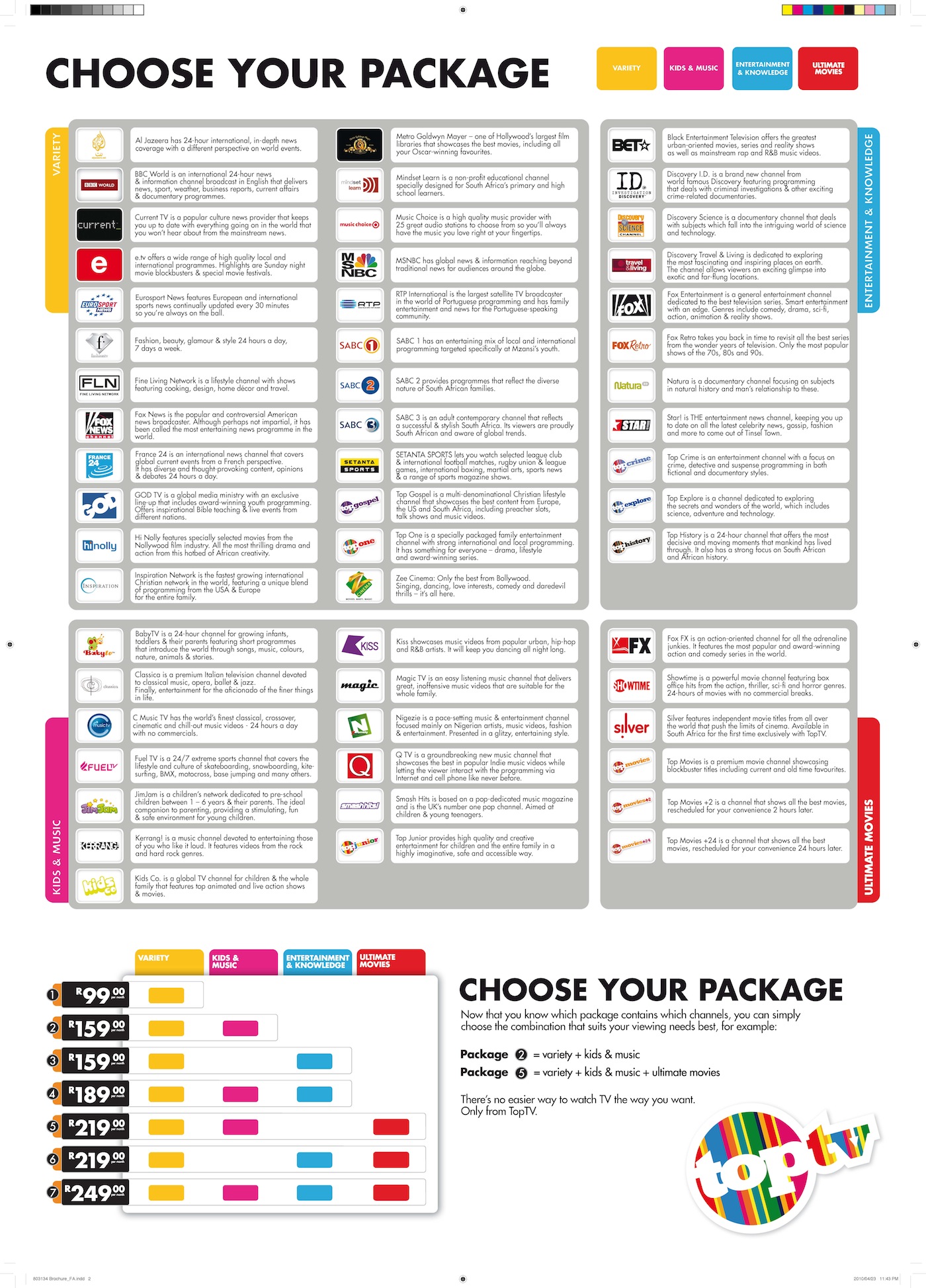
TopTV – the new satellite TV channel in South Africa. There’s a lot of activity on Twitter asking about the new channel, and how it compares with
DSTV, so I’ve collated some info that I’ve found and also created a calculator so that it’s easier to compare what’s on offer by filtering what you are interested in and then seeing
which company’s bouquet is for you.
Download the calculator from here [1MB]: Compare TopTV with DSTV Calculator
How to use this calculator:
Use the "DetailedCompare_TopTV_vs_DSTV" worksheet:
Use the filters at the top of the columns to filter by channel name OR by price OR by bouquet to see how much you need to spend to get the channels you want
For example: filter by "channel name" (column C): "Cartoon Network" shows that that channel is ONLY available in the DSTV Premium bouquet
For example: filter by "Min cost for this channel" = R99 (column J): shows all channels available for R99, THEN you can see if it's better to go for DSTV or TopTV's R99 offering
For example: filter by "bouquet name = DSTV Select 1" (column N): to see which channels are offered on the "DSTV Select 1 (R148)"
etc....
Interesting to filer using column J “Min Cost for this channel” set to R20 to see which channels you can get for R20 per month – not a bad deal
Also interesting to see that Disney and Boomerang are only available on DSTV Premium – I hope your kids don’t have expensive taste!
Same for MNet, SuperSport 1,2,5,6,7, and RAI.
Interesting that RTP International (Portuguese) is in the R99 bouquet – previously you would have to fork out R529 for DSTV’s Premium bouquet – are all the Portuguese people going to move to TopTV?
I referenced the articles below while writing this article - go to these information sources for more detail (if needed):
TopTV bouquets: http://toptv.co.za/bouquet
Compare DSTV bouquets: http://www.dstv.com/dstvsa/content/en/sa/get_dstv
DSTV Premium (R529): http://www.dstv.com/dstvsa/content/en/sa/products?bId=1
DSTV Lite: http://www.dstv.com/dstvsa/content/en/sa/products?bId=24
http://mybroadband.co.za/news/broadcasting/12247-DStv-Lite-versus-TopTV-R99-package.html
TechCentral: TopTV launch: all the details: http://www.techcentral.co.za/toptv-launch-all-the-details/14115/
Diagram of TopTV's bouquets: http://www.techcentral.co.za/wp-content/uploads/2010/04/Channel-Descriptors2.jpg
Note: DSTV has Interactive channels (TopTV doesn’t). See here for more:
http://www.dstv.com/dstvsa/content/en/sa/products?bId=1
TopTV decoder+dish+LNB+installation: R499

DSTV prices
EXcludes dish, installation and LNB
High Definition (HD) PVR:
Decoder Price: R2999*
Access Fee: R60 (per month)
(TopTV does
not have a PVR yet – due in Nov 2010)
Standard Definition (SD) PVR:
Access Fee: R60 (per month)
Standard Decoder:
Decoder Price: R499*
Please add your comment regarding the calculator… corrections included.
Update on Tue 04May2010: Heard on
CapeTalk567 this am:
beware of (DSTV and probably TopTV) installers that install the dish, decoder etc. and then charge thousands (up to R20,000) for PVR installations. Ask for a written quote
before any work is started – even if the installation costs are included in the deal! Ask them to include any additions like: extra cable, connectors, amplifiers, fibreglass/steel dishes, etc, etc…
Update on Thu06May2010: Remember, another satellite TV channel is starting in South Africa on 1st June 2010:
Super5Media (previously Telkom Media)
If this
article is anything to go by, then it's
not worth waiting for: "Super 5 Media will offer five local channels at launch in June, including a news channel and a music channel. Other details, including pricing plans, are not yet available." Additionally, it seems that ICASA
still needs to grant them a license. #WTF! Although they say that they will "go live on 1 June whether it has a network licence or not."
Here's another article about TopTV: Problems at TopTV?
Here's an excellent step-by-step guide on how to get TopTV
Update on Sat08May2010:
Where to get TopTV?: At the moment these are the stockists: Pep, Game, Makro, Dion, selected Jumbo Cash & Carry stores, CCW, Brown's and Weirs, and House & Home, and Game and Pick ‘n Pay.
Dummies guide to TopTV:
http://www.tvsa.co.za/default.asp?blogname=news&articleid=14182
The Lowdown: Sport On TopTV: http://www.tvsa.co.za/default.asp?blogname=news&ArticleID=14184
TopTV contact number 011 582 9802 extension 1001
TopTV call centre number: 08600 TOPTV (08600 86788). If all agents are busy, please leave a message Call centre is open between 08:00 to 18:00.
Updated on Thu20May2010:
Online TopTV guide: from TivoZA: instructions here:
http://mybroadband.co.za/vb/showthread.php?233437-The-unofficial-TopTV-tv-guide Direct link here:
http://www.nantage.com
Update on Sun23May2010:
Looking through the
TopTV user manual, on page 58 there's a line in the specification: "Anti-taping protection" that's enabled. I've found some people complaining (on
forums) that they can't record the TopTV programs on their VCR and DVD recorder. See this forum for updates - pls add your comments here or in the forum and let us know your recorder's make and model (if it can record and if it doesn't)
Update on Sat29May2010: Here are my experiences in getting connected to TopTV:
OK, so, I finally got my TopTV decoder and installation done. Decoder purchased on Sat15May; Took 20 minutes to get through to the call centre
08600 86788 to register; They were supposed to email me a list of installers - that list never arrived :(
I then went to the SatsRus.co.za web site (Develex) and
requested an installation - but nobody called me :(
I then called SatsRus on 021 554-4641 and booked an installation for the next day :)
I was very pleasantly surprised when the 2-man installation team arrived and installed the dish and decoder on time :)
They also didn't try to up-sell me anything! No "take this better dish" or anything like that. Neat, fast installation! They even tried (unsuccessfully, but no fault of their own {sorry babes}) to explain how it all worked to my wife.
They gave me client number details etc... that night the decoder was receiving TopTV in all its clear glory :) - and I hadn't yet paid for the monthly subscription.
Today, I tried calling the call centre - the technical line took <5 mins to answer and I explained that the signal through my video VCR and DVDR HDD recorder machines were poor - they didn't tell me, but it's because of the anti-taping software. They recommended
running the RF cable directly from the TopTV decoder directly to the other TV sets.
Another option that I
found was to purchase this
Grex gadget for $89+$10 shipping (
arrives in 2 weeks at local post office).
If you have an
old DSTV decoder then try that before bypassing your VCR and DVDR (see below for more anti-taping "solutions")
I called the call centre again to get payment details for TopTV: this time their sales option took less than 15 secs to answer :) I got an EasyPay number so that I could pay by credit card BUT it didn't work on the www.easypay.co.za web site :(
So, I called TopTV back (again answered in less than 15 secs) and I learnt that I can only go to Shoprite stores to pay - the Internet will work later.
I decided to pay using EFT for now, here is TopTV's banking details:
Bank: Std Bank
TopTV Acc Nr: 252 315 553
Type of account: Chq
Account holder: TopTV
Branch Code: 019205
Reference: use your TopTV account number eg: 0000 17xxx
The first month's payment must include the pro-rata amount - that's the partial month's payment for the days you were connected. So, if you were connected on the 20th of the month of May (which has 31 days) then the pro rata amount is: ('bouquet amount'*11)/31
Updated on Tue01Jun2010:
See post by
MagicFlame here:
http://mybroadband.co.za/vb/showthread.php?229251-Macrovision-blocking-recording-from-TopTV/page4 that describes how to bypass the MacroVision noise:
"I connected audio-out from TopTV decoder directly to HDD recorder's audio-in. Then connected the RFout from TopTV decoder to an old MNet decoder's RFin, and from there via its Video-out to HDD recorder's Video-in and it works. Proper recording to HDD in stereo! Time-shifting is also OK, so I'm a happy camper for no money spent."
Updated on Sat05Jun2010:
@TopTV_Wiz @toptvsa #TopTV is painful now - plz turn off the anti-taping, I want2 go out &record a program to my HDD recorder #FFS
Evidently, the trick to bypass the anti-taping didn't work for me :( I tried the MNet video-out "trick" - but it didn't work for me :(
Yeah, yeah, I can wait until Nov2010 for the USB port to be enabled
BUT: I have a HDD recorder
now (with no USB input). Why must I wait until Nov, and spend more $s to get another large HDD?
MeThinks my #TopTV (1 week) honeymoon is nearly over :(
Updated on Sun 4th July 2010:
Whoopee successfully paid my #TopTV bill using credit card on the
www.easypay.co.za web site. Get your "EasyPay Number" from the TopTV call centre
Updated on Sat31July2010:
Added a quick reference sheet listing the channels on TopTV: print it out and keep it close to your remote control.
"ChannelNumbers" worksheet: use the filters to print a sheet so that you can quickly jump to the channel you want





 Posts
Posts