So, I found an old Android phone and wanted to set it up with all my favourite apps, but I was upset when Waze wouldn’t install from the Google Play

Now, if my sense of direction was good then I wouldn’t need this awesome all to help me get around… so, I tried a bit harder and after a bit of Googling I found a link which mentioned a download for my specific phone: Freeware4Android: 
I opened the browser on my phone and clicked on the link and the file download started. When it was complete I clicked on it and (to my surprise) it started to install :) After the celebrations I started the app and it installed fine!

Click here to download Waze for Android version 2.1: http://www.freeware4android.net/vodafone-845-device-1569/waze-get-15899.html
Saturday, 26 January 2013
Installing Waze on an Android 2.1 phone [Solved]


Saturday, 22 September 2012
The best turn-by-turn navigation app – no need to worry about the new iOS6 maps problems
There are a lot of people reporting problems with iOS6 maps – but I don’t understand why people even bother trying anything other than Waze. It is a free turn-by-turn navigation app BUT with more – much more - it also provides free real-time traffic updates from other Waze users and provides search results directly from Yelp, Bing, Google, Yellow Pages and Foursquare.
Waze uses your phone’s data connection for maps and real-time traffic updates. 
So, you can see it’s a win-win situation where you are helped by others ahead of you, and you help people behind you.
There is a large user base in South Africa and I use it daily in Cape Town to great success! :)
Download from the iStore here: http://itunes.apple.com/us/app/waze-social-gps-traffic-gas/id323229106?mt=8
Download from Google Play here: https://play.google.com/store/apps/details?id=com.waze
or just browse with your mobile device to: http://m.waze.com

Saturday, 24 March 2012
Here’s how I got over 100 “pay for” apps for free on my iPad (and counting)
Ever since I got my iPad 3 months ago I have been meaning to make my first purchase at the iTunes store – but haven’t got to doing that though. Mainly due to the fact that I don’t really know how to do it – can I pay with credit card or PayPal or what? The answer is probably both…
So, how did I get over 100 “pay for” apps onto my iPad for free? Well, I’ve waited for “price drops” – that’s when the apps go from say $0.99 to free for a day or two (or sometimes more). No, I don’t trawl through all the free apps in the iTunes store each day… I found 3 apps that do it for me:
In the order that I use them:
AppZapp HD 
AppShopper 
Appsfire 
I then use the apps to filter and show the “Now free” apps. I spot the really good apps by the star ratings, and the number of comments (in brackets), and the number of alerts that other people have set in the app.
(Remember to get your US iTunes account otherwise some of these apps won’t be downloadable)
Here are some examples of how I use the 3 apps:
In AppZapp: use the “Now free” view and look for the listed free apps to see which ones you fancy that have lots of comments and stars
In AppZapp: use the “Top lists” view then select the “Most alerts” list, then scan that list for free apps.
If an app that you really like isn’t free (yet) then add it to your “Watchlist” and use AppZapp’s “My AppZapp” view to monitor them.
In AppShopper: use the “Top 200” view and tick the “Free” and “Change (Biggest rise)” options to list apps that you might want to download.
In Appsfire: go to the “Deals” tab and look at the “Now free” list.
With a bit of patience and monitoring of these 3 apps daily, your collection of paid apps will slowly grow like mine has ;)


Wednesday, 1 February 2012
Control your Android phone from your PC
I have been playing with an Android phone and decided to try and use a real keyboard rather than the (small) touch screen virtual keyboard. I found a wonderful tool that allows you to take control of your Android (or SonyEricsson) phone. It is called MyPhoneExplorer and connects to your phone via USB cable, Bluetooth or infrared. So, I can now send WhatsApp messages using my real keyboard… and more: 
You can also use it to sync your contacts (address book) - with direct sync to Outlook, GMail, Windows contacts, Thunderbird, SeaMonkey, Lotus Notes and Tobit David
You can also use it to sync your calendar and direct sync to Outlook, Google, Sunbird, Thunderbird, SeaMonkey, Windows calendar (Vista), Rainlendar, Lotus Notes, Tobit David and net shared calendars (WebDAV, FTP, local)
You can also use it to send SMSs and also back them up to your PC.
There’s a file browser with a cacheing system to minimize data transfer.
The phone’s date and time are also sync’d to Internet time and more.
See here for the software (and why not donate some $s too) [4MB]: http://www.fjsoft.at/en/downloads.php
To use your computer’s keyboard: Install then once connected go to the “Extras” menu option and select “Phone keypad”:

This is what my phone looks like on my PC:

Sunday, 3 July 2011
Telmap 5 maps were not showing [Solved]
I was extremely happy with the beta version of Telmap 5 on my Blackberry Bold (9700) until the maps disappeared at the end of June 2011 and I was wondering what was going on. A colleague even emailed Telmap support and got a response to call Vodacom support as they were contractually not allowed to deal with clients directly (#Fail). 
I kept on opening the maps to see if they were back. I read on the Internet somewhere that the Telmap servers were undergoing an upgrade so I was hoping…
Until last week the maps were blank. Funnily enough the maps of Europe were displaying fine – so I then suspected that perhaps Vodacom were blocking the maps for some reason – perhaps to force users to use the Vodafone Sat Nav software :(
Luckily (for Vodacom) that wasn’t the case :)
I was quite a happy user and excited when I eventually found an app that provided turn by turn navigation! – and I certainly didn’t want to be forced to use the SatNav software. It shows weather at my locations and other widgets too.
Last week, I opened the Telmap software and it wouldn’t open saying that the software had expired! I pressed the BB button and there was a link to “upgrade”…
I took a deep breath and thought that if I upgraded then I would lose “My places” – and wondered how I could extract these from the BB backups that I had made.
Another deep breath accompanied by a click on the “Upgrade” link and I started downloading the new software…
A short while and a reboot later the software started up; the maps were visible again, and I didn’t even lose “My Places”! :) :)
Navigation working again too :)
I am now upgraded to version 5.41 build 49
Now if only this software would show traffic info and tell me where the speed traps are…
Similar posts:
Update your Blackberry Bold 9700 Vodafone Sat Nav GPS Navigator

Sunday, 17 April 2011
Calculator: How much data does WhatsApp use and what are the costs?
WhatsApp is one of the few apps that I will gladly pay for when the beta period is over, but how much data does it use? I have done some experimentation over this weekend and have published the results in the attached calculator.
Click here to download the calculator: HTT’s WhatsApp Costs Calculator
Note: This is by no means a scientific experiment/calculator, I just wanted to get a feeling for how much data is being used and what charges are actually being charged by Vodacom on my prepaid, no data bundle account that charges R2 per MB.
If you have a phone that can connect to WiFi routers (like your ADSL router at home) then WhatsApp will connect over that WiFi connection rather than incurring costs on your cell phone’s data bundle. As you can see from the spreadsheet the costs for 4KB over WiFi on ADSL is 1/100th of a ZA cent.
Polling data costs:
OK, so how much are we spending when we send WhatsApp messages and how much when we’re not?
Hold on there…. how much do we spend when we’re not sending messages? – What on earth does that mean?
Well, I noticed that even when you aren’t actually sending text messages there are data packets being sent (and charged for). I call these data costs “WhatsApp polling” overheads. I assume that WhatsApp is communicating to their server to keep the channel open.
It’s difficult to figure out how many polls are made per hour. I’ve noticed sometimes up to 4 per hour – and some hours with none at all.
I’ve taken an average of 3 polls per hour, makes 72 per day, of 1,024 bytes charged at ZAR0.01 per poll: costs R21.60 per month
Messaging data costs:
Then there are actual costs for sending messages. The receiver will also incur data costs if they are not on BIS/BES or other cheaper data connections.
Note: cell phone network providers allow you to buy pre-paid bundles of data at a much reduced rate – beware though, it’s on a “use-it-or-lose-it” basis. Vodacom gives you until the end of the following month to use up the data. Note: that’s not a 2 month window! (unless you buy on the 1st of the month). If you buy a bundle on the 20th of April, then the data will expire at the end of the following month ie: end May in this example.
I sent some experimental messages and one specific message of precisely 100 characters to see what was actually billed by Vodacom.
I checked her mini-statement online using Vodacom’s online “Mini-Statement” – updated hourly (more or less).
BTW: @Vodacom, please allow prepaid users to see more than 1 page of their billing for free! Unless you are really trying to keep them in the dark on the costs – the last 10 transactions is really so pre-data connections!… like ummm so 1990‘s
Note the 100 character message that I sent:
a) row 9: WhatsApp message of 100 characters was charged ZAR0.22 by Vodacom. I expected that to be much less than that – so I resent that message later in the day:
b) row 3: WhatsApp message of 100 characters was charged ZAR0.01 by Vodacom – that’s more like it! So, I tried it again – to be sure (if that’s possible)
c) row 2: WhatsApp message of 100 characters was charged ZAR0.01 by Vodacom – OK, so now I’m sure… the first message must have included some polling “extras”. 
It also seems that Vodacom round the data charges to the nearest KB (thousand bytes).
So, as you can see it’s not a scientific analysis, but I am pretty sure the SMS and call costs that I would incur if it were not for WhatsApp would be much higher than the above illustrated costs.
Battery cost:
The “always on” way that WhatsApp communicates with its home server uses the phone’s data channel – which uses more power than if there wasn’t data communications happening. So, expect to be charging your phone more often than before.
This is not a problem for me – but might be for some.
I guess, it’s a trade-off between how many SMSs you normally send vs how many you don’t now that you have WhatsApp. For me, it’s a no-brainer!
WhatsApp program cost:
You can use the app for free for 12 months, then you need to pay per year.
Download by clicking these links:
Nokia and BlackBerry and Android: $1.99 USD/year (~R13.50);
iPhone $0.99/year (~R6.75);
The latest versions of WhatsApp allow sending of group messages and photos and voice notes – note: these are larger in size than “plain” text instant messages, so costs will go up due to higher data costs – but it’s still cheaper than sending MMS messages (MultiMedia messages).
WhatsApp, you are great – thanks… and I will definitely be purchasing an annual license for my phones!
Sunday, 13 March 2011
GoogleDocs for sharing documents
Google Docs is a great way to share your documents and even edit them online at the same time. Use it to create documents, spreadsheets and presentations online. Another advantage is that your documents are available online and whenever you need them just hop onto the Internet from any PC and connect to your Google account. 
If someone at work shares a document with you using your work email address (fred@work_address.com), there’s no need to create another account to access those shared documents – just login to your Google account (fred@gmail.com): https://www.google.com/accounts/b/0/EditUserInfo?hl=en&service=mail
then in the “Add an alternate email address to your account” section
add your work or alternate email address fred@work_address.com email address.
Then “save”… easy as that!
I struggled a bit to figure out how to share a folder in GoogleDocs… but this article solved the problem – turns out you need to share a collection, then each document that you add to the folder will automatically be shared to a group of people.
Saturday, 5 March 2011
Giveaways of full versions of software for free
My first (and still favorite) giveaway site is http://www.giveawayoftheday.com where you get what it says: a free giveaway each day – you can download and install a full version of software for free. So, what’s the catch? Well, a small one – you need to install and activate on the day of the giveaway, and most giveaways are not for commercial use. I have heard that people somehow crack the giveawayoftheday installer to keep it for future installations…. I love that site and have been using it for years 
The reason for this article is to also list other sites that I have found and also use daily:
http://www.tipradar.com 
http://www.brothergiveaway.com 
http://www.twangoo.co.za 

Tuesday, 25 January 2011
Update your Blackberry Bold 9700 Vodafone Sat Nav GPS Navigator
I have been looking for a way to get better turn-by-turn GPS software on my Blackberry since I got it. The Vodafone Sat Nav GPS Navigator software just doesn’t work as well as my old Nokia 6110 Navigator phone. The main problem that I experienced was that when it’s in navigation mode, (in other words, when it is giving you directions) the voice prompts come slightly too late and I miss the turn… the screen does not allow a slightly more zoomed out view to see if this is the time to turn.
I even tried the Garmin product for 30 days, as well as their onboard version of their product: Garmap that’s offering a R200 discount (so you pay R399) but the discount voucher didn’t work – I even emailed them 7 (yes, seven) times – still not sorted out :( 
My BB Bold 9700’s version was running Vodafone Sat Nav version 4.65.87 and I needed an upgrade.

I then came across Telmap site - Telmap is the Israeli company that produces Sat Nav software - Telmap 4.5 world edition is available on Blackberry AppWorld for $79.99
I found this great way for you to receive the Telmap5 navigation system for your mobile phone for free.
All you have to do is register for free at http://global.telmap.com/tugpcbeta to join the Telmap User Group.
Notes:
a) this will UNinstall the existing Vodafone Sat Nav software, and you DO need to reboot your phone after the installation.
b) Traffic info does not work in South Africa.
c) It is a 6.1MB download (I hope you are on BIS)
d) It is beta software – so make a backup of your entire phone using the Blackberry desktop software
TelMap info:
”
The Telmap User Group is a group of beta testers for Telmap5. As a member of the User Group you will receive Telmap5 software for free and will be able to navigate everywhere we have geographic coverage including Europe, North America and more. Feedback can be returned at any time using our feedback form, and every so often we will conduct an online or phone survey asking you to answer some specific questions about the product.
You should know that you must maintain your own data package, and that we may keep GPS logs of your navigations.
We are currently accepting new users with the following devices:
- Android devices (English, French and Hebrew)
- BlackBerry 9800 Torch (English, French and Hebrew)
- BlackBerry 9780, 9700, 9300 (English, French, German, Spanish, Italian and Hebrew)
”
Here are the installation instructions:
1) Click on the “Register” button (at the bottom of the page) to join the Telmap User Group: http://global.telmap.com/tugpcbeta
(a download link and registration code will be emailed to you)
2) Open the email on your phone and click on the download link – a 6.1MB file will then start downloading and be installed on your phone. My version is version 5.12.32.01 build 02. Release notes are here: http://downloads.telmap.com/tug/doc/TUGReleaseNotes.htm
3) It will replace the old Vodafone Sat Nav version and will ask for phone permissions
4) Reboot your phone after the install is complete.
Feedback can be given using this form: http://www.surveygizmo.com/s/193403/feedbacks-on-telmap-navigator-v5-0
(not for installation problems… rather use: tugadmin@telmap.com)
Telmap User Group Forum is here: http://www.pocketgpsworld.com/modules.php?name=Forums&file=viewforum&f=137
Telmap5 offers:
- Full-featured in-car navigation with moving maps and sound instructions with street names
- Turn-by-turn pedestrian navigation with moving maps that follow your location and bread-crumbs for orientation
- Simple and easy one-line search for anything you need
- Widgets that let you personalize your experience for in-car navigation, pedestrian navigation and mapping
- Rich UI with animations, shadowing and graphic effects – all based on a map
- Weather information for any location
- Cell-ID positioning technology lets you use mapping and local search even when you are indoors with no GPS fix
- Tiled maps for quicker map download and smooth panning
- And much more…

Sunday, 16 January 2011
Where to download VoipBusterMate and SkypeMate for USB phones
Following from my previous postings on cheap (and sometimes free) international calling using VOIP (Voice over Internet) and USB phone handsets, I was distressed to find that the http://yealink.net/skypemate/download and www.skypemate.net download sites are getting fewer and fewer. (The original location that my posts referred to are now no longer available to download the software)
So, I decided to make the downloads that I have on my local computers available here:
SkypeMate_4.0.2.2.zip
VoipBusterMate3.0.2.48.zip
I also see that some are available here too: http://www.usbphoneworld.com/fido.html
Previous posts that explain how to connect your DECT cordless telephone to make VOIP calls:
* My DECT cordless phone is now actually working with Skype and SkypeOut and VoipBuster and VOIP calls – cool, and so convenient!
* Hooray, I’ve found a way to use my cordless DECT phone to make Skype and SIP VoipBuster calls – Solved :)
* 120 free days of calls to major cities, then rates at cheaper than SkypeOut
Tuesday, 10 August 2010
Debug your web page for different versions of Internet Explorer with one (1) free program
How many times have you had to reproduce client problems on your web pages using a virtual machine or multiple PCs running different versions of Internet Explorer?
You don't have to do that anymore. Now you can debug your pages on multiple versions of IE on the same machine that you use for Web development or testing. 
IETester for Windows Internet Explorer is a stand-alone (free) browser compatibility checker for Internet Explorer versions from 5.5 to 9. It is a visual tool that makes it faster and easier to test your sites – it uses the rendering and javascript engines of IE9 preview, IE8, IE7 IE 6 and IE5.5 on Windows 7, Vista and XP, as well as the installed IE in the same process. You can then navigate to the different pages and enter data as if you had installed the different versions of IE on your computer.
It’s free, but why not make a donation to support the project? Donate now

And, look at their other product: DebugBar:
- DOM Inspector: View DOM Tree and modify tags attributes and css attributes on the fly to test your page
- HTTP Inspector: View HTTP/S request to check cookies, GET and POST parameters, view server info
- Javascript Inspector and Javascript Console: View javascript functions for easier debugging, see Javascript and AJAX code
- HTML Validator: Validate HTML code to correct and optimize your code and html size of your page
- And many more features: See page cookies, get pixel colour on a page, make a page screenshot...
Saturday, 12 December 2009
More full commercial software for free
I’ve found some more full free commercial software from ChipOnline the site is in German but get Google to translate: ChipOnlineEnglish


1) Everest Ultimate version 4.60 [8MB]: Benchmark your PC: Everest Ultimate
2) Paragon Partition Manager 10 Personal Edition: Paragon Partition Manager 10 Ooops, the 25,000 licenses are all taken :(
3) Full Version: Radio Tracker 6 [1.4MB]: Radio Tracker 6
4) Ashampoo UnInstaller 2010 [12.9MB]: Ashampoo UnInstaller 2010
5) CrazyTalk 5 SE [139MB] funny animation tool that converts portraits into animated faces that accompany voice messages recorded via microphone with the appropriate facial expressions: CrazyTalk 5 SE
6) Full Version: TuneUp Utilities 2009: TuneUp Utilities 2009
7) Full: WashAndGo 2008 [22MB]: WashAndGo 2008
8) Full Version: converter for digital photo frames: Converter for digital photo frames
9) Free eBook Bundle: Office 2007 [25MB]: ebooks for Office 2007, Excel 2007, Microsoft Office Outlook 2007, PowerPoint 2007 to use a professional, Present like a pro with Microsoft PowerPoint 2007: eBook Bundle: Office 2007
10) Steganos Shredder 11 [17.5MB]: Delete files securely: Steganos Shredder 11 (Steganos has released the serial number: 8DBB-9E6D-28ED-BB69-5B23-8F89-2464-CD42)
11) PDFTiger [17MB]: Not worth downloading
12) CyberLink DVD Suite 7 Centra [946MB]: CyberLink DVD Suite 7 Centra limited to 29,000 licenses
13 through to 24 will be released one by one, daily… follow CHIP_Download on Twitter to stay in touch with the free giveaways.
Update on 13Dec2009:
Here’s another treasure trove of free giveaways (in German): http://www.stern.de/digital/adventskalender-sternde-verschenkt-software-1526074.html
Saturday, 28 November 2009
Full commercial software for free
I’ve found some more free commercial software available for a limited time: 
Register Here and Receive the CD Key to Fully Install CyberLink YouCam 1 available from2009/11/19 to 2010/03/20:
http://www.cyberlink.com/prog/event/bundle/index.do?nEventId=2099

This is only used for CyberLink MediaShow 4 DE available from 2009/11/01 to 2010/03/31: http://www.cyberlink.com/prog/event/bundle/index.do?nEventId=2122 
CyberLink PowerDirector available from 2009/09/30 to 2010/02/05: http://www.cyberlink.com/prog/event/bundle/index.do?nEventId=2101 
CyberLink PowerDVD available from 2009/10/01 to 2009/11/30: http://www.cyberlink.com/prog/event/bundle/index.do?nEventId=2119 
Paragon Total Defrag 2010 free until 29Nov2009: http://www.paragon-software.com/free/giveaway.html 
Here’s another site that you would want to keep your eye on: http://dottech.org/category/freebies

Friday, 27 November 2009
You want to create a copy of your current hard drive without having to reinstall everything: clone it – Solved!
I’ve often been asked how to replace a suspect hard drive before it fails completely without having to reinstall all the programs and then copy all the data back onto it… well, here’s a free OpenSource solution that clones your hard drive quickly – no, very quickly!

CloneZilla is a super-fast cloning tool that can clone one system to another, or one-to-many (over the LAN) using multi-casting (or broadcasting) technology.
Clonezilla, allows you to do bare metal backup and recovery.
Clonezilla Live is suitable for single machine backup and restore.
Clonezilla SE (Server Edition) is for massive deployment, it can clone many (40 plus!) computers simultaneously.
Clonezilla saves and restores only used blocks in the hard disk which increases the clone efficiency.
Clonezilla supports many file systems including GNU/Linux,FAT, NTFS, HFS+, and more; no matter if it’s 32 or 64 bit.
See here for screen shots: http://clonezilla.org/screenshot/
See here for downloading Clonezilla and instructions on how to create a bootable CD: http://clonezilla.org/clonezilla-live/
I’m sure this will save you lots of time and trouble – consider donating to Clonezilla here: Donate
Update on 28Nov2009:
Here’s another great article listing the “5 Ways to Clone and copy your hard drive” (all free tools) covering: Paragon’s Drive Backup Express (Windows), DriveImage XML (Windows), CloneZilla (cross platform), XXCLONE (Windows), EASEUS Disk Copy (cross platform).
Thursday, 26 November 2009
So, you need an old version of the Java Runtime Engine (JRE)… look in the archive – SOLVED
Took me a while, but finally found the JRE that I was looking for (and a lot more) I was looking for JRE 1_5_0_15 for Windows.
Here’s the Sun Java Technology Products Download page (archive): http://java.sun.com/products/archive/

Use the pull-down menus to select what you need to download and press “Go”, then the next window will allow selection of your operating system, then download the file: 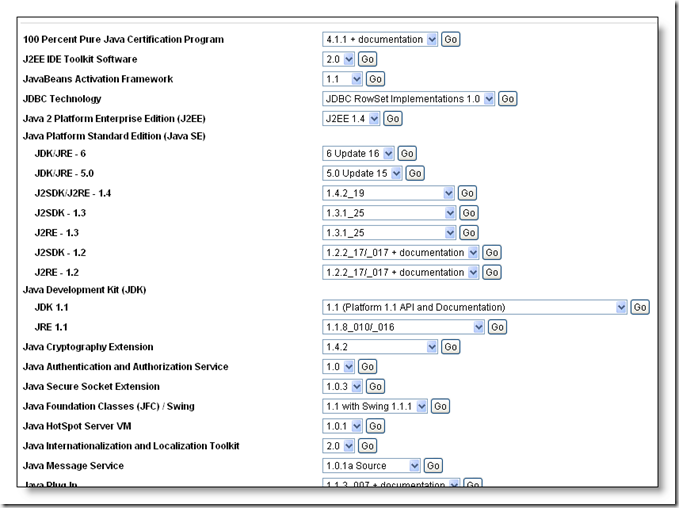
If you have multiple versions of the JRE on your computer, then use the control panel’s “Java” icon to control which JRE is used by which browser: 
In the “Java Control Panel”:
Click on the “Java” tab, then configure the ‘Java Applet Runtime Settings’ by clicking the ‘View’ button and ticking the JRE version that your browsers should use.
Then configure the ‘Java Application Runtime Settings’ by clicking the ‘View’ button and ticking the JRE version that WebStart JNLP (Java Network Launching Protocol) files should use:

So, there’s no need to UNinstall the latest version of the JRE if you need to use an older version :)
Thursday, 12 November 2009
If you want to zip something really small, then use bzip2
bzip2 is a freely available, patent free, high-quality data compressor. 
Running bzip2 resulted in a compressed file of 543Kb – that’s half the size – WOW!!!
From the home page: http://www.bzip.org/index.html :
It typically compresses files to within 10% to 15% of the best available techniques (the PPM family of statistical compressors), whilst being around twice as fast at compression and six times faster at decompression.
Why would I want to use it?
- Because it compresses well. So it packs more stuff into your overfull disk drives, distribution CDs, backup tapes, USB sticks, etc. And/or it reduces your customer download times, long distance network traffic, etc. It's not the world's fastest compressor, but it's still fast enough to be very useful.
- Because it's open-source (BSD-style license), and, as far as I know, patent-free. (To the best of tbzip2’s knowledge. Caveat emptor). So you can use it for whatever you like. Naturally, the source code is part of the distribution.
- Because it supports (limited) recovery from media errors. If you are trying to restore compressed data from a backup tape or disk, and that data contains some errors, bzip2 may still be able to decompress those parts of the file which are undamaged.
- Because you already know how to use it. bzip2's command line flags are similar to those of GNU Gzip, so if you know how to use gzip, you know how to use bzip2.
- Because it's very portable. It should run on any 32 or 64-bit machine with an ANSI C compiler. The distribution should compile unmodified on Unix and Win32 systems. Earlier versions have been ported with little difficulty to a large number of weird and wonderful systems.
- Because everybody else uses it too.
Download from here: http://www.bzip.org/downloads.html
Wednesday, 11 November 2009
Downloading Skype: where’s the full install program?
I notice that Skype now allows you to download their “install” package that actually isn’t the full install program. So, here’s a link to download the full package so that you can use it to install on multiple computers:
Skype 4.0: http://download.skype.com/partner/trackable259/SkypeSetupFull.exe
OR
Skype 4.1: http://skype.updatestar.com/description
This will download the full package and it’s currently about 20MB, and not 2.5MB for the “plain” installer package. 


 Posts
Posts


