Showing posts with label mobile Internet. Show all posts

Thursday, 3 May 2012

The winner of the “no contract, pre-paid data deal” in South Africa is… CellC!

I was looking for a data deal that doesn’t attract monthly charges since I don’t use my iPad away from home very much – ideally, the per MB rate should also be lower than the R2/MB out of bundle rates that Vodacom and MTN offer.

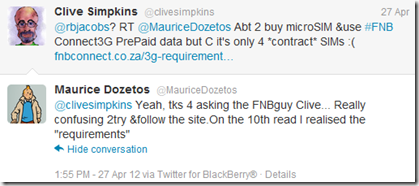
I had my eye on the much-advertised-to-me offer from FNB.  I was prompted to investigate further when I saw a tweet to FNB asking for clarity on the FNB deal (first 50 MB per month at 30c/MB, thereafter 59c/MB).  The pre-requisites for using this deal was listed as “A Vodacom Service Provider contract (excluding alternative service providers like AutoPage, Nashua Mobile, etc.) Or alternatively, any MTN cellphone contract”.
So, if I wanted to take up this offer, then I would need to take up a cheap contract that would attract monthly charges, and then the per MB rate would be low.

Here are the Twitter conversations:

image 

image

image 

image
@TopEditorInt warned against contracts – I tend to agree with that… so, I looked further…


I needed to answer the question: “What was the best per MB rate that I could get without taking out a contract, and where the data wouldn’t expire in a month or two?” 

{
Note: this posting has been updated and edited since it was first published… VirginMobile was my original choice (until I found out the their packages expired after 30, 90 or 120 days), the modified “winner” is CellC
}

So, the search was on… perhaps a small monthly fee for a contract from MTN or VSP (Vodacom Service Provider) with a small amount of data could be topped up with data from FNB?  So, I checked all the web sites and compared them.  Bear in mind, I really didn’t want a monthly fee since I hardly used my iPad away from WiFi for more than once or twice per month.

Vodacom data deals list had “MyMeg 10” deal on offer (90c per MB) – but those aren’t contracts so I wouldn’t be able to topup with the FNB deal :(  These were valid until the end of the following month.

MTN data deals list had “MTN-10MB” deal on offer (R1 per MB)– but those aren’t contracts so I wouldn’t be able to topup with the FNB deal :(

CellC data deals list had “25” deal on offer (80c per MB) – but those aren’t contracts so I wouldn’t be able to topup with the FNB deal :( 
These were valid for 30 days.

8ta data deals list had “100” deal on offer (40c per MB) – but those aren’t contracts so I wouldn’t be able to topup with the FNB deal :(
These were valid until the end of the following month.
VirginMobile data deals list had a flat rate of 60c per MB – but those aren’t contracts so I wouldn’t be able to topup with the FNB deal :(
These didn’t expire! Plus: you get R10 for every R30 used.
Plus: DOUBLE YOUR AIRTIME on your first recharge: That takes the rate down to 26c/MB

You get the recharge amount immediately.  The first 50% of FREE airtime will be loaded within 24 hours.  A calendar month later you will receive the next 50% of FREE airtime. e.g. If you recharged with R300, you receive your R300 + R150 (50% of the first recharge free) and a calendar month later, you’ll receive another R150 (balance of the 50%) free.

image

So, if you bought R300 for your first purchase, that would get you a rate of 26c per MB – that’s even better than the “special” FNB deal, and there’s no need for a contract and no monthly fees, and no expiring/lost data! 

After the first recharge, the per MB rate goes up to 45c – still not too shabby:
image

imageSo, the clear winner of this competition is: well…. not so sure any more… Waiting for VirginMobile’s response to my Tweet (see explanation below)
With this hurdle, I decided to look further into the other offerings more closely… and I found this winning deal from CellC: 3GB Valid for 365 days (SIM card only – no modem) for R399 once off!

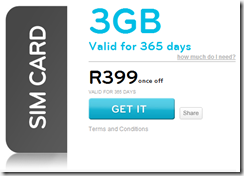
image image
The CellC offer works out to 13c per MB, R133 per GB, or R33 per month, and 250MB per month – perfect!  I don’t think I’d use that much but hey, what a winning deal!

Comparing this with the original “winning” VirginMobile offer even with the ‘Double your airtime on first recharge’ I would only get 1.5GB at 26c/MB for R400!  So, I will get double the bandwidth that won’t expire after 120 days.
image
Comparing that with the FNB offer of 30c/MB then 59c/MB – it just plainly blows that out of this universe!


Now, where can I go and get one of those CellC microSIMs from?:  http://www.cellc.co.za/cellc-stores

Oh, and yes, you can purchase CellC airtime from the FNB Internet Banking web site :)
BUT, the 3GB for R399 deal can ONLY be purchased at any CellC shop.


Call CellC on 084 140 (Available 24 hours a day, including public holidays)
Twitter: @CellC
Find your nearest CellC store here: http://www.cellc.co.za/cellc-stores  Remember to take your ID and some sort of proof of address eg: Edgars account, or municipal account.
I wonder how much their MicroSIMs cost? {From comments: R29 incl VAT)

Thanks to the original Tweeters for prompting me to do this investigation!

Please let me know if you have found a better solution to this by adding your comments to this post.


Update 30 Apr 2012: Just got a response from VirginMobile to an email – the MicroSIM cost 99c (not like Vodacom’s that cost R110) and can be obtained from any VirginMobile store.

Update 01May2012 08h00: So, I went into a VirginMobile store and wanted to confirm my findings.  I wanted to confirm with the salesman that the Virgin Mobile airtime didn’t expire… but, to my surprise he showed me a brochure with a table of how long the airtime lasted for before expiring – so, it seems that VirginMobile airtime does expire:
VirginMobileAirtimeWindowsMay2012
How frustrating – I had done all of this research on the web site (and awarded a “clear winner” to VirginMobile) only to find out of this obscure “expiry period”! 
BTW: I searched long and hard on their web site and couldn’t find any reference to the expiry period – hopefully @VirginMobileSA will reply to my tweet.
So, I decided to rename the title of this posing – I removed the “non-expiring” phrase, so as not to mislead you my readers… and now I need to decide whether to award my winning provider to one of the other networks?
If I decide to go with another network then they certainly will not be the winner of this “competition” – watch this space for my decision…

Update 01May2012 18h45: I have updated the post with further investigations and I have decided to go with the CellC offer – so, the clear winner of this competition is: the CellC 3GB for 365 days offer

Sunday, 6 September 2009

International calling from your South African PrePaid cell phone: if you’re with Vodacom, then you’re getting ripped off!

If you have a Vodacom PrePaid cell phone, then here are some tips to avoid the very high Vodacom call charges (R10 per minute).  One could use an MTN SIM card and save over R6.51 per minute!  Or dial a local CellC number and save over R6.40 per minute – here’s how:

A friend asked me how much it was to call Italy from his MTN Prepaid cell phone – here are the outcomes from my investigations:
Vodacom PrePaid cell phone to Italy from a PayAsYouGo phone is R10 per minute. http://www.vodacom.co.za/pkgcr.do?action=getpkgmenus&pkgTypeId=2&pageId=21

{If you had a contract: Vodacom Talk120: International Calls (Per minute):
Off Peak: 0.99 + Telkom Off-peak (landline = 0.83; mobile = 2.82) ===> Off peak to a landline: R1.82 per minute; Off peak to a mobile: R3.81 per minute.
Peak: 2.10 + Telkom Peak (landline = 0.99; mobile = 3.19) ===> Peak to a landline: R3.09 per minute; Peak to a mobile: R5.29 per minute.
http://www.telkom.co.za/products_services/internationalcallservice/cost.html
}

image  image image image image

For MTN PrePaid Classic: it costs (per minute) R3.49 to dial a mobile phone directly in Italy, and R2.90 to a landline in Italy (billed on a per second basis).
http://www.mtn.co.za/Travel/International%20Calling/Pages/default.aspx?index=2 

Wow, seems like MTN is MUCH cheaper than Vodacom…. But still, VoipBuster to Italy landline is free for 120 days!  See here for more details: http://handytechtips.blogspot.com/2009/08/voipbuster-over-skypeout-verdict-read.html

You could also dial this CellC number (084 198 0001) and speak to over 60 international countries for no extra cost: http://handytechtips.blogspot.com/2008/10/make-cellc-call-and-speak-to-over-60.html . This works for landlines only in Italy.
{Works for cell phones in these countries: USA (most networks); Canada; China; Singapore; Hong Kong.}

Costs of calls to CellC:
For Vodacom pre-paid Vodago to CellC: to Value-Added Services Off-Peak: R1.08; Peak: R3.60 http://www.vodacom.co.za/pkgcr.do?action=getpkgsgroups&pkgTypeId=2&pkgGroupId=8&packageId=17

For Vodacom contract Talk 240 to CellC: Value-Added Services Off-Peak: R0.98; Peak: R1.88 http://www.vodacom.co.za/pkgcr.do?action=getpkgsgroups&pkgTypeId=1&pkgGroupId=1&packageId=4

For MTN PayG Classic to CellC: Peak: R2.85; Off peak: R1.60 per minute.

See here for details of MTN’s peak and off peak calling times: http://www.mtn.co.za/Support/faq/NewSubscribers/Pages/MakingTakingcalls.aspx

So, HTT’s verdict:  since my friend was already with MTN (whew), his cheapest option to call a landline in Italy @off peak times is to dial the local CellC number which would cost R1.60 per minute. 
At peak times he should rather dial direct (ie: MTN call) @R2.90 per minute (the CellC number’s cost is R2.85 but the call setup time (while you’re keying in the international number on the CellC call) will use up time and nullify the 5c per minute savings).
If he needed to call a cell phone in Italy (the CellC number doesn’t cover cell phones in Italy yet) then he would need to dial directly @R3.49 per minute.

HTT’s verdict for other Vodacom PrePaid users: rather than paying the R10 per minute, get an MTN SIM card for your international calls.

But, for all of you that read this far… these costs can be slashed further if you use VOIP – even on your cell phone.  Install NimBuzz and configure a SIP connection using your VoipBuster account.  Then for the 1st 120 days you’ll pay nothing for landline calls to major international cities except for the data costs (R2 per MB on prepaid if you don’t have a data bundle). See here for more info:  VoipBuster over SkypeOut: the verdict? Read this for hands on tips on saving on your phone bill


Sunday, 9 August 2009

VoipBuster over SkypeOut: the verdict? Read this for hands on tips on saving on your phone bill

I’ve now proven to myself that SkypeOut has been beaten by price hands down! Further to the HTT calculator comparing rates of SkypeOut to FreeCall, the voice quality and reliability of the VoipBuster service has me so impressed that I’m searching for more hardware so that I can call using a cordless phone.

Oh, the 3 reasons why I eventually decided to go with VoipBuster over FreeCall: 1) VoipBuster offers 120 free call days (others offered 60 days); 2) I could purchase airtime using my credit card; 3) Airtime purchase could be done directly with VoipBuster so there were no middle-man charges.

VoipBusterLogo
Download (for your PC) and register for free to create your VoipBuster account [3.5MB]:  Download VoipBuster here.
You can even make some free trial calls (limited to 1 minute each) without even purchasing any credit.
Purchase credits here: Purchase VoipBuster credits

I have even set up my Symbian cell phone to call using the VoipBuster SIP settings.  I was surprised however that the Nokia 6110 Navigator allows you to enter the SIP settings but doesn’t come with the Internet Phone application to actually use the SIP connection!  WTF!

So, NimBuzz to the rescue – which allows you create a SIP connection and call your contacts using this SIP connection (that’s VOIP over your data 3G connection).  This way, you can make a long distance call using your mobile phone’s data package…. and with Vodacom’s free bandwidth offer until end Aug 2009, you could really call for free!

BTW: if you aren’t using NimBuzz, then you’d better rush over to their web site and see how this amazing free program allows you to see all your Instant Messaging services in one place.  As on Aug 2009 v2.0.3.1535:  these are the communities supported by NimBuzz: AIM, Facebook, Gadu Gadu, Giovani, GoogleTalk, Hyves, ICQ, Jabber, MySpace, Orkut, schulerVZ, Skype, studiVZ/meinVZ, Twitter, Windows Live Messenger MSN), Yahoo Messenger.

Nimbuzz Mobile lets you call, chat, message, and send files, for free.  It combines all your buddies from Skype, MSN, Yahoo, ICQ, AIM, Google Talk and more.  One login, one contact list, all accounts.  There are other Instant Message aggregators out there, but none (that I know of) that include Skype as well.
If that wasn’t enough… you can even download the PC version of NimBuzz that allows you to login on your PC (and save your cell phone’s battery and data bandwidth).
Oh, wait, there’s more: if you’re at an Internet Cafe, or a friend’s PC and you don’t want to download and install anything, then there’s a Web NimBuzz version – just use your browser to log on to NimBuzz.com from anywhere. It’s free.
For those of you that have web sites or blogs, then add the NimBuzz widget and stay in touch with your visitors.

NimBuzz default SIP settings offered (as on Aug 2009 v2.0.3.1535):  A1, MWeb, Vyke, SipGate, Gizmo5, Tpad, TerraSip, Global TeleLinks, Skytel Srbija, XeloQ, ApnaTelelink, Adepto Telecom, VoIP HIT, Voiceglobe, and ‘Other’ (that’s what I use for VoipBuster) by entering the following settings:
    SIP port: 5060
    Registrar: sip.voipbuster.com
    Proxy server: sip.voipbuster.com
    Outbound proxy server: leave empty
    Account name: your VoipBuster username
    Password: your VoipBuster password
    Display name/number: your VoipBuster username or voipnumber
    Stunserver (option): stun.voipbuster.com


Fring also does SIP calls and connects to FaceBook, Twitter, Skype, Google Talk, MSN messenger, ICQ, Yahoo, AIM, orkut, Yandex, WeFi, Last.fm.

Ooops, off at a tangent – sorry.  Let’s get back to VoipBuster… So, I’ve established that using VoipBuster allows calls at a much lower rate than SkypeOut and at very good quality.  For the first 120 days after purchasing credit (minimum of €10 Euro) calls to a lot of countries are free (you only pay for the data bandwidth used).
After the 120 free days period is over (or if you overuse the free service ie: more than 300 minutes per week of free calls, measured over the last 7 days and per unique IP address), then the VoipBuster normal rates apply.  The good news is that even these charged “normal rates” are much lower than Skypeout’s rates – so it’s a win-win situation!  For example: calls to USA on SkypeOut are 19.6c per minute, and on VoipBuster are 11.1c per minute (South African cents).
After the 120 free days, then purchase more credit for more free days or pay the normal rate.  Some people opt to buy more credit to get more free days to use on landline calls to free destinations and conserve their credit to use on cellular calls or calls to non-free destinations.


Here’s more details on some clever features from VoipBuster:
SIP setup for some popular SIP devices, VOIPin: get your own regular fixed telephone phone number - for only 1 Euro (not available in South Africa yet), certified VoipBuster devices (and I’m now searching for one of those cordless phones that can support Telkom and SIP), Phone-to-phone (callback service which enables you to make your VoipBuster call on your home or mobile phone), PC-to-PC free calls, VoipBuster mobile (download the app to your mobile phone), VoipSMS client for your Windows mobile phone, send cheap SMS (ZAR 33c per SMS to South Africa), Symbian contact import tool (to import your cell phone’s contacts into VoipBuster for easy dialling)

Come to think of it… the VoipBuster rate to call a South African cell phone is ZAR 88.7c per minute, compare this to the Telkom rate of R1.89 (peak) and R1.03 (off peak) per minute – it’s actually cheaper to use VoipBuster (even if you take the approx. 1MB per minute (ZAR 7c) ADSL data charges into account).

More detail on SIP calling using a wireless phone – the idea is to try and make calling over VoipBuster as convenient as using the DECT cordless Telkom phone.  I have successfully connected the cell phone’s bluetooth headset to my laptop and set up the VoipBuster program to use the bluetooth audio device.  But, the range is limited to about 5m… so, I decided to move my laptop with me, and use the laptop’s wireless LAN to provide mobility.  A more convenient solution would be to use a DECT phone and switch between Telkom and SIP connection – being able to browse through the VoipBuster list of contacts would also be a nice bonus!  So, I’m looking for one of the devices listed under ‘SIP Wireless phones” or “USB Bluetooth phones” or “USB wireless phones” here (or maybe even those ADSL routers or FRITZ!Box Fon).  Sure, there are devices costing over ZAR1,000 but I’m looking for a solution costing less than ZAR600.
Most South African households already have a DECT cordless phone, so, it would be nice to be able to use a similar phone to call your VoipBuster contacts.
Some suppliers are importing the Sedna SE-W3D VOiP/PSTN USB Wireless Handset, with LCD, built in soundcard, Keypad, speaker Phone, rechargeable, up to 50m range, no ext. power required for about R620.00… but, that’s a Skype phone – I need one that’s configurable to use SIP settings.


So, in other words, I agree with VoipBuster’s slogan:  “If you like Skype, you will love VoipBuster!

Saturday, 27 June 2009

Are you coming to the FIFA World Cup 2010?: How to get connected while you are in South Africa

The FIFA Confederations Cup is almost over (Good luck to USA and Brazil in the final game).
If you are one of the lucky football fans who will be coming to South Africa for the 2010 World Cup Soccer tournament, then you will need to get your mobile phone connected to the Internet while you are here.

HandyTechTipper (HTT) has travelled to foreign countries and it is most frustrating when arriving and not being able to connect to the Internet for Instant Messaging and VOIP services on my cell phone (like Fring, or NimBuzz or Skype, or GMail) and laptop (VOIP buster).
So, here are some considerations and steps to get your phone configured when you arrive in South Africa for the 2010 World Cup Soccer tournament.

Use a local cellular provider:
although South African cellular networks have roaming agreements with most other countries, it will be much cheaper to purchase a South African PrePaid SIM card and use that in your cell phone. {A SIM card is a thumbnail sized microchip that snaps into the back of your cellular phone and activates service on a specific local network.}

In South Africa there are 4 cellular networks (
Vodacom, MTN and CellC, Virgin Mobile) and all are able to provide voice and data connections (GPRS, Edge, 3G, 3.5G (HSPA)).

Most International Mobile phones work in South Africa (make sure that the phone is not SIM-locked and is GSM 900 compatible) - just insert a local South African SIM Card - they are available at all supermarkets for
less than R5.00 (although some web sites say that it's as much as $30).
Don't forget to purchase some airtime as well (R50 should be fine to get you started - the cost per MB is about R2.00)

The SIM card will give you: a local cell phone number in South Africa, and free incoming calls, and free Voicemail, access to send and receive SMS (text messaging), with no yearly contract, no monthly charges nor credit checks.


Mobile phones can be hired at airports or cellular shops at approximately R12/day, but
I would suggest bringing a spare phone with you: 1 for your foreign SIM card, and the other for the local SIM card (for connecting to the South African cellular network for local calls and Internet access).

If you have a laptop, then
remember to bring your phone's cables so that you can use it as a modem and connect your laptop to the mobile phone and so to the Internet. See here for more info.

Don't forget your phone's charger and headset either!


Why is it cheaper to use a South African SIM card instead of your foreign SIM card?

It's obviously more convenient to "roam" with your foreign GSM phone (and use the same foreign number), but there are plenty of problems with this approach:

Your GSM phone might not work in South Africa;

It will be expensive for you. You'll be paying anywhere from $1 to $6 per minute for every phone call you make or receive.

Although it will be convenient for friends and associates back home (and in South Africa) to call you – they simply dial the number they already have –
but this means you'll be paying for all these non-essential calls, also at the same $6 per minute rates.
Note: You will be paying for the calls that your friends make. They pay for the local leg of the call, and you pay for the long distance (expensive) leg of the call. However, when you call your South African friends, then you pay local call rates (same rate as if you were calling a mobile number in your home country.)

It will not be convenient for anyone in South Africa to call you. Even though you might be in the next hotel room, they will have to call your foreign number to speak to you – making it an expensive international call for them as well as you.


If you use the South African SIM card then SMS your new number to your friends at home and in South Africa (SMS for free) - then they can call you and they pay for the calls... and you pay local rates for Internet access and to call your South Africa friends.

Use your foreign cell phone and SIM card for emergencies only.


The SIM card (and monetary credit) stays active for 12 months, so if you're visiting South Africa again, you don't need to buy a new SIM for each visit.


Some people store their contact numbers on their SIM card - that mean that when the SIM card is removed, then all the numbers are "lost" - so remember to copy your numbers onto the phone - or sync them to your PC then print them out for easy reference while travelling.


So, you've purchased your SIM card and airtime - here's what to do next:

Setting up voice calls:

Turn your cell phone off and insert the SIM card.

Turn the cell phone on and enter the PIN if it asks for one (should be in the SIM card's packaging, usually 00000 {5 zeros}).

Load the prepaid airtime into the cell phone - explanation should be on the transaction slip.


Customer service for your Pay as you Go prepaid SIM card is available 24 hours a day by dialing (Vodacom: 111; MTN: 173; CellC: 140) at any time from your South Africa cellular phone. You can also dial (Vodacom: 082 111; MTN: 083 173; CellC: 084 140) from any phone other than your South Africa cell phone.


For emergencies while using your local South African GSM SIM card in South Africa: dial 112 from your cell phone.


*You will need to snap out the thumbnail sized South Africa SIM card along the perforated edge of its holder and then insert the SIM card into your cell phone with the gold contacts of the SIM card facing the metal contacts of your cellular phone.


^The PUK is only required to unblock your phone if you enter a PIN code incorrectly 3 times. Follow your cell phone manual instructions to correctly use the PUK to unblock your phone.


**When calling overseas from the United States to your South Africa cell phone, callers will need to dial 011 followed by country code 27 and your South Africa cell phone number, omitting the first 0 (zero). To call abroad from your South Africa cell phone simply dial 00 followed by the country code and phone number.


Setting up for data connectivity:

See this post for
setting up your phone to connect to South African Data connection
Note: for high data usage - you can purchase data bundles which will reduce the cost from R2 per MB.

Dial *111#, free from your Vodacom cellphone for self-help activities such as checking your balance, buying Data or SMS Bundles, downloading cellphone settings or transfer airtime.
See here for more info.
See here for Vodacom bundle rates:
Data bundle costs (Vodacom)

Good luck! and enjoy the soccer 2010!


1 more tip: Beware of Hotel Phones:

There are lots of horror stories about huge hotel phone bills. You can find yourself paying up to $10/minute just to call back to the US if you use the phone in your hotel room. Even calls across town can sometimes cost $1/minute. So, rather use your cell phone (loaded with the local SIM card) or use a public phone.

Thursday, 4 June 2009

Buy a Vodacom 5MB MyMeg data bundle for R9.25 and get 25MB for free.

Buy a Vodacom 5MB MyMeg data bundle for R9.25 and get 25MB for free. So, that's 30MB for R9.25 = 31c/MB
If you buy a bundle... then you already have the 25MB added to your account.

If you buy a bigger bundle then they add on 10% for free (whichever is the larger... so you get a minimum of 25MB for free)

See here for more info: http://ow.ly/b2nS

Valid from 01June2009 to 31Aug2009

Friday, 27 February 2009

Send SMSs anywhere in the world for FREE from your mobile phone! Site updated....


Mjoy is an unbelievable service and I use it daily!


Granted, MXit is (very) gr8, but for those that aren't 'hard-wired' (logged in) to MXit all day, SMS is more accessible (but, until Mjoy, more expensive).


I see the site has just been upgraded and I couldn't find the login button on the new site (I could only see a 'Join' button) on the http://www.mjoy.com/ page. :eek:


I managed to find a (temporary, I hope) workaround.... by entering my Country and Cell number, then clicking on the "Join" button,
then an SMS was sent to my cell phone.
I followed the link on my cell phone and the system complained that the cell number was already registered - I clicked 'No' to keep the exiting user,
and then I was taken to the 'Change password' screen.
I entered the old password (twice) and I was then taken to the Mjoy main menu (and I could send SMSs again).


BUT, I logged out again, and then the Login button was still missing.... do I need to go thru the "Join" process again??


{For the record: today there are 83,254 users from 141 countries - 125 new members joined today.}

See here for the orginal HTT MJoy post: Send SMSs anywhere in the world for FREE! (OK, you pay less than 1c for the GPRS costs)

Update: Mar2009: see comments below which include statement from Mjoy indicating that their service is primarily for mobile - so PC users cannot use their browser to login.

I have heard of colleagues using Firefox to login successfully though.... must be an Add on, because virgin installations of Firefox are blocked from logging into Mjoy.

Here's a dump of add ons from a PC with Firefox that does allow logging into Mjoy:

Application: Firefox 3.0.7 (2009021910)
Operating System: WINNT (x86-msvc)
- Better Gmail 2 0.7.3.2
- BugMeNot 2.1
- Context Search 0.4.3
- DownloadHelper 4.2
- Enrique B. and John S. 0.6.1
- Extended Statusbar 1.5.3
- Extension List Dumper 1.14.1
- Fast Dial 2.22b
- Free Download Manager plugin 1.3.4
- HandyTechTipper Toolbar 2.0.0.58
- IE Tab 1.5.20090207
- ImgLikeOpera 0.6.17
- Java Console 6.0.11
- Java Quick Starter 1.0
- keyconfig 20080929
- Linkification 1.3.5
- PageZoom 0.4.0
- PC Sync 2 Synchronisation Extension (Nokia) 1.0.0.685
- RetailMeNot 2.2
- Rewind/Fastforward Buttons 2.1.2008062002
- Secure Login 0.9.3
- Session Manager 0.6.4.4
- StumbleUpon 3.28
- Tab Mix Plus 0.3.7.3
- Tree Style Tab 0.7.2009031701
- User Agent Switcher 0.6.11
- View Cookies 1.7
- Web Developer 1.1.6
- wmlbrowser 0.7.18
- Xinha Here! 0.14

Items listed in bold are probably the enabler(s) - if you manage to isolate the add on, then please comment and assist others in using their PCs to send free SMSs.

{For the record: today (21Mar'09) there are 113,404 users from 145 countries - 952 new members joined today.}


Update: 06Apr2009: Seems like all good things come to an end... Mjoy have now restricted the SMS sending of messages to max 5 per day. I got this error message when sending an SMS:
"Sorry, you can currently only send 5 messages per day. To help increase the daily amount of messages, please click on advertisement when using this service."

They still need to modify their message on their registration page which still says;
"Send unlimited FREE Text Messages to any mobile phone in the world. Enter your phone number below and we will send you a message with a link to our service."

{For the record: today (21Mar'09) there are 127351 users from all parts of the world - 483 new members joined today.}

Sunday, 9 November 2008

Send SMSs anywhere in the world for FREE! (OK, you pay <1c for the GPRS costs)

Powered by advertising, now you can send a text message to any cell phone in the world for free.
Mobile web portal mjoy.com is offering a groundbreaking new service: from now on, any cellphone user can send messages to any phone in the world, unlimited, to all countries and completely free of charge.

I couldn't figure out the details of what was involved by reading their web site, so I decided to try it out, and sure enough I could send free SMSs to cell phones for free! The delivery was almost immediate as well - so, so far, I'm pretty impressed.
Oh, 1 more thing - the text messages have no character limit!
The process was simple. Here's what I had to do:
1) Once you've set up your cell phone for GPRS use (here are some instructions: http://handytechtips.blogspot.com/2008/03/in-this-day-and-age-im-amazed-by-low.html) open your cell phone's Internet browser and connect to http://www.mjoy.com
2) Click on "Join" and fill in your details: Country, cell number
3) Mjoy will then send an SMS to your cell phone with a URL that you need to follow to activate your account
4) Open the SMS, and click on the URL - your browser should open and you'll be taken to Step 3 of the registration process: Choose a nickname and password, then click on "Send me the link".
5) You should then get a "Registration successful" message, then click on the "Login" button, then "Home" button
6) Bookmark this page for future use
7) To send SMSs, click on the "Free Text" button, then on "New Message" and fill in the destination cell number and message, then click "Send"
The recipient will receive your text message along with an advert like "I am texting for FREE with http://mjoy.com"
(Seems like if you are registered on mjoy, then you don't actually receive the text message - you receive a message pointing you to your InBox on the mjoy.com web site: "New mjoy message - open the link http://mjoy.com/m/t/abcdef............")
For other ways to send free SMSs see here:
Did you know that you can send FREE SMSs to Vodacom cell phones?: http://handytechtips.blogspot.com/2008/03/did-you-know-that-you-can-send-free.html
Send 1 free SMS every 2 hours to any network in South Africa; and 5 SMSs every 4 hours to Zim - and it works!: http://handytechtips.blogspot.com/2008/04/send-1-free-sms-every-2-hours-to-any.html

Sunday, 23 March 2008

Setting up your PC to connect to the Internet using your cell phones (modem settings for Vodacom, CellC, and MTN)

I dived into the article stating that "I connect my laptop to my phone (using BlueTooth or the cable)" but I neglected to describe the pains that I went through in setting up my PC's DialUp networking to use the phone (Nokia modem) to connect to the Internet!
So, I have decided to share this information here:
{note: for simplicity, I have only described the use of a USB cable to connect the cell phone to the PC (running MS Windows). Using BlueTooth instead of a cable is also possible, but I have found the cable more reliable. See http://handytechtips.blogspot.com/2008/03/forget-about-bluetooth-use-blooming.html for more details.}
Installing the cell phone modem:
1) Install the software that usually comes with your cell phone. For Nokia, it's called "Nokia PC Suite" and can be downloaded from the www.nokia.com web site. Ensure that the Nokia USB modem is also installed.
2) Plug in the USB cable and Windows should recognise that a phone has been plugged into a USB port and will install new drivers.
3) In the control panel: Start->Settings->Control Panel->Phone and Modem Options->Modems and select the cell phone modem, then click "Properties" then "Advanced" and enter the following in the "Extra initialisation string": (see below for your network's initialisation string) 4) In the control panel: Start->Settings->Control Panel->Network connections->Create a new connection->Next->Connect to the Internet->Next->Setup my connection manually->Next->Connect using a dialup modem->Next->Select (and tick) the new modem (untick any others)->Next->enter a name eg. "Nokia N70" ->Next->Enter the phone number: *99***1# -> Enter the username and password (see below for your network's username/password) ->Tick "Add a shortcut to my desktop"->Finish
5) A new dialup connection will now be listed in the "Network connections" list. Right click this new item (Nokia N70) and select "Properties"->Options->Untick the following 2 items: Prompt for name and password; Prompt for phone number; -> then click "OK"
6) Double clicking on the "Nokia N70" shortcut on your desktop should start the dialup process over your phone.
Here are the network dependent settings:
Vodacom:
Extra initialisation string: +CGDCONT=,,"internet"
Username: leave blank
Password: leave blank
CellC:

Extra initialisation string: +CGDCONT=,,"internet"

Username: leave blank
Password: leave blank

MTN:


Extra initialisation string: +CGDCONT=,,"myMTN"

Username: mtnwap
Password: mtnwap
Note: I am aware that the Nokia PC suite's (version 6.85.14.1 download the latest from here: http://europe.nokia.com/A4144905) "Connect to the Internet" can also be used and the setup process allows you to select the network that you're on (Vodacom, MTN or CellC).

Did you know that you can send FREE SMSs to Vodacom cell phones?

If you have a Vodacom SIM card then you can register on www.vodacom4me.co.za and then you can send up to 20 free SMSs per day to other Vodacom subscribers?
If you don't have a Vodacom SIM card, then go and buy one (for R1.99 at some supermarkets), then purchase and load R12 airtime…..and then register on on www.vodacom4me.co.za

{I think MTN has a similar feature called MTN-ice - so buy your MTN SIM card now and let me know}

There's also a cool feature to schedule the sending of SMSs.... eg: for your friend's birthday or Christmas
You can set up a contacts list and then pick from that list when sending SMSs


Also, there's a service called "email-to-SMS" where you can send a (free) SMS to a Vodacom subscriber by sending an email.
If your friend's cell phone number is 0824567890 then write a short email as follows:
To: 0824567890@voda.co.za
Subject: Type your SMS in the subject line [limited to about 145 characters]

Note: this email-to-SMS service is limited to 3 SMSs per day (per email account)

For other countries' free email-to-SMS services go here: (thanks orkut): http://orkuttricks.blogspot.com/2008/01/send-free-sms-from-mail.html
[Currently lists: AUSTRALIA, AUSTRIA, CANADA, GERMANY, ICELAND, INDIA, ITALY, JAPAN, NETHERLANDS, SINGAPORE, SPAIN, SWEDEN, UNITED KINGDOM]

Here are some more tips on saving money re: cell phones:

Did you know that it is cheaper to call cell‑to‑cell than to call cell‑to-Telkom?

Did you know that it’s sometimes cheaper to dial someone’s voice mail directly than it is to send an SMS (contract dependent)

Did you know that it’s cheaper to dial someone’s voice mail directly (sly voicemail)than to let it divert to voice mail?

Did you know that you can dial someone’s voice mail directly by dialling:

Vodacom: 082131+rest of the number;

MTN: 0831483+rest of the number;

CellC: ????? ;

This is useful when:
*) you think of something and don't really want to call someone at that time (early in the morning or late at night)
*) you don't really feel like typing an SMS (costs are more-or-less the same for SMS and direct-voicemail)


Update on 14July2009:

From http://richelectron.blogspot.com/2009/01/free-vodacom-sms.html:

Vodacom4me allows Vodacom subscribers to send 20 free sms's every day from the Vodacom portal website. BUT, this feature is only available from desktop computers and cell phone users are redirected to a mobile version of the Vodacom4me site :(

This means that the site cannot be used to send free sms's from a mobile phone :(

Free082SMS bridges this divide though :) by providing users with an interface to the Vodacom4me website or email to sms from their mobiles to send free messages on the go! The site is built around a simple text based structure for optimal performance on most web enabled phones. Check it out... click here for more (and screen shot)


In this day and age I'm amazed by the low number of people that use their cell phones to connect to the Internet for email, www access, cheap IM etc

I'm amazed by the number of people that don't use their cell phones to connect to the Internet for email, www access, cheap Instant Messaging (eg. MXIT, Skype, NimBuzz), etc.
Here's a quick guide on how to set up your cell phone for data. Either follow it step by step, or call your network provider - they will send you an SMS that will automatically configure your cell phone for data use:
111 for Vodacom, else 808 for MTN: or 140 for CellC {these calls are free if dialled from your cell phone to your network provider}

Thanks to MXIT for this set-up information: http://www.mxit.co.za/web/downloads.htm
I've modified a few things from their site:
"
PHONE SUPPORT
Some phones are not GPRS/3G compatible. Don't stress, yours is most probably supported.

CONNECTIVITY
Setting up GPRS/3G
Get connected via your service provider's service menu; just follow the simple instructions below:
(It helps to know your mobile's manufacturer and model. Oh and remember, you only have 2 minutes to complete these steps, don't know why)
Vodacom:
1. On your mobile, dial *111#
2. Select option 5 (phone settings) from the menu that follows. (Answer -> 5 -> send)
3. Select option 1 to choose your mobile make and model from a list, or options 2 to have Vodacom identify the phone for you.
4. In both cases, simply follow the steps provided to get the WAP settings sent to your phone.
5. Connection settings will be sent to your phone; save these settings.
6. If any of the above mentioned steps fail, simply retry.
7. Still having trouble? Call Vodacom's call centre on 111 from your Vodacom cellphone or 082 111 from another phone. Alternatively visit a Vodacom outlet near you.
(GPRS/3G can only be activated by the person in whose name the contract was taken out, so some of you might have to get mom or dad's help on this one. Good luck!)

Cell C
1. On your mobile, dial *147#
2. Connection settings will be sent to your phone; save these settings. If a password is requested enter 0000
3. If any of the above mentioned steps fail, simply retry.
Still having trouble? Call Cell C's call centre on 140 or visit a Cell C outlet near you.
(GPRS/3G can only be activated by the person in whose name the contract was taken out, so some of you might have to get mom or dad's help on this one. Good luck!)

MTN
1. On your mobile, dial *123#
2. Select option 1 (phone setup) from the menu that follows. (Answer -> 1 -> send)
3. Select option 3 (WAP).
4. Connection settings will be sent to your phone; save these settings.
5. If any of the above mentioned steps fail, simply retry.
Still having trouble? Call MTN's call centre; dial 808 (contract) or 173 (pay as you go) from your mobile phone. Alternatively, visit an MTN outlet near you. (GPRS/3G can only be activated by the person in whose name the contract was taken out, so some of you might have to get mom or dad's help on this one. Good luck!)

Virgin Mobile
1. When you first insert your Virgin Mobile SIM into your mobile you'll receive an SMS asking you if you would like to accept Virgin Settings.
2. If you reply YES, your settings for MMS and WAP can be automatically downloaded and installed on your mobile.
Do the following to manually request MMS and WAP settings:
1. Go to the 'Virgin Mobile' menu which you will find on either the main menu or applications menu of your mobile.
2. Select 'Virgin Settings' and reply YES when asked if you'd like to download them.
Still having trouble? Call Virgin Mobile's call centre on 123 or visit a Virgin Mobile outlet near you. (GPRS/3G can only be activated by the person in whose name the contract was taken out, so some of you might have to get mom or dad's help on this one. Good luck!)
"


Now that your phone is set up, let's look at some examples of how to use data on your cell phone:
*) I use my cell phone to receive and send email - I use Gmail's cell phone app (http://www.google.com/mobile/mail/index.html) to fetch my home and work emails (create a Gmail account and then change the settings to fetch email from other email accounts).
*) I use my cell phone to connect to the Internet: I recommend Opera Mini (http://www.operamini.com/download/)
*) I use my cell phone to connect to the Internet from home: I connect my laptop to my phone (using BlueTooth or the cable (see here for more: http://handytechtips.blogspot.com/2008/03/forget-about-bluetooth-use-blooming.html). 150MB is sufficient for my email and graphics-less web browsing I have purchased a 150MB bundle (R119 incl VAT per month) and so my "per MB" cost is 79c (there's no monthly ISP fee and it's much faster (I connect over 3G) than dialup). I was paying R79 for TelkomInternet and then paid for duration of calls. I did investigate the Telkom Closer plans but it couldn’t beat the wireless MyMeg150 bundle at R119.
*) I use Instant messaging on my cell phone to keep in contact with my Skype® and GoogleTalk® (as well as MSN® Messenger, ICQ, Twitter, Yahoo!™ and AIM) contacts: this beats sending SMSs at 80c (or more) each… each instant message costs less than 1c (yes, that's one cent). I have installed Fring (www.fring.com) on my Nokia N70 and my wife uses NimBuzz (www.nimbuzz.com) (her Nokia 6230 doesn't support Fring). I also use MXIT (www.mxit.co.za)
*) I check the weather for various locations using my cell phone: install "Mobile Weather" from http://www.ubahnstation.net/weather/
*) I use Reporo (
http://www.reporo.com/rw/register.jsp) to check news headlines

Now that your phone is set up, let's look at the costs:
Setting up your cell phone for internet access is easy - and it costs from 39c per MB up to R2.00 per MB (out of bundle)
You pay for the data sent and received not for the time that you're connected!

Data connectivity is sometimes referred to by the type of connection e.g. GPRS, Edge, 3G or HSDPA. They are send and receive data but at varying speeds (GPRS is slowest, HSDPA is fastest). If there's no high speed connection available, then your phone will step back and use the next slowest connection.
Note: the faster the connection, the faster your pages update (no more frustrating wasted time waiting for the web page to update or the email to load), but the faster your Rands are spent!


Note: graphics use up your bandwidth fast! If you don't really need to see the images on the pages you visit then turn off loading images on your Web Browser (I recommend FireFox (with ImgLikeOpera addon)
See here for more info: http://handytechtips.blogspot.com/2008/03/moving-from-opera-to-firefox.html) or Opera on your PC and Opera Mini on your cell phone). If you need to see an image then right click on it and select the option to "Show image:. This will save you lots of Rands!


The costs:
First of all - remember that you pay for the data sent and received not for the time that you're connected!
1MB is read "1 MegaByte" and is 1 million bytes
1KB is read "1 KiloByte" and is 1 thousand bytes
To calculate the cost: for 200KB at your out-of-bundle rate of R2 per MB: divide the 200,000 data by 1,000,000 and then multiply by R2
I.e. (200,000/1,000,000)*2=R0.40

Typically, a session to retrieve say 10 emails (no attachments) is around 200 KiloBytes and will cost 40c (that's 4c per email)
{Vodacom costs: http://www.vodacom.co.za/services/mobile_data/vodacom_what_cost.jsp}
{MTN costs: http://www.mtn.co.za/?pid=248769, and note that there's a monthly subscription fee}
{CellC costs: http://www.cellc.co.za/content/services/smartdatagprs.asp and note that there's a monthly subscription fee}

Note too that for these bundles, there's a "use it or lose it" policy ie. If the bundled bandwidth is not used up each month then it's lost :(

Note: all costs quoted are for Vodacom unless otherwise stated
The quoted 39c per MB are for the Vodacom "MyMeg One GB" data bundle
All costs are for cell phones operating in South Africa - using your cell phone while roaming in other countries is much more expensive (eg. Vodacom: R17.50 per MB: http://www.vodacom.co.za/services/travel/data_option1.jsp) - rather purchase a local SIM card at your destination and set it up for data.


Note: While your cell phone has a data connection active then your cell phone uses more power - so your battery's power will drain faster.

Live Traffic Feed


Be notified of
page updates
it's private
powered by
ChangeDetection

Copyright © 2008 HandyTechTipper. All articles are released under the Creative Commons Attribution 2.5 South Africa license, unless where otherwise stated.