As you know FNB has pretty much killed earning eBucks on the Gold account – they have renamed it “Aspire” and dropped the tier levels from the rewards on the Aspire account. Which means the rewards/CashBacks/eBucks are limited and the 40% off discounts from their Shop.

- Up to R150 back in eBucks at Checkers, Shoprite or USave
- Up to R150 back in eBucks at Clicks
- Up to R150 back in eBucks at Engen
- Up to R150 back in eBucks at InterCape – I mean who goes on an InterCape trip every month?
…and, to get the maximum of R150 back in eBucks, per partner, you would have to spend R3,000 or more at a partner,
and have an active Credit Product or have an investment account with a minimum balance of R150,000.
An additional “boost” is available: R1,500 towards a pair of shoes. (Really?)
OK, so… moving on – it’s time to either ditch eBucks and go with DiscoveryBank OR move to Premier or Private Clients or Private Wealth – with or without the Spousal option (to earn extra 1,000 tier points, and to earn more eBucks on Spouse’s spend)?
See here for the eBucks page explaining how to qualify, and how to earn eBucks for each of those accounts: https://www.ebucks.com/web/eBucks/earn/fnb-premier-2021.jsp
Having read all of that, and estimated my highest possible monthly spend at FNB, I came up with this calculator taking the account fees into account and other personal criteria – like my Discovery Card miles, linked to my Discovery Life’s “Discovery Card Integrator” which says that if I spend at least Rxx per month then my Life premium is lowered (a bit).
The main decision criteria for me were:
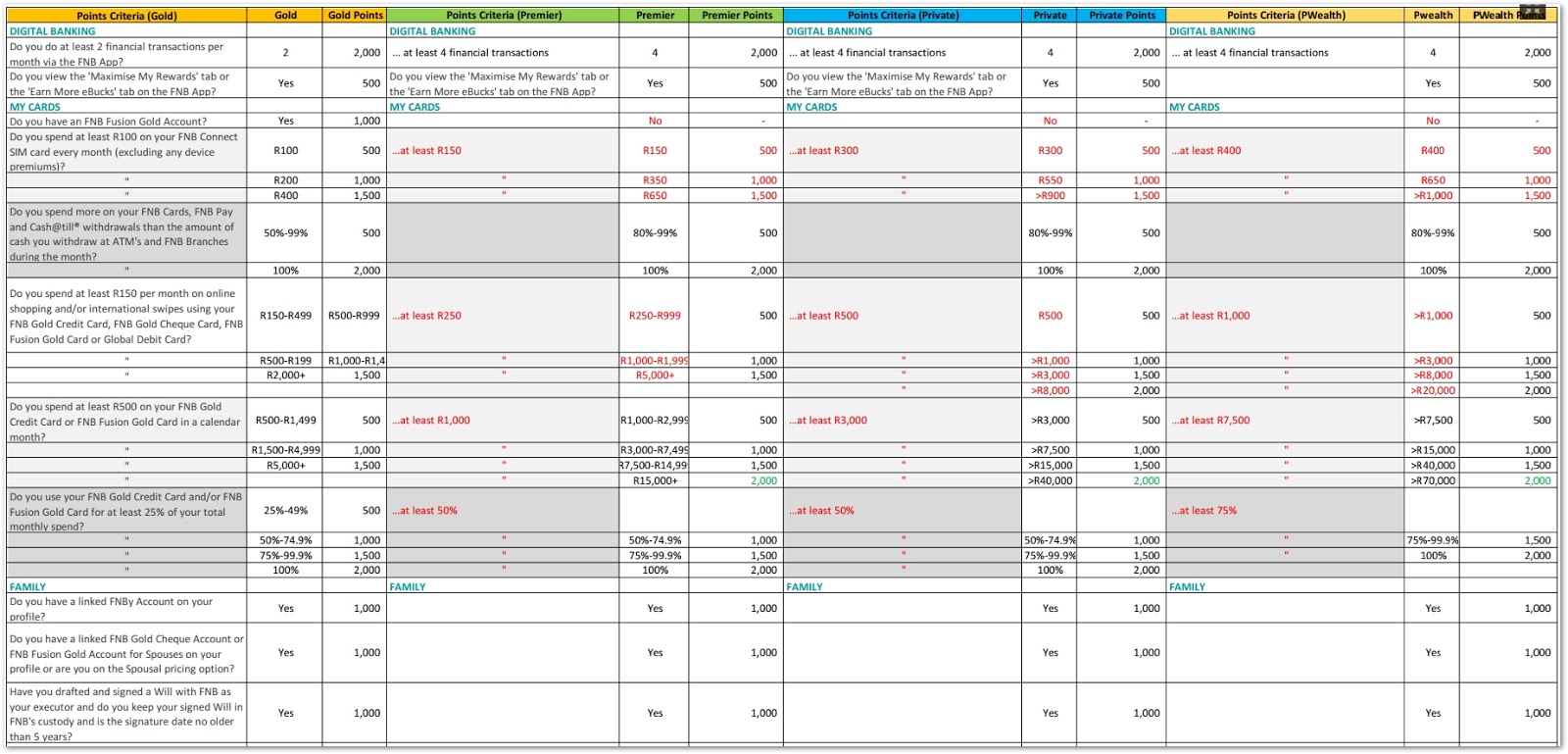
- How easy/difficult is it for me (and Spouse) to get to tier 5 every month
- How many eBucks could I reasonably expect to earn by making minor changes to my current spend habits
- Still use my Discovery Card to earn partner store Discovery Miles (I’m still on the “old” non-VitalityMoney plan): BP, Pick ‘n Pay, Nando’s, Dischem
- Via DiscoveryInsure: Still use my Discovery Card to earn 50% cashbacks on BP (up to earned DQ points)
- Still spend the minimum on my Discovery Card to satisfy my Discovery Life’s “Discovery Card Integrator” policy
- Still use my Woolworths card for 3% cashback at Woolworths plus additional 5% on various items
- All other non-cashback spend would then move from the above to FNB card to earn eBucks (Clicks, Checkers, Engen, SmartSpend)
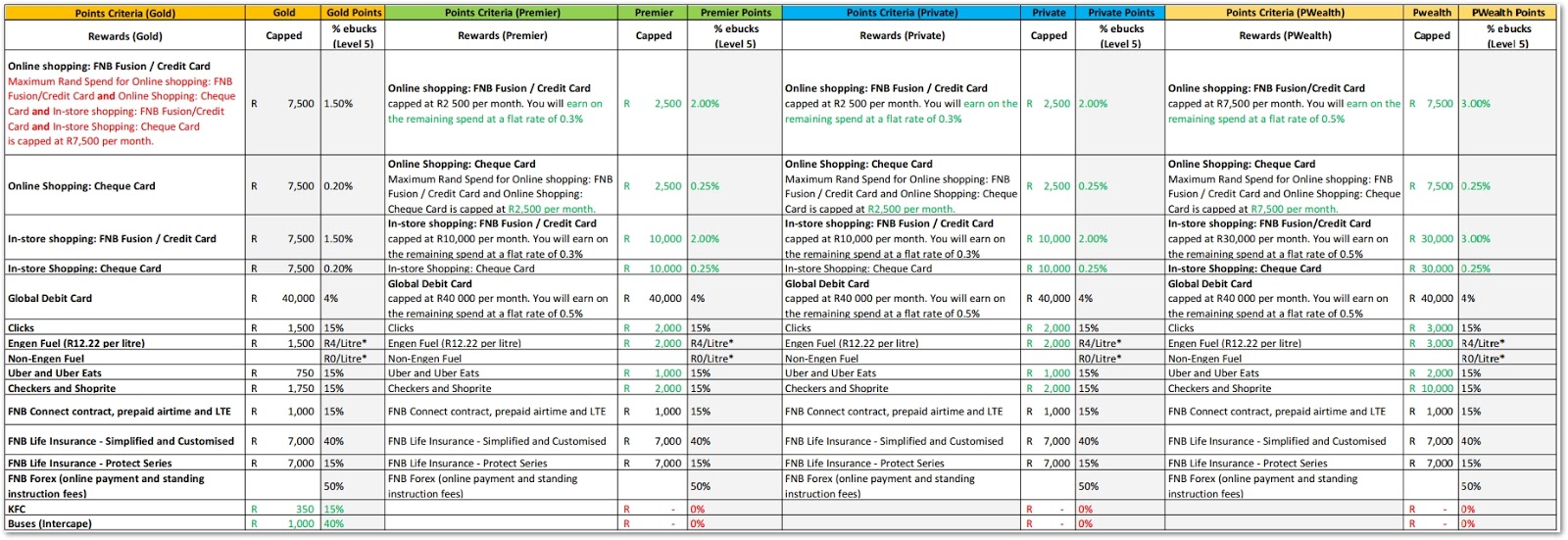
To assist me with the decision, I put together this calculator (which is open for feedback, as I’m sure there are many gaping holes and errors) which laid out the figures based on my current spending habits and other decision criteria.
The aim was to use my predicted FNB spend and compare that with the banking fees and predicted eBucks and SmartSpend rewards, and so help me decide which account to upgrade to – and decide whether it was best to go up to a higher account type (and have to deal with the more difficult tier earning criteria) OR to take the Spousal account option (and pay 50% of the monthly banking fees).
The calculator:
From the “ReadMe” worksheet:
- Worksheet "RewardsCalc_Premier_Jul2021"
- Use worksheet "RewardsCalc_Premier_Jul2021" to see how many tier points you and your spouse can earn
- Fill in your figures in the green cells
- Worksheet "PersonalSpend_SmartSpend_Plan"
- Use worksheet "PersonalSpend_SmartSpend_Plan" to see how your monthly spend can be split across your current cards
- Compare YOUR spend with the SmartSpend eBucks earn levels per FNB account type
- Fill in your figures in the green cells
- Worksheet "AccountCosts+Cashback"
- Use worksheet "AccountCosts+Cashback" to see how your monthly spend will earn eBucks based on the caps per account type,
and whether getting a Spousal account is worth the banking fees and effort to earn (and maintain monthly) tier miles - Fill in your figures in the green cells
- Cells marked in yellow are my choices based on decisions made using the above worksheets
- Use the SmartSpend plus Cashback at Checkers, Clicks, Engen to make your decision
ie: Add figures from worksheets: "PersonalSpend_SmartSpend_Plan" + "AccountCosts+Cashback"
Link to HTT's Calculator: 2021_06_13_eBucks_Calculator_Gold_Aspire_Premier_Private-Blog.xls (File->Download and enter your data into green cells - on your local, downloaded copy)
From the above, I decided it was best for me to:
- Upgrade ASAP from Gold to Premier (Bundled option: to get free credit card, plus set up an auto payment to earn 1,000 tier points per month)
- Open a Spousal Premier account
- Move all my non-Woolworths spend from my Woolworths credit card to my FNB Fusion Premier card
- Get Spouse a FNB Connect SIM before end June – to benefit from the monthly free 1GB data allocation
- Buy some streaming and online platform services: eg: GoogleOne for more space on my GMail accounts, NetFlix, Spotify, XBox;
- FNB Pay: Change to use Virtual cards to earn double tier points (main and spouse)
- Remember to do 6 financial transactions per month on FNB app(main and spouse)
- Set up SmartBudget on three categories, and check them every month (main and spouse)
- Spousal: Check credit status
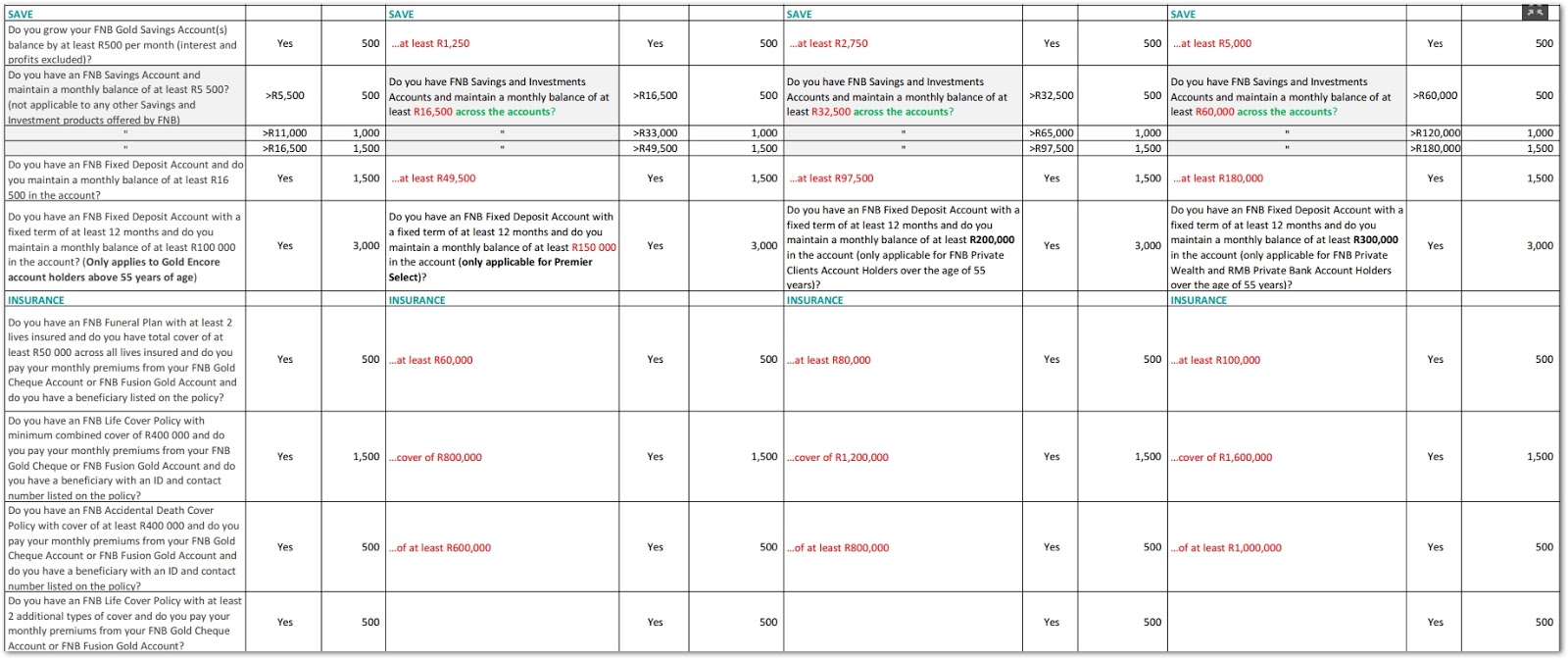
- Set up monthly transfer of R1,250 to Savings (main and spouse)
- Maintain savings balance >= R13,500
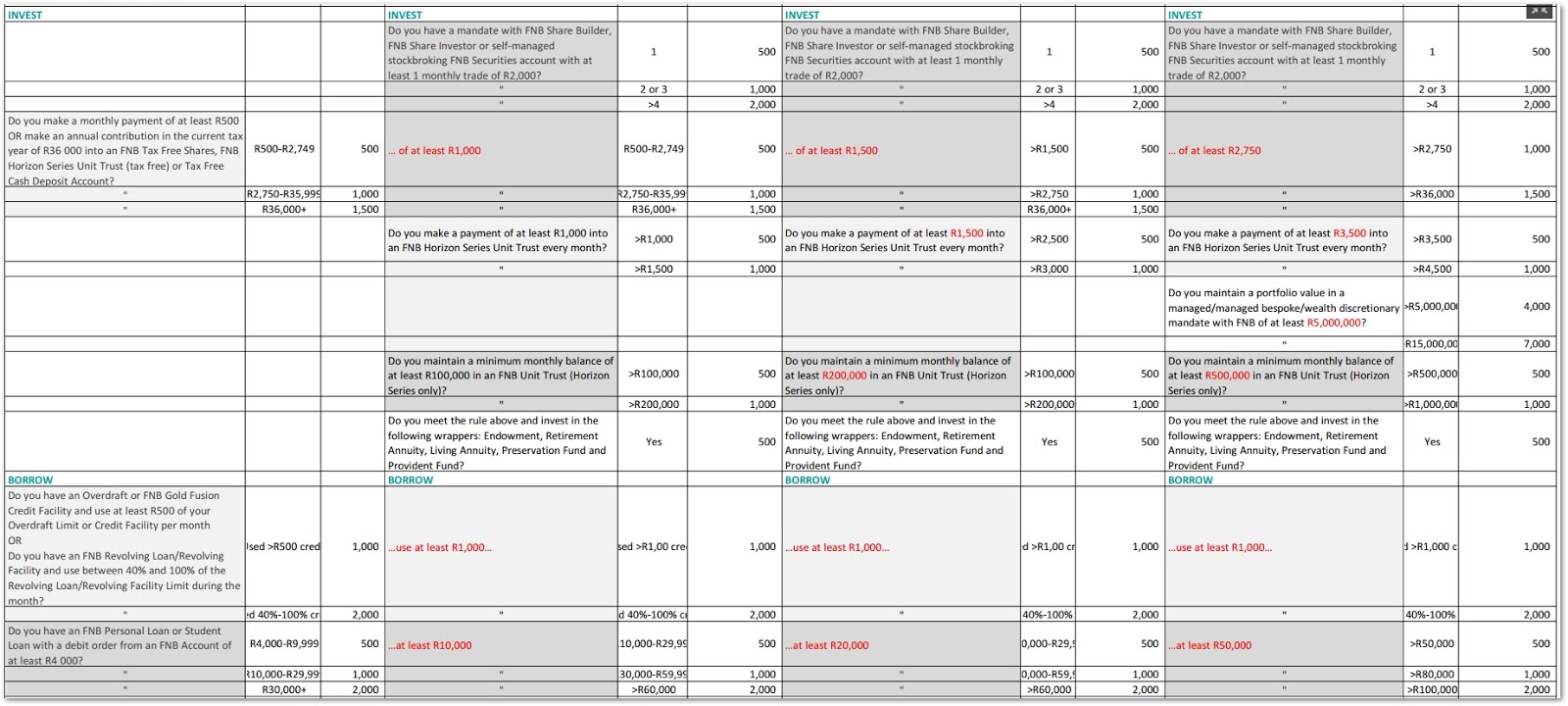
- Spouse: Monthly payment of >=R1,000 into FNB Tax Free Shares
- Spouse: move salary into new Premier account
Your comments and corrections are welcome in the comments below.
Some useful resources:
eBucks online calculator: https://www.ebucks.com/web/calculator/rewardsCalculatorAction.do
MyBroadband forum: Tips to boost your eBucks July 2021 to 30 June 2022
FNB pricing guides from 1 July 2021: FNB Pricing Guides




 Posts
Posts

