Some people are battling to check their data balance on their CellC data account from their iPad… I use to use the iPad’s menu:
Settings->MobileData->SimApps->ProductsServices menu option… but for some reason - I think iOS 6.0 came along – then that stopped working.

1) put the SIM into a phone (you will need to purchase a MicroSIM adapter) and call the balance check *101#
2) from another Internet connection: go to http://cellc.co.za/my-account and request your password via email, then go to:
MyAccount->Dashboard-> UsageInformation for a listing of usage and remaining data
3) put the SIM into a phone (you will need to purchase a MicroSIM adapter) and SMS the word "balance" to 14302
4) If you have iOS5: then use the iPad’s menu system: Settings->MobileData->SimApps->ProductsServices->BalanceEnquiry->Accept
Note: You can also read your SMSs (and voice mails) using the MyCellC->MyTools portal. Register here: https://www.cellc.co.za/mytools/login

Thanks to this forum for the information: http://mybroadband.co.za/vb/showthread.php/469242-Checking-data-balance-on-CellC-prepaid
Thursday, 15 November 2012
Checking your CellC data balance on your iPad with iOS6


Saturday, 22 September 2012
iPad solution for cheaper calls than Telkom [Solved]
I recently replied to a question on the MyBroadBand forums. Ettiene69 asked: “Is there any VOIP App or service provider which I can use on my iPad, which IS ACTUALLY CHEAPER than normal Telkom or Cell Phone Rates?”
I provided this 3 step solution:
Step 1: Install the MobileVoip app (available for iPhone, iPad, iPod, Symbian, BlackBerry, Android, Windows Phone): iStore link here: http://itunes.apple.com/app/mobilevoip/id362528311?mt=8 
Step 2: Register and purchase 10 Euros of any Voip provider - for South Africa I recommend Rynga: http://www.rynga.com/calling-rates.html#letter-S 
Rynga rate for South Africa (Landline) FREE (for 120 days, then R0.31c per minute) [Telkom rate is R0.57c per min]
Rynga rate for South Africa (Mobile) R0.558 per minute [Telkom rate is R1.35 per min]
Telkom rates from here: http://www.telkom.co.za/general/pricelist/automaticexchanges_worldcall.html
See Rynga’s rates list here: http://www.rynga.com/en/calling-rates.html
Step 3: Purchase data for your iPad - for low usage per month, I recommend CellC prepaid:
http://handytechtips.blogspot.com/2012/04/winner-of-no-contract-non-expiring-pre.html

Rynga rate for South Africa (Mobile) 56c+16c=72c per minute [Telkom rate is R1.35 per min]
So, with all 3 steps done you should be able to take your iPad anywhere in South Africa, start up the MobileVoip app and make calls cheaper than using Telkom and cell phone rates :) :)
At home or when within range of WiFi point, switch to WiFi and save even more.
Let me know if it works for you.
Thursday, 3 May 2012
The winner of the “no contract, pre-paid data deal” in South Africa is… CellC!
I had my eye on the much-advertised-to-me offer from FNB. I was prompted to investigate further when I saw a tweet to FNB asking for clarity on the FNB deal (first 50 MB per month at 30c/MB, thereafter 59c/MB). The pre-requisites for using this deal was listed as “A Vodacom Service Provider contract (excluding alternative service providers like AutoPage, Nashua Mobile, etc.) Or alternatively, any MTN cellphone contract”.
So, if I wanted to take up this offer, then I would need to take up a cheap contract that would attract monthly charges, and then the per MB rate would be low.
Here are the Twitter conversations:

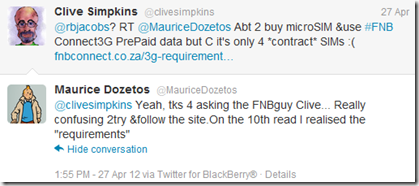


@TopEditorInt warned against contracts – I tend to agree with that… so, I looked further…
I needed to answer the question: “What was the best per MB rate that I could get without taking out a contract, and where the data wouldn’t expire in a month or two?”
{
Note: this posting has been updated and edited since it was first published… VirginMobile was my original choice (until I found out the their packages expired after 30, 90 or 120 days), the modified “winner” is CellC
}
So, the search was on… perhaps a small monthly fee for a contract from MTN or VSP (Vodacom Service Provider) with a small amount of data could be topped up with data from FNB? So, I checked all the web sites and compared them. Bear in mind, I really didn’t want a monthly fee since I hardly used my iPad away from WiFi for more than once or twice per month.
Vodacom data deals list had “MyMeg 10” deal on offer (90c per MB) – but those aren’t contracts so I wouldn’t be able to topup with the FNB deal :( These were valid until the end of the following month.
MTN data deals list had “MTN-10MB” deal on offer (R1 per MB)– but those aren’t contracts so I wouldn’t be able to topup with the FNB deal :(
CellC data deals list had “25” deal on offer (80c per MB) – but those aren’t contracts so I wouldn’t be able to topup with the FNB deal :(
These were valid for 30 days.
8ta data deals list had “100” deal on offer (40c per MB) – but those aren’t contracts so I wouldn’t be able to topup with the FNB deal :(
These were valid until the end of the following month.
VirginMobile data deals list had a flat rate of 60c per MB – but those aren’t contracts so I wouldn’t be able to topup with the FNB deal :(
Plus: DOUBLE YOUR AIRTIME on your first recharge: That takes the rate down to 26c/MB
You get the recharge amount immediately. The first 50% of FREE airtime will be loaded within 24 hours. A calendar month later you will receive the next 50% of FREE airtime. e.g. If you recharged with R300, you receive your R300 + R150 (50% of the first recharge free) and a calendar month later, you’ll receive another R150 (balance of the 50%) free.

So, if you bought R300 for your first purchase, that would get you a rate of 26c per MB – that’s even better than the “special” FNB deal, and there’s no need for a contract and no monthly fees,
After the first recharge, the per MB rate goes up to 45c – still not too shabby:

 So, the clear winner of this competition is: well…. not so sure any more… Waiting for VirginMobile’s response to my Tweet (see explanation below)
 With this hurdle, I decided to look further into the other offerings more closely… and I found this winning deal from CellC: 3GB Valid for 365 days (SIM card only – no modem) for R399 once off!

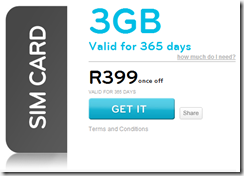
The CellC offer works out to 13c per MB, R133 per GB, or R33 per month, and 250MB per month – perfect! I don’t think I’d use that much but hey, what a winning deal!
Comparing this with the original “winning” VirginMobile offer even with the ‘Double your airtime on first recharge’ I would only get 1.5GB at 26c/MB for R400! So, I will get double the bandwidth that won’t expire after 120 days.

Comparing that with the FNB offer of 30c/MB then 59c/MB – it just plainly blows that out of this universe!
Now, where can I go and get one of those CellC microSIMs from?: http://www.cellc.co.za/cellc-stores
Oh, and yes, you can purchase CellC airtime from the FNB Internet Banking web site :)
BUT, the 3GB for R399 deal can ONLY be purchased at any CellC shop.
Call CellC on 084 140 (Available 24 hours a day, including public holidays)
Twitter: @CellC
Find your nearest CellC store here: http://www.cellc.co.za/cellc-stores Remember to take your ID and some sort of proof of address eg: Edgars account, or municipal account.
I wonder how much their MicroSIMs cost? {From comments: R29 incl VAT)
Thanks to the original Tweeters for prompting me to do this investigation!
Please let me know if you have found a better solution to this by adding your comments to this post.
Update 30 Apr 2012: Just got a response from VirginMobile to an email – the MicroSIM cost 99c (not like Vodacom’s that cost R110) and can be obtained from any VirginMobile store.
Update 01May2012 08h00: So, I went into a VirginMobile store and wanted to confirm my findings. I wanted to confirm with the salesman that the Virgin Mobile airtime didn’t expire… but, to my surprise he showed me a brochure with a table of how long the airtime lasted for before expiring – so, it seems that VirginMobile airtime does expire:

How frustrating – I had done all of this research on the web site (and awarded a “clear winner” to VirginMobile) only to find out of this obscure “expiry period”!
BTW: I searched long and hard on their web site and couldn’t find any reference to the expiry period – hopefully @VirginMobileSA will reply to my tweet.
So, I decided to rename the title of this posing – I removed the “non-expiring” phrase, so as not to mislead you my readers… and now I need to decide whether to award my winning provider to one of the other networks?
If I decide to go with another network then they certainly will not be the winner of this “competition” – watch this space for my decision…
Update 01May2012 18h45: I have updated the post with further investigations and I have decided to go with the CellC offer – so, the clear winner of this competition is: the CellC 3GB for 365 days offer
Wednesday, 23 September 2009
PrePaid airtime offers not to be missed: R400 gives you R1,176 airtime (VC), or R800 for R2,400 (MTN), or R800 for R2,760 (CellC)
Here’s an airtime offer that seems too good to be true! MTN and CellC have also thrown in some free SMSs! Pay these once off fees with no credit check and get lots of free airtime. This seems to be a fantastic offer! What’s the catch?? If you’re on a VodaGo prepaid account, on the old per minute billing, then I see this is a per second billed plan… so the per minute cost is probably more, and so you win on the “short” calls (i.e. those that terminate before the 30sec mark), but lose on the “long” calls (i.e. those that terminate close to the 59 sec mark).
I wonder if there are any other catches? Like, what happens after the 24 month period? Does it revert back to the VodaGo per minute billing? – Probably not, so this is a way of getting people onto a “contract” and on to per second billing?
What happens if this offer’s minutes (R49 in the Vodacom case) run out during the month, can you topup by buying airtime at your currently used outlets? {See here for an HTT article on where to buy your airtime: http://handytechtips.blogspot.com/2009/02/buying-airtime-can-be-done-in-numerous.html}

Here are more details:
| Vodacom TopUp49 for R400.00 once off giving:
|
| MTN TopUp100 for R800.00 once off giving:
|
| Cell C ControlChat 100 for R800.00 once off giving:
|
Download the application forms here: http://www.mobile2mobile.co.za/downloads {make sure that you have the latest Adobe Reader else you will get an error “There was an error opening this document. The file is damaged and could not be repaired.”}
Update on Wed23Sept2009: Feedback from mobile2mobile CEO Warwick Ward-Cox answering some of the questions that I posed above:
”
From: Warwick Ward-Cox
Sent: 23 September 2009 09:04
To: HandyTechTipper@gmail.com
Morning HTT,
You are correct it’s an awesome deal, I've personally taken out 3 now for the family. This has to be the cheapest way to get airtime, and with the networks now reducing call costs these deals will in the future be even more attractive if not already ;)
The catch, well you don't get a "free phone". At the end of the 24 months, you have the option to carry on and pay an additional amount and carry on with the contract, or you will be downgraded to prepaid at the end of the 24 months.
Oh yes, and we don't do any network activation, until your deposit reflects in the bank account and has been cleared, so depending on where you EFT from it can take about 3 days or so to be activated. If it’s a cheque deposit then minimum 8 days until the cheque has cleared.
Regards
Warwick Ward-Cox
Mobile 2 Mobile
http://www.mobile2mobile.co.za
”
Sunday, 6 September 2009
International calling from your South African PrePaid cell phone: if you’re with Vodacom, then you’re getting ripped off!
If you have a Vodacom PrePaid cell phone, then here are some tips to avoid the very high Vodacom call charges (R10 per minute). One could use an MTN SIM card and save over R6.51 per minute! Or dial a local CellC number and save over R6.40 per minute – here’s how:
A friend asked me how much it was to call Italy from his MTN Prepaid cell phone – here are the outcomes from my investigations:
Vodacom PrePaid cell phone to Italy from a PayAsYouGo phone is R10 per minute. http://www.vodacom.co.za/pkgcr.do?action=getpkgmenus&pkgTypeId=2&pageId=21
{If you had a contract: Vodacom Talk120: International Calls (Per minute):
Off Peak: 0.99 + Telkom Off-peak (landline = 0.83; mobile = 2.82) ===> Off peak to a landline: R1.82 per minute; Off peak to a mobile: R3.81 per minute.
Peak: 2.10 + Telkom Peak (landline = 0.99; mobile = 3.19) ===> Peak to a landline: R3.09 per minute; Peak to a mobile: R5.29 per minute.
http://www.telkom.co.za/products_services/internationalcallservice/cost.html
}


For MTN PrePaid Classic: it costs (per minute) R3.49 to dial a mobile phone directly in Italy, and R2.90 to a landline in Italy (billed on a per second basis).
http://www.mtn.co.za/Travel/International%20Calling/Pages/default.aspx?index=2
Wow, seems like MTN is MUCH cheaper than Vodacom…. But still, VoipBuster to Italy landline is free for 120 days! See here for more details: http://handytechtips.blogspot.com/2009/08/voipbuster-over-skypeout-verdict-read.html
You could also dial this CellC number (084 198 0001) and speak to over 60 international countries for no extra cost: http://handytechtips.blogspot.com/2008/10/make-cellc-call-and-speak-to-over-60.html . This works for landlines only in Italy.
{Works for cell phones in these countries: USA (most networks); Canada; China; Singapore; Hong Kong.}
Costs of calls to CellC:
For Vodacom pre-paid Vodago to CellC: to Value-Added Services Off-Peak: R1.08; Peak: R3.60 http://www.vodacom.co.za/pkgcr.do?action=getpkgsgroups&pkgTypeId=2&pkgGroupId=8&packageId=17
For Vodacom contract Talk 240 to CellC: Value-Added Services Off-Peak: R0.98; Peak: R1.88 http://www.vodacom.co.za/pkgcr.do?action=getpkgsgroups&pkgTypeId=1&pkgGroupId=1&packageId=4
For MTN PayG Classic to CellC: Peak: R2.85; Off peak: R1.60 per minute.
See here for details of MTN’s peak and off peak calling times: http://www.mtn.co.za/Support/faq/NewSubscribers/Pages/MakingTakingcalls.aspx
So, HTT’s verdict: since my friend was already with MTN (whew), his cheapest option to call a landline in Italy @off peak times is to dial the local CellC number which would cost R1.60 per minute.
At peak times he should rather dial direct (ie: MTN call) @R2.90 per minute (the CellC number’s cost is R2.85 but the call setup time (while you’re keying in the international number on the CellC call) will use up time and nullify the 5c per minute savings).
If he needed to call a cell phone in Italy (the CellC number doesn’t cover cell phones in Italy yet) then he would need to dial directly @R3.49 per minute.
HTT’s verdict for other Vodacom PrePaid users: rather than paying the R10 per minute, get an MTN SIM card for your international calls.
But, for all of you that read this far… these costs can be slashed further if you use VOIP – even on your cell phone. Install NimBuzz and configure a SIP connection using your VoipBuster account. Then for the 1st 120 days you’ll pay nothing for landline calls to major international cities except for the data costs (R2 per MB on prepaid if you don’t have a data bundle). See here for more info: VoipBuster over SkypeOut: the verdict? Read this for hands on tips on saving on your phone bill
Wednesday, 26 August 2009
If you use less than 150MB of cell phone data per month then you should be buying your data from G-Connect
Following on from the ADSL pricing article, here’s a comparison of Vodacom data costs vs G-Connect’s data costs, and it seems that for users that use less than 150MB of data per month, it’s cheaper to purchase from G-Connect.
Note: If you have a SIM card from the following then sorry, you’ll need to purchase another SIM card: Pay-as-you-go, Top-Up SIMS, Nashua Mobile, Autopage Cellular, MTN, Virgin Mobile and CellC.

G-Connect https://gconnect.wirelessg.co.za/pricing.aspx Only 62c/MB (compared to Vodacom’s R1.85/MB). That’s R12.40 for 20MB (compared to Vodacom’s R28.00 for 20MB).
I see that they also have a Happy Hour (every weekday from 17:00 - 20:00) for 55c per MB 
and
Super Happy Weekend (Saturday and Sunday from 00:00:00 to 23:59:59) for 59c per MB. 

So, buying 150MB of data from GConnect will save you R26.00.
Here are G-Connect’s FAQs: https://gconnect.wirelessg.co.za/stuck.aspx
Here’s some more info to help compare ADSL costs (from Hellkom.co.za): ADSL Accounts
Sunday, 26 October 2008
Make a CellC call and speak to over 60 international countries for no extra cost
Cell phones only in the following countries: USA (most networks); Canada; China; Singapore; Hong Kong
for Vodacom contract Talk 240: Value-Added Services (Off-Peak) R0.98 (Peak R1.88) http://www.vodacom.co.za/pkgcr.do?action=getpkgsgroups&pkgTypeId=1&pkgGroupId=1&packageId=4
Still interested?, then go to their web site: http://www.farcall.co.za/ for more information.
2) Wait for the voice-prompt to enter your international number.
3) Enter the international dialing code for the country you’re dialing. No need to enter “0” beforehand, just the country’s code.
One thing's for sure - if you are going to use your cell phone to make an international call, then use this service - it will definitely be cheaper than calling the international party directly!
eg: On Vodacom Talk 240 contract: International calls cost: (Per minute) Off-Peak: R0.95 + Telkom Off-Peak {Peak: R1.76 + Telkom Peak}
On prepaid Vodago: depending on global zone: ranges from R5.50 to R17.50 per minute!
See here for another calling service that allows you to Use your cell phone's free minutes to make international calls
Sunday, 23 March 2008
Setting up your PC to connect to the Internet using your cell phones (modem settings for Vodacom, CellC, and MTN)


 Posts
Posts

