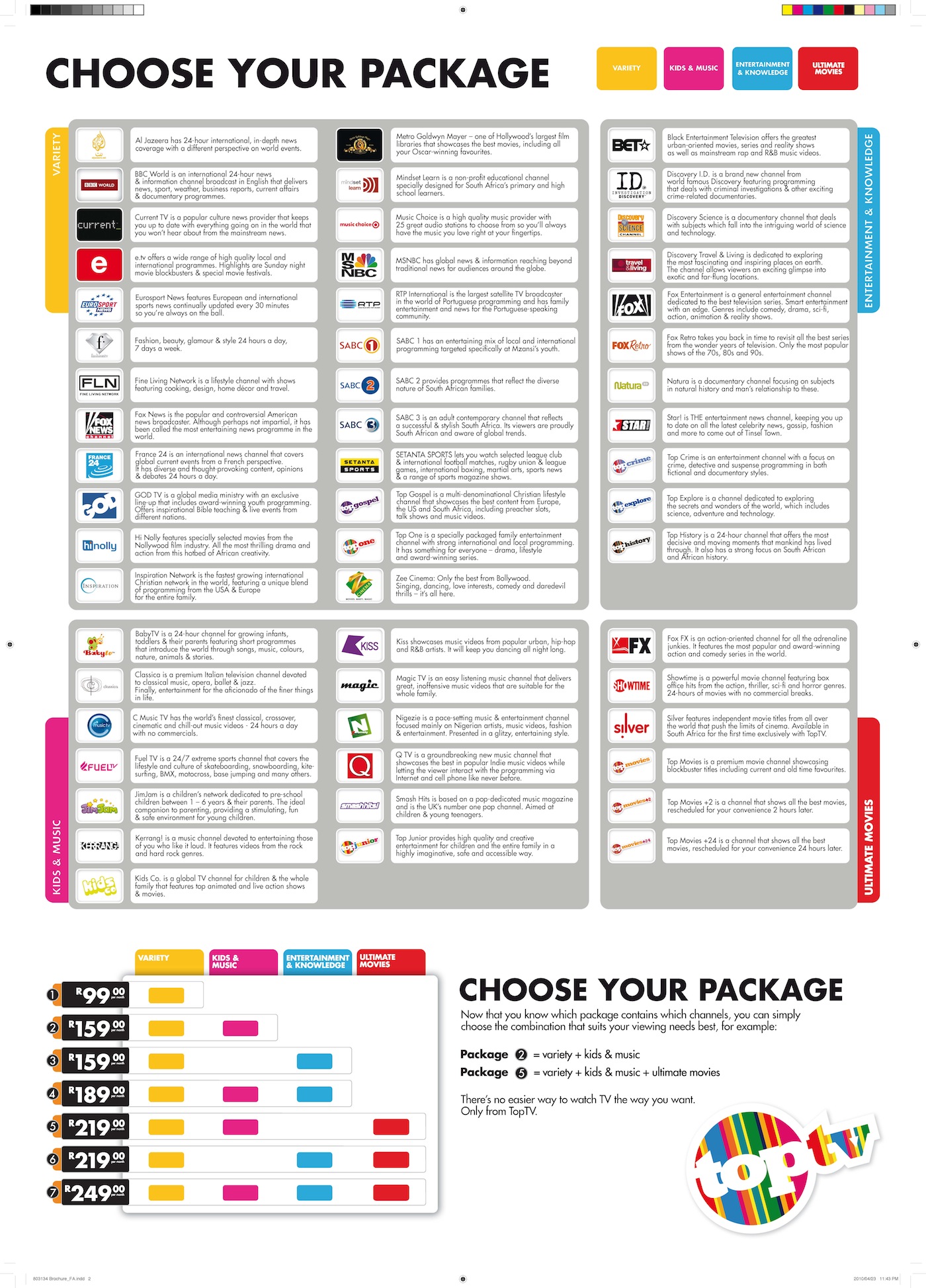
So, the message arrived on my TopTV decoder this evening telling of the channel changes and the new pricing. For December, we will get the new bouquet for the same pricing as for the “old” TopTV offering but from 1 Jan 2014 the pricing will change.
So, what will be added and removed from my package you might ask?
Well, a visit to the new TopTV web site redirects you to the new StarSat web site, so it’s a bit difficult to compare :(
So, I dug up my old calculator and started modifying it to see what’s new and what’s been removed.
To summarize (and what they don’t tell you on the new StarSat web site):
These are the channels that will not be on StarSat any more:
1KZN, Classica, Discovery Science, Fashion, Fuel TV, Magic TV, Natura, and Zee Cinema
These are the new channels to be added to the StartSat offering (a lot of Chinese stuff in these):
Animaux, Bollywood HD, CCTV9, CCTV News, Chinese 2, CNC, e Kasi, e Movies, eAfrica, Entertainment Stars, Extreme Sports Channel, Extremely Nigerian, Fox crime, Kung Fu 3, KZN TV, Nat Geo Gold, NBA TV, NBA TV HD, Novela E1, OH Africa, Science Channel, Smile of a Child, Star Africa 2, Star Bollywood, Star E1, Star Movies 1, Star Music, Star Novela E3, Times Now, Tshwane TV, Zing.
My main concerns and the reason why I’m probably going to say goodbye to TopTV/StarSat is that the 3 channels that we watch the most on our R169 pm bouquet (previously called Variety+Entertainment+Knowledge) are not available on the “Smart” offering for R149: Discovery Science and Natura (which – it seems - have both gone completely from StarSat) and ID Investigation Discovery (which is available on the “Super” bouquet for R199 pm).
I don’t want to be forced into spending the extra R30 per month for those 2 channels and I may as well see what the DSTV people are offering for R199.
Here’s the detail of my comparison of the old TopTV with the new StarSat bouquets: 


Luckily the old TopTV web site is still online on the www.ondigitalmedia.co.za site if you want to do your own comparisons.
The DSTV site for comparing what your R169 or R199 per month can buy you is here: http://selfservice.dstv.com/get-dstv/compare-packages
Showing posts with label TopTV. Show all posts
Showing posts with label TopTV. Show all posts
Monday, 18 November 2013
TopTV changes to StarSat – what’s gone and what’s new? (and for how much)


Tuesday, 24 May 2011
So, does it work? Building your own HDD recorder (PVR) for under R1,850 (US$280)
Here’s a follow up posting to my design of How to build your own 500GB HDD recorder (PVR) for under R1,850 (US$280).
Unfortunately, it's not as easy as I hoped it would be....
The smoothest part was the ordering of the parts from BidOrBuy and Kalahari. The parts arrived much faster than I expected. (BidOrBuy much faster than Kalahari by the way.)
The Mecer LT291HD Stand Alone TV Tuner did not work as advertised/expected and I am in the process of sending it back (seems like getting a refund from Kalahari is no problem #BrandPlus).
The web page (https://www.kalahari.net/profile/electronics/Mecer-LT291HD-TV-Tuner/4585/37643532.aspx) states: “TV input: (75 ohm impedance, F or PH type)” and “Video output: RCA x1” BUT the TV signal is *not* output on the video RCA cable at all :(
So, either the unit is faulty or does not operate as I interpreted. I will have to rely on the input from my TopTV decoder.
Additionally, it did not remove the CSS copy protection :(
For anyone that needs it, here is the Mecer’s instruction manual: Instruction Manual Mecer LT291HD External Tuner HD
Unfortunately, the Emprex ME1-V2 Media Player+Recorder also gave more than its fair share of problem – however, I don’t think I’ll be returning that box as I have 2 possible workarounds, and I kind of enjoy watching the media files on our bedroom TV.
The problems that I encountered were with pausing live TV. The system seemed to hand and had to reset it by removing power! :(
Googling a bit found that the 500GB HDD that I have (WD5000AAKB) was incompatible with the Emprex unit! – how is that for UNlucky! #FFS #Frustrating!
So, I might also try to get another (bigger 1TB HDD) at some time.
Another option is to get an external HDD enclosure (info from this article).
The picture quality on AV OUT was poor on my 29” TV, but displayed fine on my older 54cm TV in the bedroom.
I had to use the Component (Y, Pb, Pr) to get excellent quality picture on the 29” TV (I don’t have a HDTV to test the higher quality output on).
I upgraded the firmware and played with the scheduled recording function – the start date setting is a bit clunky, but once you get the hang of it it’s fine… remember to set the date to today’s date in the settings page before trying to play with the scheduled recordings feature.
I wanted to test how many tasks you could program in that scheduled list – but didn’t get to it – the HDD hung while I was testing the live-pause feature.
I haven’t yet tested the streaming content feature yet.
The remote control is a bit thin and looks brittle, but it works well and the range is good. I have programmed most functions into the learning remote but it doesn’t have enough buttons for all the features :(
So, to summarise:
The Mecer LT291HD Stand Alone TV Tuner did not work as I needed it to and will need to record from the channel that the TopTV decoder is set to.
Not having a tuner inside the recording device is a big disadvantage since you cannot schedule recordings independently from your “tuner-device” – that’s the coup-de-grace of this design…
The Emprex ME1-V2 Media Player+Recorder is a nice media player, and I think that I will sort out the HDD issues.
The number of cables and connections (power and video and audio) don’t make the “system” very portable
So, if I had R2,800 would I spend it on that Sony RDR-HX980B 250GB unit? It’s only 250GB, but it has a tuner, it’s standalone, it has a scheduled recording feature, its HDD doesn’t hang when doing live-pause… I think I would!


Unfortunately, it's not as easy as I hoped it would be....
The smoothest part was the ordering of the parts from BidOrBuy and Kalahari. The parts arrived much faster than I expected. (BidOrBuy much faster than Kalahari by the way.)
The Mecer LT291HD Stand Alone TV Tuner did not work as advertised/expected and I am in the process of sending it back (seems like getting a refund from Kalahari is no problem #BrandPlus).
The web page (https://www.kalahari.net/profile/electronics/Mecer-LT291HD-TV-Tuner/4585/37643532.aspx) states: “TV input: (75 ohm impedance, F or PH type)” and “Video output: RCA x1” BUT the TV signal is *not* output on the video RCA cable at all :(
So, either the unit is faulty or does not operate as I interpreted. I will have to rely on the input from my TopTV decoder.
Additionally, it did not remove the CSS copy protection :(
For anyone that needs it, here is the Mecer’s instruction manual: Instruction Manual Mecer LT291HD External Tuner HD
Unfortunately, the Emprex ME1-V2 Media Player+Recorder also gave more than its fair share of problem – however, I don’t think I’ll be returning that box as I have 2 possible workarounds, and I kind of enjoy watching the media files on our bedroom TV.
The problems that I encountered were with pausing live TV. The system seemed to hand and had to reset it by removing power! :(
Googling a bit found that the 500GB HDD that I have (WD5000AAKB) was incompatible with the Emprex unit! – how is that for UNlucky! #FFS #Frustrating!
So, I might also try to get another (bigger 1TB HDD) at some time.
Another option is to get an external HDD enclosure (info from this article).
The picture quality on AV OUT was poor on my 29” TV, but displayed fine on my older 54cm TV in the bedroom.
I had to use the Component (Y, Pb, Pr) to get excellent quality picture on the 29” TV (I don’t have a HDTV to test the higher quality output on).
I upgraded the firmware and played with the scheduled recording function – the start date setting is a bit clunky, but once you get the hang of it it’s fine… remember to set the date to today’s date in the settings page before trying to play with the scheduled recordings feature.
I wanted to test how many tasks you could program in that scheduled list – but didn’t get to it – the HDD hung while I was testing the live-pause feature.
I haven’t yet tested the streaming content feature yet.
The remote control is a bit thin and looks brittle, but it works well and the range is good. I have programmed most functions into the learning remote but it doesn’t have enough buttons for all the features :(
So, to summarise:
The Mecer LT291HD Stand Alone TV Tuner did not work as I needed it to and will need to record from the channel that the TopTV decoder is set to.
Not having a tuner inside the recording device is a big disadvantage since you cannot schedule recordings independently from your “tuner-device” – that’s the coup-de-grace of this design…
The Emprex ME1-V2 Media Player+Recorder is a nice media player, and I think that I will sort out the HDD issues.
The number of cables and connections (power and video and audio) don’t make the “system” very portable
So, if I had R2,800 would I spend it on that Sony RDR-HX980B 250GB unit? It’s only 250GB, but it has a tuner, it’s standalone, it has a scheduled recording feature, its HDD doesn’t hang when doing live-pause… I think I would!

Wednesday, 18 May 2011
How to build your own 500GB HDD recorder (PVR) for under R1,850 (US$280)
So, my 250GB Philips DVDR appliance died an untimely death (well, it was 5 years old) – it wasn’t the most user friendly unit, but we loved it. The ability to pause live TV and fast forward over the advertisements was awesome. We missed it when it horribly when it was in for repair. Unfortunately, it couldn’t be repaired, and it was time to look for a replacement… we went shopping and hoped to find even larger capacity DVDR devices for much less than what we originally paid for the Philips unit: bought in Apr 2006 for R3,200 incl. VAT.
We were unpleasantly surprised: The cheapest we could find was a 160GB LG unit for about R3,300!
Another option (through a friend-of-a-friend) was a Sony RDR-HX980B 250GB unit for about R2,800 incl VAT… but that’s also only 250GB.
Many people have asked… why not just buy a PVR from DSTV… well, we don’t want DSTV and their recurring monthly fees of over R500 – the recordings become inaccessible if the PVR isn’t connected to a dish and your account is paid up – and there’s no way to copy the recordings to DVD or USB memory or external HDD.
We want to be able to record SABC, eTV, CTV (Cape Town TV), TopTV, video camera to HDD.
So, decided to see what modern media players could offer. 1st problem – we needed a media recorder. Not that many recorders around….
But managed to find this one which had good reviews:
Emprex ME1-V2 Hi Def Media Player Recorder:

Comes with remote control; HDD Support: 3.5” IDE and SATA - FAT32 (Max Capacity 1TB with new firmware)
One Touch Record and Time-shift input video from AV-in port -> so no internal tuner; records from AV in
Has Schedule Record function (with new firmware)
Built in RJ-45 Ethernet connector you can stream content from networked devices such as your PC, notebook or home NAS.
Instruction manual is here: http://www.emprex.com/03_support_03.php?group=84
Review: http://www.goodgearguide.com.au/review/home_entertainment/emprex/me1/224284
Forum: http://emprex.codejs.com/
See here for full specifications and diagrams: http://www.emprex.com/02_products_02.php?id=253
From the reviews and forum, I could see 2 main “problems” with it with respect to what we needed:
1) No tuner inside it: solved with this nifty standalone box: http://www.kalahari.net/electronics/Mecer-LT291HD-TV-Tuner/4601/37643532.aspx for R380 (with added possibility that this box might remove CSS copy protection)
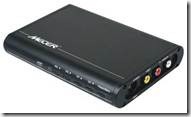
2) Dicey remote control: purchase a learning remote control from Cash Crusaders C-Tech for about R65: http://www.saiteg.com/products/en/91/2303/sort/1/filter/0_0_0_0/SRM-403E-Intelligent-Learning---Type-Remote-Control.html
3) Minor issue: Audio output: 3.5mm audio connector converter cable: http://www.dealextreme.com/p/3-5mm-audio-jack-male-to-rca-audio-converter-30cm-5143

So this is what my bill will look like:
Emprex ME1 (from BidOrBuy): R850 + R145 delivery: R995 (Note: this is available on Amazon.com for much cheaper (R250), but they do not ship to SA and price does not include SARS Duty).
HDD drive: 500GB: approx. R375
Remote control: R65
TV Tuner: R380
3-5mm audio jack to RCA audio converter cable: R20
Total: R1,835
So, there you have it: a replacement PVR/HDD recorder unit for under R1,850 – with the ability to upgrade to 1TB of storage and no proprietary recording format.
I can’t wait for all the bits and pieces to arrive to see how it all fits together!
Stay tuned for the results.
Do you have any comments or advice to me or others on the above design?
Update on 15May2011: I have written a follow up posting over here listing the results of my design:
http://handytechtips.blogspot.com/2011/05/so-does-it-work-building-your-own-hdd.html
We were unpleasantly surprised: The cheapest we could find was a 160GB LG unit for about R3,300!
Another option (through a friend-of-a-friend) was a Sony RDR-HX980B 250GB unit for about R2,800 incl VAT… but that’s also only 250GB.
Many people have asked… why not just buy a PVR from DSTV… well, we don’t want DSTV and their recurring monthly fees of over R500 – the recordings become inaccessible if the PVR isn’t connected to a dish and your account is paid up – and there’s no way to copy the recordings to DVD or USB memory or external HDD.
We want to be able to record SABC, eTV, CTV (Cape Town TV), TopTV, video camera to HDD.
So, decided to see what modern media players could offer. 1st problem – we needed a media recorder. Not that many recorders around….
But managed to find this one which had good reviews:
Emprex ME1-V2 Hi Def Media Player Recorder:

Comes with remote control; HDD Support: 3.5” IDE and SATA - FAT32 (Max Capacity 1TB with new firmware)
One Touch Record and Time-shift input video from AV-in port -> so no internal tuner; records from AV in
Has Schedule Record function (with new firmware)
Built in RJ-45 Ethernet connector you can stream content from networked devices such as your PC, notebook or home NAS.
Instruction manual is here: http://www.emprex.com/03_support_03.php?group=84
Review: http://www.goodgearguide.com.au/review/home_entertainment/emprex/me1/224284
Forum: http://emprex.codejs.com/
See here for full specifications and diagrams: http://www.emprex.com/02_products_02.php?id=253
From the reviews and forum, I could see 2 main “problems” with it with respect to what we needed:
1) No tuner inside it: solved with this nifty standalone box: http://www.kalahari.net/electronics/Mecer-LT291HD-TV-Tuner/4601/37643532.aspx for R380 (with added possibility that this box might remove CSS copy protection)
2) Dicey remote control: purchase a learning remote control from Cash Crusaders C-Tech for about R65: http://www.saiteg.com/products/en/91/2303/sort/1/filter/0_0_0_0/SRM-403E-Intelligent-Learning---Type-Remote-Control.html
3) Minor issue: Audio output: 3.5mm audio connector converter cable: http://www.dealextreme.com/p/3-5mm-audio-jack-male-to-rca-audio-converter-30cm-5143
So this is what my bill will look like:
Emprex ME1 (from BidOrBuy): R850 + R145 delivery: R995 (Note: this is available on Amazon.com for much cheaper (R250), but they do not ship to SA and price does not include SARS Duty).
HDD drive: 500GB: approx. R375
Remote control: R65
TV Tuner: R380
3-5mm audio jack to RCA audio converter cable: R20
Total: R1,835
So, there you have it: a replacement PVR/HDD recorder unit for under R1,850 – with the ability to upgrade to 1TB of storage and no proprietary recording format.
I can’t wait for all the bits and pieces to arrive to see how it all fits together!
Stay tuned for the results.
Do you have any comments or advice to me or others on the above design?
Update on 15May2011: I have written a follow up posting over here listing the results of my design:
http://handytechtips.blogspot.com/2011/05/so-does-it-work-building-your-own-hdd.html
Tuesday, 4 May 2010
Compare the TopTV and DSTV offerings (calculator)
Here’s a quick posting on the newly launched TopTV – the new satellite TV channel in South Africa. There’s a lot of activity on Twitter asking about the new channel, and how it compares with DSTV, so I’ve collated some info that I’ve found and also created a calculator so that it’s easier to compare what’s on offer by filtering what you are interested in and then seeing which company’s bouquet is for you.
Download the calculator from here [1MB]: Compare TopTV with DSTV Calculator
How to use this calculator:
Use the "DetailedCompare_TopTV_vs_DSTV" worksheet:
Use the filters at the top of the columns to filter by channel name OR by price OR by bouquet to see how much you need to spend to get the channels you want
For example: filter by "channel name" (column C): "Cartoon Network" shows that that channel is ONLY available in the DSTV Premium bouquet
For example: filter by "Min cost for this channel" = R99 (column J): shows all channels available for R99, THEN you can see if it's better to go for DSTV or TopTV's R99 offering
For example: filter by "bouquet name = DSTV Select 1" (column N): to see which channels are offered on the "DSTV Select 1 (R148)"
etc....
Interesting to filer using column J “Min Cost for this channel” set to R20 to see which channels you can get for R20 per month – not a bad deal
Download the calculator from here [1MB]: Compare TopTV with DSTV Calculator
How to use this calculator:
Use the "DetailedCompare_TopTV_vs_DSTV" worksheet:
Use the filters at the top of the columns to filter by channel name OR by price OR by bouquet to see how much you need to spend to get the channels you want
For example: filter by "channel name" (column C): "Cartoon Network" shows that that channel is ONLY available in the DSTV Premium bouquet
For example: filter by "Min cost for this channel" = R99 (column J): shows all channels available for R99, THEN you can see if it's better to go for DSTV or TopTV's R99 offering
For example: filter by "bouquet name = DSTV Select 1" (column N): to see which channels are offered on the "DSTV Select 1 (R148)"
etc....
Interesting to filer using column J “Min Cost for this channel” set to R20 to see which channels you can get for R20 per month – not a bad deal
Also interesting to see that Disney and Boomerang are only available on DSTV Premium – I hope your kids don’t have expensive taste!
Same for MNet, SuperSport 1,2,5,6,7, and RAI.
Interesting that RTP International (Portuguese) is in the R99 bouquet – previously you would have to fork out R529 for DSTV’s Premium bouquet – are all the Portuguese people going to move to TopTV?
Same for MNet, SuperSport 1,2,5,6,7, and RAI.
Interesting that RTP International (Portuguese) is in the R99 bouquet – previously you would have to fork out R529 for DSTV’s Premium bouquet – are all the Portuguese people going to move to TopTV?
I referenced the articles below while writing this article - go to these information sources for more detail (if needed):
TopTV bouquets: http://toptv.co.za/bouquet
Compare DSTV bouquets: http://www.dstv.com/dstvsa/content/en/sa/get_dstv
DSTV Premium (R529): http://www.dstv.com/dstvsa/content/en/sa/products?bId=1
DSTV Lite: http://www.dstv.com/dstvsa/content/en/sa/products?bId=24
http://mybroadband.co.za/news/broadcasting/12247-DStv-Lite-versus-TopTV-R99-package.html
TechCentral: TopTV launch: all the details: http://www.techcentral.co.za/toptv-launch-all-the-details/14115/
Diagram of TopTV's bouquets: http://www.techcentral.co.za/wp-content/uploads/2010/04/Channel-Descriptors2.jpg
Note: DSTV has Interactive channels (TopTV doesn’t). See here for more: http://www.dstv.com/dstvsa/content/en/sa/products?bId=1
TopTV decoder+dish+LNB+installation: R499

DSTV prices EXcludes dish, installation and LNB
High Definition (HD) PVR:
Decoder Price: R2999*
Access Fee: R60 (per month)
(TopTV does not have a PVR yet – due in Nov 2010)
Standard Definition (SD) PVR:
Access Fee: R60 (per month)
Standard Decoder:
Decoder Price: R499*
Please add your comment regarding the calculator… corrections included.
Update on Tue 04May2010: Heard on CapeTalk567 this am: beware of (DSTV and probably TopTV) installers that install the dish, decoder etc. and then charge thousands (up to R20,000) for PVR installations. Ask for a written quote before any work is started – even if the installation costs are included in the deal! Ask them to include any additions like: extra cable, connectors, amplifiers, fibreglass/steel dishes, etc, etc…
Update on Thu06May2010: Remember, another satellite TV channel is starting in South Africa on 1st June 2010: Super5Media (previously Telkom Media)
If this article is anything to go by, then it's not worth waiting for: "Super 5 Media will offer five local channels at launch in June, including a news channel and a music channel. Other details, including pricing plans, are not yet available." Additionally, it seems that ICASA still needs to grant them a license. #WTF! Although they say that they will "go live on 1 June whether it has a network licence or not."
Here's another article about TopTV: Problems at TopTV?
Here's an excellent step-by-step guide on how to get TopTV
Update on Sat08May2010:
Where to get TopTV?: At the moment these are the stockists: Pep, Game, Makro, Dion, selected Jumbo Cash & Carry stores, CCW, Brown's and Weirs, and House & Home, and Game and Pick ‘n Pay.
Dummies guide to TopTV: http://www.tvsa.co.za/default.asp?blogname=news&articleid=14182
The Lowdown: Sport On TopTV: http://www.tvsa.co.za/default.asp?blogname=news&ArticleID=14184
TopTV contact number 011 582 9802 extension 1001
TopTV call centre number: 08600 TOPTV (08600 86788). If all agents are busy, please leave a message Call centre is open between 08:00 to 18:00.
Updated on Thu20May2010:
Online TopTV guide: from TivoZA: instructions here: http://mybroadband.co.za/vb/showthread.php?233437-The-unofficial-TopTV-tv-guide Direct link here: http://www.nantage.com
Update on Sun23May2010:
Looking through the TopTV user manual, on page 58 there's a line in the specification: "Anti-taping protection" that's enabled. I've found some people complaining (on forums) that they can't record the TopTV programs on their VCR and DVD recorder. See this forum for updates - pls add your comments here or in the forum and let us know your recorder's make and model (if it can record and if it doesn't)
Update on Sat29May2010: Here are my experiences in getting connected to TopTV:
OK, so, I finally got my TopTV decoder and installation done. Decoder purchased on Sat15May; Took 20 minutes to get through to the call centre 08600 86788 to register; They were supposed to email me a list of installers - that list never arrived :(
I then went to the SatsRus.co.za web site (Develex) and requested an installation - but nobody called me :(
I then called SatsRus on 021 554-4641 and booked an installation for the next day :)
I was very pleasantly surprised when the 2-man installation team arrived and installed the dish and decoder on time :)
They also didn't try to up-sell me anything! No "take this better dish" or anything like that. Neat, fast installation! They even tried (unsuccessfully, but no fault of their own {sorry babes}) to explain how it all worked to my wife.
They gave me client number details etc... that night the decoder was receiving TopTV in all its clear glory :) - and I hadn't yet paid for the monthly subscription.
Today, I tried calling the call centre - the technical line took <5 mins to answer and I explained that the signal through my video VCR and DVDR HDD recorder machines were poor - they didn't tell me, but it's because of the anti-taping software. They recommended running the RF cable directly from the TopTV decoder directly to the other TV sets.
Another option that I found was to purchase this Grex gadget for $89+$10 shipping (arrives in 2 weeks at local post office).
If you have an old DSTV decoder then try that before bypassing your VCR and DVDR (see below for more anti-taping "solutions")
I called the call centre again to get payment details for TopTV: this time their sales option took less than 15 secs to answer :) I got an EasyPay number so that I could pay by credit card BUT it didn't work on the www.easypay.co.za web site :(
So, I called TopTV back (again answered in less than 15 secs) and I learnt that I can only go to Shoprite stores to pay - the Internet will work later.
I decided to pay using EFT for now, here is TopTV's banking details:
Bank: Std Bank
TopTV Acc Nr: 252 315 553
Type of account: Chq
Account holder: TopTV
Branch Code: 019205
Reference: use your TopTV account number eg: 0000 17xxx
The first month's payment must include the pro-rata amount - that's the partial month's payment for the days you were connected. So, if you were connected on the 20th of the month of May (which has 31 days) then the pro rata amount is: ('bouquet amount'*11)/31
Updated on Tue01Jun2010:
See post by MagicFlame here: http://mybroadband.co.za/vb/showthread.php?229251-Macrovision-blocking-recording-from-TopTV/page4 that describes how to bypass the MacroVision noise:
"I connected audio-out from TopTV decoder directly to HDD recorder's audio-in. Then connected the RFout from TopTV decoder to an old MNet decoder's RFin, and from there via its Video-out to HDD recorder's Video-in and it works. Proper recording to HDD in stereo! Time-shifting is also OK, so I'm a happy camper for no money spent."
Updated on Sat05Jun2010:
@TopTV_Wiz @toptvsa #TopTV is painful now - plz turn off the anti-taping, I want2 go out &record a program to my HDD recorder #FFS
Evidently, the trick to bypass the anti-taping didn't work for me :( I tried the MNet video-out "trick" - but it didn't work for me :(
Yeah, yeah, I can wait until Nov2010 for the USB port to be enabled BUT: I have a HDD recorder now (with no USB input). Why must I wait until Nov, and spend more $s to get another large HDD?
MeThinks my #TopTV (1 week) honeymoon is nearly over :(
Updated on Sun 4th July 2010:
Whoopee successfully paid my #TopTV bill using credit card on the www.easypay.co.za web site. Get your "EasyPay Number" from the TopTV call centre
Updated on Sat31July2010:
Added a quick reference sheet listing the channels on TopTV: print it out and keep it close to your remote control.
"ChannelNumbers" worksheet: use the filters to print a sheet so that you can quickly jump to the channel you want
Subscribe to:
Posts (Atom)


 Posts
Posts