Showing posts with label cellphone. Show all posts

Monday, 21 March 2011

What’s the cheapest cell phone to run WhatsApp on?

My young son wants a cell phone – he’s got R1,000 to spend.  So, what’s the cheapest phone that can run WhatsApp so that he doesn’t waste all his airtime on SMSs and calls that could be handled by a short instant message?  Here’s my story on how I bought his phone brand new Android phone for R849 incl. VAT and everything else.

I did a lot of hunting around for Nokia phones and even looked at the LG and Samsung offerings – but all the phones that I could find in the WhatsApp minimum requirements list cost over R1,200.

I then looked at the WhatsApp download page and realised that I was overlooking other types of phones that WhatsApp supports: iPhone, Android, and BlackBerry.  I ruled out iPhone and BlackBerry due to cost, but that left Android – I hadn’t looked at any Android phones except HTC devices – but perhaps there was an entry level Android phone below R1,000?
The WhatsApp download page specifies that it can run on any device with Android OS 2.1 or above.

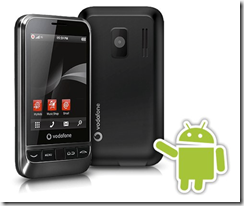
I Googled a bit and found references to the Vodafone 845 as being a great phone.  It was launched on South Africa in Aug 2010
It is a branded version of the Huawei “Joy” handset.
Here’s a great review on www.androidza.co.za and also shows “what’s in the box”: Battery, USB Cable, Wall Charger, Basic Manual, Headphones.
image
It is a 3G phone (HSDPA 3.6 Mbps), with GPS (with A-GPS support), accelerometer, touch screen, WiFi, BlueTooth, camera (3.15 MP), FM radio, on Android 2.1 (Éclair).  I was surprised on the quality of the phone – it felt good and solid. 

Wow… but how much could I pick this phone up for in Cape Town, South Africa? 
And is it for sale for under R1,000?
Well, to cut a long story short…. I was browsing for music in Musica the other day and happened to be browsing their cell phones pamphlet and saw the VF 845 for sale on prepaid for R849 all included – no catches.  I rubbed my eyes a couple of times and then asked the assistant for more info.  She confirmed that it was an Android phone but was out of stock but she would find one – she called her other branches and found a couple of options.  By this time my son was getting more and more excited!  We landed up going to the Parow Centre branch to buy their last phone - and were warned to take IDs and proof of residence for RICA purposes (we RICA’d our other SIM cards while we were there).  Not sure if it’s network locked (I think the SA networks stopped locking phones a while ago – but even if it is locked… for R849 it’s a great buy).

So, results are:
*
1 happy son, busy playing Angry Birds as we speak!  WhatsApp is running fine; Google Sky Map is mind blowing  - what an educational tool!
image
* Now my other, elder son also wants his own phone… so, let’s find another branch with the phone in stock. 
* I’m an UNhappy camper – my young son’s phone can do (much) more than mine (except for BBM!)

Click here for some help from Vodacom specific to this phone and OS 2.1

Comment from Coenie: “You can now get this phone at Clicks stores for as cheap as R798, R999 at Game and Edgars in South Africa, bear in mind the Vodacom store operator told me it is discontinued in South Africa, as I understand the VF 945 being released in the coming months here”
I did a compare of the VF 845 with the VF 945 and the main differences that I could see were: bigger screen size, up to 32GB memory card, 5MP camera with flash, second camera…. so, if you want to wait for its release… but I’m sure it will be over R1,000.

Here are the minimum requirements for WhatsApp (from here: http://www.whatsapp.com/nokia):
— Nokia S60 3rd edition, 5th edition or Symbian^3 Operating System
Supported device list:
Symbian^3: N8 · C6 · C7 · E7
S60 5th edition: Nokia 5800 XpressMusic · Nokia 5800 Navigation Edition · Nokia 5530 XpressMusic · Nokia 5230 · Nokia 5233 · Nokia N97 · Nokia N97 mini · Nokia X6 · Nokia C6 · Samsung i8910 Omnia HD · Sony Ericsson Satio · Sony Ericsson Vivaz · Sony Ericsson Vivaz Pro · Nokia N8
S60 3rd edition: LG KS10 · LG KT610 · LG KT615 · Nokia 5700 XpressMusic · Nokia 6110 Navigator · Nokia 6120 Classic · Nokia 6121 Classic · Nokia 6124 classic · Nokia 6290 · Nokia E51 · Nokia E63 · Nokia E66 · Nokia E71 · Nokia E90 Communicator · Nokia N76 · Nokia N81 · Nokia N81 8GB · Nokia N82 · Nokia N95 · Nokia N95 8GB · Samsung SGH-G810 · Samsung SGH-i400 · Samsung SGH-i408 · Samsung SGH-i450 · Samsung SGH-i458 · Samsung SGH-i520 · Samsung SGH-i550 · Samsung SGH-i550w · Samsung SGH-i560 · Samsung SGH-i568 · Nokia 5320 XpressMusic · Nokia 5630 XpressMusic · Nokia 5730 XpressMusic · Nokia 6210 Navigator · Nokia 6220 Classic · Nokia 6650 fold · Nokia 6710 Navigator · Nokia 6720 Classic · Nokia 6730 Classic · Nokia 6760 Slide · Nokia 6790 Surge · Nokia C5 · Nokia E52 · Nokia E55 · Nokia E71x · Nokia E72 · Nokia E75 · Nokia E5 · Nokia N78 · Nokia N79 · Nokia N85 · Nokia N86 8MP · Nokia N96 · Samsung GT-i8510 · Samsung GT-I7110 · Samsung SGH-L870
For those uber-geeks out there that want the latest Android OS on it:  There is already a custom ROM project: http://forum.xda-developers.com/showthread.php?t=741643
Download the original firmware here (just in case): 
{From: http://forum.vodafone.co.nz/topic/6538-vodafone-845-firmware-update/}
1. Go to www.huaweidevice.com  
2. Click on "Service Center"
3. On the Service Centre page, under "Download", click on "Software"
You should see a list of file to download.  Near the bottom is the firmware currently on the Vodafone 845.
http://www.huaweidevice.com/worldwide/downloadCenter.do?method=list&flay=software&directoryId=20&treeId=0#
"V845 V845 V100R001NZLC02B233SP01(New Zealand Vodafone) Host Software 2010-09-19"

See here for more info on WhatsApp: WhatsApp for Nokia Symbian phones is now available

Friday, 16 July 2010

WhatsApp for Nokia Symbian phones is now available

Yes, the always-on chat app “WhatsApp Messenger” has just been (beta) released for Nokia phones (14 July 2010).  You can use it to chat (as in type messages, like Skype or GTalk) to other friends that have also installed it on their phones.  The program has had a great uptake from iPhone and Blackberry phone users… and now Nokia users can do the same. 
So, as long as you have the program installed on your phone you will be able to chat to others – just create a contact using their cell phone number.  This means no more SMSs locally and internationally.  All this for free – well, almost – WhatsApp costs $1.99 per year – BUT, this beta version is free for 90 days. 

Nokia phone requirements: Nokia S60 3rd or 5th edition Smartphone (those are phones that run Symbian operating system; N73 or newer phones) – if you don’t know what Symbian is, then your phone probably isn’t compatible.
See here for a list of Nokia cell phones and their Symbian versions: http://3lib.ukonline.co.uk/s60history.htm

Download the .sis file to your PC from here [796KB]: WhatsApp for Nokia phones then use Nokia’s PC Suite to install it onto your phone… else navigate to this URL using your phone’s browser: http://www.whatsapp.com/nokia/WhatsApp_2_0_0.sis.  Here’s their download page for more info.

It takes a while when installing... since it checks all your contacts cell numbers and checks if your contacts are already using WhatsApp... then you can connect with them.

I must warn you though that it keeps the Internet connection on your phone open all the time... but it doesn't send/receive data all the time... only once every 3 or so minutes (unless you are busy in a chat “conversation”). 
The beauty about this is that people can send you messages even when the program isn’t open – they appear like an SMS since the open Internet connection checks for messages every 3 or so minutes.  I have tested it and my battery life isn’t adversely affected.

Once it’s installed, it will ask you for your cell number so that others can find you by using your cell number.  No need to login or anything, it knows who you are.

Remember, it doesn’t connect to the Blackberry BB messenger service – BB users will also need to install the WhatsApp program and subscribe to the service, then use it to chat to their iPhone and Nokia friends.

Will it work on my wife’s phone? Well, to see if it’s compatible do a Google search with the phone’s model number eg: “Nokia E66” +specification
Pick one of the results and then search for “Symbian” in the page – if there’s a line like this: “Symbian OS 9.2, Series 60 v3.1 UI” then it IS compatible.  You need to look for “Series 60” v3 or v5.

What does it cost to send messages: It’s cheap… charged at data rates.  In South Africa, the unbundled data rates is about R2.00 per MB.  That’s 200c per million characters, which is 1c per 500 characters!  So, it’s as close to free as can be! 
You gotta be dumb to continue using SMSs are say R1 per local SMS for only 180 characters! (and R2 for international SMSs)

Currently Nokia users can only send text - transfer of images is only available to iPhone and Blackberry users – iPhone can also transfer audio and location.

Remember to change your status (using the Options menu) to "Available" - it looks more tech savvy than "Hey there! I'm using WhatsApp!"

“Always-on” means that there is always a “service” running on the phone – even when you’ve exited the messaging interface.  This service periodically checks the WhatsApp server for any messages for you  -if it finds one when the messaging interface is exited, then it pops up a notification on your phone like an incoming SMS.  Open up the “SMS” and it will open the WhatsApp messaging interface – all ready to read and reply.

I’ve always wondered why MXit and NimBuzz never really took off compared to Blackberry messenger (and probably now WhatsApp) – I think it’s the ‘Always on’ feature…


BTW: to all my loyal readers that have read the whole article: when I installed the beta version it said that it was licensed until July 2011 – whooppeeee 1 year free license for using the beta version.  Let me know if you also got a year.

Update on 28July2010: WhatsApp has been updated: version 2.0.0 has been updated to 2.0.6. Download from here: http://www.whatsapp.com/nokia/

Update on 01Sept2010: WhatsApp for Android beta is now available - use your Android browser to download from here: http://www.whatsapp.com/android/
Minimum requirements: Android OS 2.2 or above, Unlimited internet data plan

Wednesday, 23 September 2009

PrePaid airtime offers not to be missed: R400 gives you R1,176 airtime (VC), or R800 for R2,400 (MTN), or R800 for R2,760 (CellC)

Here’s an airtime offer that seems too good to be true!  MTN and CellC have also thrown in some free SMSs! Pay these once off fees with no credit check and get lots of free airtime.  This seems to be a fantastic offer!  What’s the catch??  If you’re on a VodaGo prepaid account, on the old per minute billing, then I see this is a per second billed plan… so the per minute cost is probably more, and so you win on the “short” calls (i.e. those that terminate before the 30sec mark), but lose on the “long” calls (i.e. those that terminate close to the 59 sec mark).
I wonder if there are a
ny other catches?  Like, what happens after the 24 month period?  Does it revert back to the VodaGo per minute billing? – Probably not, so this is a way of getting people onto a “contract” and on to per second billing?
What happens if this offer’s minutes (R49 in the Vodacom case) run out during the month, can you topup by buying airtime at your currently used outlets?  {See here for an HTT article on where to buy your airtime: http://handytechtips.blogspot.com/2009/02/buying-airtime-can-be-done-in-numerous.html}

image

Here are more details:


 Vodacom TopUp49 for R400.00 once off giving: 
                R49 airtime per month for 24 months – a total of R1,176 Airtime 
                Total Saving of 66% 
                FREE SIM connection 
                FREE CLI activation 
                Calls billed per second


 MTN TopUp100 for R800.00 once off giving: 
                R100 airtime per month for 24 months – a total of R2,400 Airtime 
                25 SMSs per month for 24 months – a total of 600 SMSs 
                43.5 minutes talktime per month for 24 months a total of 1,044 minutes of talktime 
                A total saving versus prepaid of R2,854 or 83%


 Cell C ControlChat 100 for R800.00 once off giving: 
                R115 airtime per month for 24 months – a total of R2,760 Airtime 
                100 SMSs per month 
                FREE SIM connection 
                FREE CLI activation 
                Calls billed per second 
                Friends and family discounts to 7 numbers


Download the application forms here: http://www.mobile2mobile.co.za/downloads  {make sure that you have the latest Adobe Reader else you will get an error “There was an error opening this document. The file is damaged and could not be repaired.”}

Update on Wed23Sept2009:  Feedback from mobile2mobile CEO Warwick Ward-Cox answering some of the questions that I posed above:

From: Warwick Ward-Cox
Sent: 23 September 2009 09:04
To: HandyTechTipper@gmail.com

Morning HTT,

You are correct it’s an awesome deal,  I've personally taken out 3 now for the family.  This has to be the cheapest way to get airtime,  and with the networks now reducing call costs these deals will in the future be even more attractive if not already  ;)

The catch,  well you don't get a "free phone".  At the end of the 24 months, you have the option to carry on and pay an additional amount and carry on with the contract, or you will be downgraded to prepaid at the end of the 24 months.

Oh yes, and we don't do any network activation, until your deposit reflects in the bank account and has been cleared,  so depending on where you EFT from it can take about 3 days or so to be activated.  If it’s a cheque deposit then minimum 8 days until the cheque has cleared.  

Regards

Warwick Ward-Cox

Mobile 2 Mobile
http://www.mobile2mobile.co.za


Monday, 14 September 2009

Using your phone to receive and send emails is so easy – you need to start using it now!

A colleague recently had a problem with their ADSL line at home and was literally cut off from his emails and Skype.  He couldn’t get to his emails and had to clamour to get to an Internet cafe to access his emails using Web mail.  Then he “discovered” GMail (and Fring) on his phone and he was “cured”.  He could even receive and send emails from other email accounts eg: work address.  Also, GMail works off-line if the cellular signal is weak (like underground) – when you’re online again, then emails are sent in the background.

{If your phone isn’t set up to connect to the Internet, then read this article first: In this day and age I'm amazed by the low number of people that use their cell phones to connect to the Internet for email, www access, cheap IM etc}
image
Here are the steps to getting GMail to work for you:

1) Watch the GMail video here: http://www.google.com/mobile/products
2) Type this URL into your cell phone's browser: m.google.com/mail and download the program onto your phone
3) Create a GMail account for yourself: www.gmail.com using your PC’s browser (it’s just easier on your PC) and click on “Create an account” and follow the prompts.
4) Optional: Enable your other accounts on GMail: from GMail on your PC: click Settings->Accounts and Import, then enable receiving and sending from the other accounts (verification steps need to be followed)
5) Login to GMail on your phone (and if you’ve enabled your other accounts, then add them to your phone’s GMail program)
6) Start sending and receiving from your mobile phone!

Enjoy…


Sunday, 6 September 2009

International calling from your South African PrePaid cell phone: if you’re with Vodacom, then you’re getting ripped off!

If you have a Vodacom PrePaid cell phone, then here are some tips to avoid the very high Vodacom call charges (R10 per minute).  One could use an MTN SIM card and save over R6.51 per minute!  Or dial a local CellC number and save over R6.40 per minute – here’s how:

A friend asked me how much it was to call Italy from his MTN Prepaid cell phone – here are the outcomes from my investigations:
Vodacom PrePaid cell phone to Italy from a PayAsYouGo phone is R10 per minute. http://www.vodacom.co.za/pkgcr.do?action=getpkgmenus&pkgTypeId=2&pageId=21

{If you had a contract: Vodacom Talk120: International Calls (Per minute):
Off Peak: 0.99 + Telkom Off-peak (landline = 0.83; mobile = 2.82) ===> Off peak to a landline: R1.82 per minute; Off peak to a mobile: R3.81 per minute.
Peak: 2.10 + Telkom Peak (landline = 0.99; mobile = 3.19) ===> Peak to a landline: R3.09 per minute; Peak to a mobile: R5.29 per minute.
http://www.telkom.co.za/products_services/internationalcallservice/cost.html
}

image  image image image image

For MTN PrePaid Classic: it costs (per minute) R3.49 to dial a mobile phone directly in Italy, and R2.90 to a landline in Italy (billed on a per second basis).
http://www.mtn.co.za/Travel/International%20Calling/Pages/default.aspx?index=2 

Wow, seems like MTN is MUCH cheaper than Vodacom…. But still, VoipBuster to Italy landline is free for 120 days!  See here for more details: http://handytechtips.blogspot.com/2009/08/voipbuster-over-skypeout-verdict-read.html

You could also dial this CellC number (084 198 0001) and speak to over 60 international countries for no extra cost: http://handytechtips.blogspot.com/2008/10/make-cellc-call-and-speak-to-over-60.html . This works for landlines only in Italy.
{Works for cell phones in these countries: USA (most networks); Canada; China; Singapore; Hong Kong.}

Costs of calls to CellC:
For Vodacom pre-paid Vodago to CellC: to Value-Added Services Off-Peak: R1.08; Peak: R3.60 http://www.vodacom.co.za/pkgcr.do?action=getpkgsgroups&pkgTypeId=2&pkgGroupId=8&packageId=17

For Vodacom contract Talk 240 to CellC: Value-Added Services Off-Peak: R0.98; Peak: R1.88 http://www.vodacom.co.za/pkgcr.do?action=getpkgsgroups&pkgTypeId=1&pkgGroupId=1&packageId=4

For MTN PayG Classic to CellC: Peak: R2.85; Off peak: R1.60 per minute.

See here for details of MTN’s peak and off peak calling times: http://www.mtn.co.za/Support/faq/NewSubscribers/Pages/MakingTakingcalls.aspx

So, HTT’s verdict:  since my friend was already with MTN (whew), his cheapest option to call a landline in Italy @off peak times is to dial the local CellC number which would cost R1.60 per minute. 
At peak times he should rather dial direct (ie: MTN call) @R2.90 per minute (the CellC number’s cost is R2.85 but the call setup time (while you’re keying in the international number on the CellC call) will use up time and nullify the 5c per minute savings).
If he needed to call a cell phone in Italy (the CellC number doesn’t cover cell phones in Italy yet) then he would need to dial directly @R3.49 per minute.

HTT’s verdict for other Vodacom PrePaid users: rather than paying the R10 per minute, get an MTN SIM card for your international calls.

But, for all of you that read this far… these costs can be slashed further if you use VOIP – even on your cell phone.  Install NimBuzz and configure a SIP connection using your VoipBuster account.  Then for the 1st 120 days you’ll pay nothing for landline calls to major international cities except for the data costs (R2 per MB on prepaid if you don’t have a data bundle). See here for more info:  VoipBuster over SkypeOut: the verdict? Read this for hands on tips on saving on your phone bill


Wednesday, 26 August 2009

If you use less than 150MB of cell phone data per month then you should be buying your data from G-Connect

Following on from the ADSL pricing article, here’s a comparison of Vodacom data costs vs G-Connect’s data costs, and it seems that for users that use less than 150MB of data per month, it’s cheaper to purchase from G-Connect
Note: If you have a SIM card from the following then sorry, you’ll need to purchase another SIM card: Pay-as-you-go, Top-Up SIMS, Nashua Mobile, Autopage Cellular, MTN, Virgin Mobile and CellC.

image
G-Connect
https://gconnect.wirelessg.co.za/pricing.aspx Only 62c/MB (compared to Vodacom’s R1.85/MB). That’s R12.40 for 20MB (compared to Vodacom’s R28.00 for 20MB).

I see that they also have a Happy Hour (every weekday from 17:00 - 20:00) for 55c per MB image
and
Super Happy Weekend (Saturday and Sunday from 00:00:00 to 23:59:59) for 59c per MB.    image  

 image  
So, buying 150MB of data from GConnect will save you R26.00.

Here are G-Connect’s FAQs: https://gconnect.wirelessg.co.za/stuck.aspx

Here’s some more info to help compare ADSL costs (from Hellkom.co.za): ADSL Accounts


Friday, 1 May 2009

Calculator: What's the best cell phone or contract for me?

So, your contract is about to run out and now it's time to find the best phone and/or contract for yourself. So, how do you figure it out? Well, the bad news is that there's no simple way of comparing the different networks' offerings. The good news is that HTT has found 2 calculators to help you in this mission!
1) You know what you want in a phone and you want to find the phone that meets your requirements then click here:
Find the Contract that's right for you
OR
2) You know your call or SMS or data usage habits and want to find the best contract that meets your usage then click here:
Package comparison tool
OR
3) You have a few cell phones in mind and want to compare their features then click here: Find the phone that's right for you

Thanks to
NashuaMobile for providing these useful calculators.


Tips: What's MNP? Mobile Number Portability; here's a easy to understand guide to MNP: Number Portability

Vodacom subscribers: Who is my Service provider?
Go here for a lookup tool: vodacom4me » specific needs » service provider contact details

MTN subscribers: Who is my Service provider? Go here for a lookup tool: MTN SP lookup

Monday, 2 February 2009

Buying airtime can be done in numerous ways - HandyTechTipper weighs up convenience with discounts

I was looking for a online site that offered discounted airtime for my prepaid cell phone.
I previously used Discovery Vitality's Airtime that offered 10% discount (now discontinued and handed over to
GotPrepaid).
I now purchase from Pick 'n Pay stores or Clicks.

I was looking for an online alternative - and here are my findings...
image
Buying airtime for your pre-paid cell phone is easy - go to any shop and they'll gladly sell you the airtime 'virtual' voucher that you can enter into your phone.
Online purchasing of airtime is also easy - if you have a credit card

HandyTechTipper (HTT) did a search for airtime vendors

Discounted airtime is also a bonus for the end user i.e. buy R29 worth of airtime for R27.

HandyTechTipper's ideal place to purchase airtime would be one that offered all of the following:
i) online vendor; ii) accept credit cards; iii) offered discounted airtime; iv) automated airtime credits.

Click here to download: BuyingAirtimeCalculatorFeb2009.xls

Note: not all vendors have been verified - use at your own risk!

Using the spreadsheet:

In worksheet "AirTimeOutlets":
Use worksheet "AirTimeOutlets" to see a summarised view of what's out there
Look through the offers and use the "ShortList" column to filter the offer that you are interested in and so home in on the offer best suited to your needs

In worksheet "DiscountedAirtime":
Use worksheet "DiscountedAirtime" to see what %age discounts are given.
Look through the offers and use the "ShortList" column to filter the offer that you are interested in and so home in on the offer best suited to your needs.

It seems that the following services come up tops for me:


http://www.airtimeforfree.co.za/ due to the highest discount and 26th voucher free offer [buy 25 of R12 vouchers for R287.50 and get airtime to the value of R312.00 [= 7.85% discount]].
image
http://www.vtime.co.za/ due to the random discounts and specials offered eg: R1,100 for R1,000
image 
Pick 'n Pay and Clicks give small discounts (or ClubPoints), allow credit card purchases - but don't sell airtime online :(

Banks like FNB, ABSA are very convenient (no registration forms), online, 24x7, and transfer airtime immediately.

eBucks: gr8 to use up those bucks for airtime too.

Watch out for those "services" that require registration fee and transactional fees.

So, either go through the pains of registering and paying using EFT (and wait for your topup) to get your discounted airtime,
OR purchase online via your bank for immediate topups (but no discounted airtime).

Update on 7th April 2009:

I would love to be able to verify all the vendors listed but I do not have such funds (and time) at my disposal – for a proper verification of all services I would need to purchase at least 30 vouchers from each vendor and then calculate what the overall costs and savings were. This would (sort-of) then take into account the varying/random discounts and come up with a better comparison. But, even then, random prizes (eg: free cell phones, etc.) could not be taken into account…. I’d say that was an extra bonus that the end user shouldn’t bank on.

I have also noticed that http://www.vtime.co.za/Tips.asp have an ongoing offer of R1,100 airtime for R1,000.

Updated on 14July2009:
MTN users can now buy prepaid on credit (directly from MTN).
See here for more details: ITweb article

Update on 7th September2009:
Another service that accepts credit cards online is: BigTimeAirtime
There's also a small discount of R1 or R2 on amounts over R100 or so.
image


Sunday, 9 November 2008

Stop theft now! Register your cell phone for free and your laptop for R50 per year

Register your cell phone for free here: http://www.itcrimes.co.za/cellreg.htm
Register the rest of your household goods for free here: Tagga

Register your laptop for R50 per year: http://www.itcrimes.co.za
This web site collects all sorts of information from your laptop e.g. Mac address, HDD serial number, motherboard serial number, and more….

When stolen laptops are recovered, the hardware is scanned and matched with the database and returned to the rightful owners.
This initiative was founded with the aim of eliminating the theft of computer equipment throughout South Africa.

By partnering Government, South African Police Service, Insurance Companies, Second-hand Dealers and YOU the Taxpayer, ITCrimes have made it their mission to declare WAR on Computer/Laptop and Cellphone THEFT...

See here for more Tagga posts: http://handytechtips.blogspot.com/search?q=tagga

Sunday, 26 October 2008

Make a CellC call and speak to over 60 international countries for no extra cost

Is this too good to be true? Dial 084 198 0001 from any cell phone (in South Africa) or any everyday Telkom land line to call any of the 60 listed countries 24 hours a day, seven days a week, at the cost of a normal local CellC phone call.

No contracts, no sign-up, no subscription or memberships.

All you pay for is the local call to the CellC number.

Free minutes canNOT be used. V.A.S (Value Added Services) rates apply.
VAS rates means that VAS rates are charged and excludes discounts of any kind such as free minutes etc.
The cost of calls to VAS numbers depend on your calling package.

Cell phones only in the following countries: USA (most networks); Canada; China; Singapore; Hong Kong

Browse your network provider's web site to see what the VAS call rate would be.
eg:
for Vodacom pre-paid Vodago: to Value-Added Services (Off-Peak) R1.08 (Peak) R3.60) http://www.vodacom.co.za/pkgcr.do?action=getpkgsgroups&pkgTypeId=2&pkgGroupId=8&packageId=17
for Vodacom contract Talk 240: Value-Added Services (Off-Peak) R0.98 (Peak R1.88) http://www.vodacom.co.za/pkgcr.do?action=getpkgsgroups&pkgTypeId=1&pkgGroupId=1&packageId=4

Still interested?, then go to their web site: http://www.farcall.co.za/ for more information.
To use the service:
1) Dial 084 198 0001
2) Wait for the voice-prompt to enter your international number.
3) Enter the international dialing code for the country you’re dialing. No need to enter “0” beforehand, just the country’s code.
4) Dial the phone number.
For more info or clarifications: why not drop them an email: info@farcall.co.za

Ok, now for HandyTechTipper's analysis of the offering:
As stated on their web site they are using Voice Over IP (VOIP) technology.... this means that when you make the call, you will be routed from the South African CellC network using VOIP to the party you are calling in the other country.
Essentially, this means that your voice will be take the following path:
1) your cell phone to your cellular provider,
2) to CellC to an automated voice response system that will answer the call and routed to the Internet and then to a telephone in the country that you have "dialled".
So, things to watch out for: 1) since it's voice over IP watch out for voice quality; 2) watch your cell phone account!
How do they do it? Well, 1 way of doing this would be to have the automated answering service route calls using SkypeOut ie: VOIP calls over the Internet that call "real" phones for a cheap rate. See here for SkypeOut rates: http://www.skype.com/intl/en/prices/callrates/?currency=ZAR
See here for more Skype related articles:
Where do they make their money? They get a revenue share from the VAS calls ie: CellC gives FarCall a percentage from each call's cost... which needs to be more than the cost of making the call over the VOIP service (and their infrastructure and Internet costs: bandwidth and ADSL lines).
So, is their statement correct: "...forget the inconvenience of international calling cards, and ditch the local monopoly!"?
Well, I suppose, if you're on a contract that has low VAS rates then this will probably be cheaper that calling from your Telkom line but not cheaper than using SkypeOut.
But, if you're on prepaid, then I don't think many countries will be cheaper than Telkom rates and definitely fewer (if any) will be cheaper than using the calling card option - none will be cheaper than using the SkypeOut method.
See here for Telkom rates: http://www.telkom.co.za/common/pricelist/prices/international/internationaldestinations/countries.html

One thing's for sure - if you are going to use your cell phone to make an international call, then use this service - it will definitely be cheaper than calling the international party directly!
eg:
On Vodacom Talk 240 contract: International calls cost: (Per minute) Off-Peak: R0.95 + Telkom Off-Peak {Peak: R1.76 + Telkom Peak}
On prepaid Vodago:
depending on global zone: ranges from R5.50 to R17.50 per minute!

See here for another calling service that allows you to Use your cell phone's free minutes to make international calls

Tuesday, 26 August 2008

Nokia 6110 Navigator: free Road Safety Data (eg: camera locations) for South Africa and the world

OK, you've now purchased that new cell phone with the built-in GPS and now you want to make it tell you when to slow down for those "road hazards".

Here's some information that I've reaped from all over the Internet and put it in one place.
I have tested the download and install process - but I'm yet to try it out on the road!
Your feedback will be appreciated.... good experiences and bad :)

POI = Points Of Interest (like camera speed trap info!!)

High level steps are as follows:
0) Register for the data files [once off step]

1) Get the latest data (download from web site) [short and long steps]

2) Convert data into .gpi format to Nokia format (lmx)

3) Download to phone and set up audio alerts

======================================================================
0) Register for the data files [once off step]

For the data files, you will need to register on this web site (you don't need a Garmin GPS) - if they ask (which they don't), then say you (will) own a Garmin GPS (soon) ;)
{BTW: You don't need to provide your, well, let's say, your "most checked email address"... the email they send back to you contains your username and password... which you know anyway!!!}
http://www.garmap.co.za/POILoader/register_email.asp

After entering your email address, they will want more of your personal info....

======================================================================
1"short") Get the latest data (download from web site)
http://www.gps-data-team.com/poi/
Select Country: South Africa
Select Category: Road Safety
Select: Speed Cameras
Click Download GPS POI: "Download" button [69Kb]
Select: LMX - Nokia Landmarks format {http://www.gps-data-team.com/poi/south_africa/safety/index.php?Speed_Cameras_za.lmx&sid=free_poi_files&format=lmx&file=Speed_Cameras_za}
{Note: .zip file links are not clickable if you haven't registered/logged in}
Save file as: c:\temp\Speed_Cameras_za.lmx

Note: if this step 1 is successful, then go to step 3 (ie: skip step 2 below)

======================================================================
NOTE: step 1"long" gets the data from a different place on the Internet... and must be converted: in step 2 below...
1"long") Get the latest data (download from web site)
You might need to login: http://www.garmap.co.za/POILoader/login_registered.asp
Then go to this page for the data files:
http://www.garmap.co.za/PoiLoader.asp#PoiData

Download the zip files {at the bottom of the screen} (updated weekly):
{Note: .zip file links are not clickable if you haven't registered/logged in}
Download_ReadMe_20080825.zip
This is the one with Camera info: ------->>>>>>Road_Safety_Data_20080825.zip
Toll_Plaza_Std_20080825.zip
TollOne_Voice_20080825.zip

======================================================================
2) Convert data into .gpi format to Nokia format (lmx)
NOTE: if you already have the .lmx file from step 1"short" above, then skip this step (ie: go to step 3)

Unzip the data zip files and place on your computer:
c:\temp\RS_GDB_20080825\
c:\temp\RS_GPX_20080825\

2a) Download the "POI loader" software and convert the downloaded .gpx files to a .gpi file

Download the software here [15.7MB]: http://www8.garmin.com/products/poiloader/ click on the "Download the latest version" link

or directly from here: http://www8.garmin.com/support/collection.jsp?product=999-99999-12

Install POILoaderforWindows to your Windows PC (ie: run the setup file).

Run the "POI loader" software:
Save points of interest files to: Save options: Select: "Custom folder"
Next
Enter folder to save your POI file: c:\temp\
Next
Point to where data files can be found: c:\temp\RS_GPX_20080825\Camera_Hazards_20080825
Express
Next
"Congratulations: you have successfully installed nnnn POIs to your computer.
Finish

2b) Convert the .gpi file to a Nokia understandable .lmx file:
Go to http://garmin.gps-data-team.com/poi_manager.php
Enter the location of the .gpi file: c:\temp\Poi.gpi
Click on the "Edit POIs online" button
Click on the "LMX" button and save the file to your computer c:\temp\poi.xml

======================================================================
3a) Download the LMX file to the Nokia 6110 Navigator phone and set up audio alerts:
From here: http://www.gps-data-team.com/pda-gps-navigation/topic/1435.html

1. Download Nokia GPS LMX files (see step 1"short" above) or convert POI files with the online POI Editor (see step 2 above)

2. Save LMX file to your memory card (e.g. Data). Use USB "Data Transfer"
{remember to unplug the phone from your PC}

3. On your phone go to Settings >> Data manager >> File manager >> Data and click on the poi.xml file.
The Nokia Landmark editor will open and display a list of landmarks.


4. Options->Save all landmarks

5. Assign appropriate category to your POIs:
Goto Applications >> Landmarks >> Categories >> Uncategorised >> Options > Mark/Unmark >> Mark All

6. Return to Options and select Add To Category say "Speed Cameras"

3b) Setup audio alerts on the cell phone:
Download audio alerts:
From: http://www.gps-data-team.com/pda-gps-navigation/topic/1435.html

"Traffic camera ahead" - download: http://tomtom.gps-data-team.com/voices/Traffic_camera_ahead.wav
"Speed camera ahead" - download: http://tomtom.gps-data-team.com/voices/Speed_camera_ahead.wav
'Red light camera ahead" - download: http://tomtom.gps-data-team.com/voices/Red_light_camera_ahead.wav

How to set Nokia audio alerts:
1. Click on the download link with right mouse button, save to your HDD and copy audio file to your Nokia.

2. On your Nokia, startup the GPS navigator: goto Options->Settings >> Alarm >> Landmarks >> Speed Cameras (or whatever you called the category)

3. Change alarm settings - Visual alarm, Warning sound and distance

4. Press Save and exit


For reference:
This is the main page to get all the software and data files you will need:
http://www.garmap.co.za/default.asp
{Note: .zip file links are not clickable if you haven't registered/logged in}

Note: Steps 1"short" and 1"long' get different data files - the accuracy of the data might be different as well.

Remember, your feedback will be appreciated.... good experiences and bad :)


Friday, 4 July 2008

Stop throwing away unused ADSL bandwidth at the end of every month....

Buy non-expiring bandwidth: If you don’t use up your 1GB per month of your ADSL bandwidth then you probably lose it since TelkomInternet’s policy (and lots of other ISPs) is “use it or lose it”. Changing your ISP will allow you to buy bandwidth and carry over any unused bandwidth.


For example:

WebAfrica: R70 per GB (excellent help-desk; credit cards accepted). See here for more info: WebAfrica info

NoFrills.co.za: R65 per GB (no help-desk; EFT only); R40 dial-up.


No ADSL connection yet?:

then get connected using Nashua mobile - they now offer ADSL for R139 per month – that includes: ADSL line (from Telkom), 1GB per month, free ADSL router (it’s network locked but…. try this)

Then if you run out of bandwidth, top-up using WebAfrica (as above).


If you prefer to have No monthly charges then rather:

Connect using GPRS/3G using your cell phone as a modem. Out of bundle rates: R2 per MB (else purchase a bundle for lower rates).
See here for info on connecting your cell phone to your PC: setting-up-your-pc-to-connect

Saturday, 19 April 2008

Neighborhood watch goes hi-tech: WAP cell phone query for suspicious and stolen vehicles

Join your neighborhood watch and you too can assist by looking out for suspicious and stolen vehicles. The BKM watch (http://www.bkmwatch.org.za/) [Bergvliet, Kreupelbosch and Meadowridge] has just launched their latest high tech innovation: query their system using your cell phone while you're driving around, shopping, waiting for your wife/family, putting in petrol, etc. Access is via WAP over GPRS and is extremely cheap (cost <1c)

I've tried it and it works... After setting up my phone as described in a previous blog: (http://handytechtips.blogspot.com/2008/03/in-this-day-and-age-im-amazed-by-low.html), you launch your phone's Internet browser, then log in using your pre-approved username, then enter any registration number... .the system then searches and return results.
The details returned include: details of crime (or when stolen) and who to contact to alert of the sighting.

See here for their user manual on how to use the system [40Kb]: http://www.bkmwatch.org.za/document.ashx?name=Suspicious_vehicles_via_your_cell_phone.doc

If you live in the area, then register here: http://www.bkmwatch.org.za/member_register.aspx (or email: crime@bkmwatch.org.za) else contact your neighborhood watch and help stop crime - it's time we all stood up against these *&@#-ing criminals!
Don't just say "it's fine, there are other people in the area doing their "watch" thing"! Get off your arse and do something!
If you can't patrol, then contribute financially and help cover the costs.

Come to think of it, the BKM watch web site is also a great example of using technology to fight crime.

They also use Google Earth as a tool to monitor incidents of crime and plot crime vs location to assist in crime fighting.
Criminals beware! The residents have awoken! Crime does not pay any more.


Oh, by the way, have you registered your valuables on Tagga yet - the R10,000 is still up for grabs! Don't be sorry later, do it now!

Tuesday, 8 April 2008

Toll free not really toll free: I'm amazed by the number of people who don't know when a toll free number is not toll free?

Some people advertise their numbers as toll free….. But when is a toll free number actually not toll free?
Let's start with a definition: 'toll free' means that the caller pays nothing for the call. In South Africa, there are various types of toll free numbers depending on where you call from.

If you call from a Telkom land-line, then 0800 numbers are toll free. Calling these numbers from any cell phone is not free!

If you call from a Vodacom cell phone, then there's a list of toll free numbers e.g. 111, 121

If you call from an MTN or CellC cell phone, then there's a different list of toll free numbers e.g. 808 (for MTN) or 140 for CellC

So, it's simple really - dialling 0800 from a Telkom phone is toll free

Dialling 08anything other than 080 is not toll free.

086 numbers are not toll free.

086x is not toll free, and as the x increases, so does the call cost per minute i.e 0860 costs less than 0861 which costs less than 0862 which costs less than 0867

0865 calls are fax to email calls - here the caller pays over R2 per minute (it's free to the person receiving the fax though)

0860 is called a ShareCall number and the cost is shared by the caller (national cost) and the called (the remainder)

0861 is called a MaxiCall number and is paid by the caller at national rates (even if you're calling from the next door building!).

See here for more:
Hellkom: Hellkom 0860 research
And from Telkom: Telkom pricing

Live Traffic Feed


Be notified of
page updates
it's private
powered by
ChangeDetection

Copyright © 2008 HandyTechTipper. All articles are released under the Creative Commons Attribution 2.5 South Africa license, unless where otherwise stated.